Homebrew ioQuake3-PS4

  • Thread starter Thread starter Mayo1990
  • Start date Start date
  • Views Views 1,695
  • Replies Replies 23
  • Likes Likes 4

Mayo1990

I just play vidya
Member
Joined
Jan 4, 2016
Messages
805
Reaction score
1,831
Trophies
3
Age
30
XP
4,093
Country
Italy
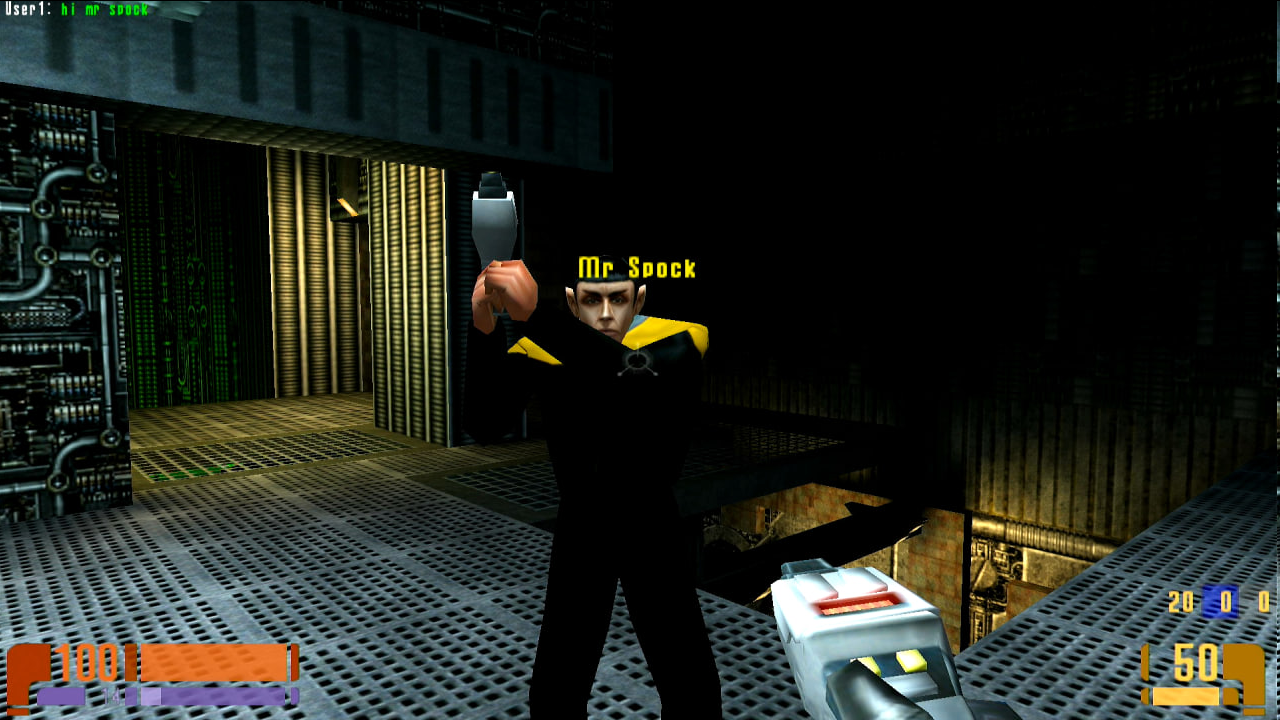
Since my ioQuake3-Wii and my ioQuake3-PS3 ports are in a pretty good shape, my latest release is a PS4 port of said game. Like others, It's perfectly capable of crossplaying with other Quake 3 Arena clients. Like the PS3 client, it also has on-screen-keyboard support. Like my other Quake3 ports, community devkits (in this case OpenOrbis + Piglet) as well as AI has been used to speed up the porting process. Especially for the rendering side.

AI has been used to assist me in this project due to lack of time. I won't share my CLAUDE.MD, but you can find the details of which AI models I used, and their respective role. I hope this will help and encourage more developers or people trying to approach this field in a much less intimidating way. Be aware that the approach was the same for basically every Quake 3 port I made.

Hardened code's skill module is mandatory. Without it, AI will hallucinate a lot and will either introduce issues or regressions.
Sonnet 4.6
did good chunk of the work code-wise. It would often struggle with more advanced things (ex. renderer). If it struggled or introduced regressions when implementing something, I would instantly swap to Opus to continue
Opus 4.6 does the much more complex stuff, then code review and comment trimming.
Codex although not mandatory does the double check on code.

Since this is the most stable port so far, most of its changes were backported to my other ports.

Users will need to provide libSceShaccVSH.sprx and libScePigletv2VSH.sprx and place both in /data/self/system/common/lib/ in your PS4. You will also need the Quake3 Arena files you get from your own copies, and you must place the .pak files on /data/ioq3/ in your console.

You can open the console in-game with L1 + Touchpad and the chat with R1+Touchpad. (It will bring the keyboard but the button combo will either send the command on console, or chat, depending on your L/R press)

MAIN FEATURES:
  • Touchpad aim (Enable with L3+Touchpad)
  • Name is taken from the console's Username on boot
  • Lightbar will pulse when below 50% health
  • Rumble support (enable/disable with L3+R3)
  • Mod support
  • Standalone Open Arena and Team Arena support

Latest release

TODO:
  • TA/OA bugfixes

RELATED PROJECTS:
ioQuake3-Wii

ioQuake3-PS3
ioQuake3-One


1780103213058.png


1777887632553.png
 
Last edited by Mayo1990,
Thank you!
-
Where can we find those sprx files?
Some existing game I guess?
The Mario 64 PS4 port has them in its Github, that's what I used. But there's a way to get the PKG to load them from the console itself. I'll look up more on this later this week. (Which will let me include a legal PKG in the Release tab and It's not needed when compiling)
 
  • Like
Reactions: cearp
The Mario 64 PS4 port has them in its Github, that's what I used. But there's a way to get the PKG to load them from the console itself. I'll look up more on this later this week. (Which will let me include a legal PKG in the Release tab and It's not needed when compiling)
Retroarch ps4 pkg file also has them in it.
 
It's got a file missing in the source so can't compile:

error: cannot open ps4_crt1.o: No such file or directory

Then again, there's no ps4_crt.c file in the ps4 folder, so the linker can't link the object file because it was never compiled.
 
It's got a file missing in the source so can't compile:

error: cannot open ps4_crt1.o: No such file or directory

Then again, there's no ps4_crt.c file in the ps4 folder, so the linker can't link the object file because it was never compiled.
Fixed the ps4_crt1.o issue (It's in the repo now)

1778439039253.png


My PS4 folder doesn't have PS4_crt.c either. Let me know if you run into other issues, I'll sort them right away.
 
Thanks, that's compiling now. What version of .net are you using. I'm sure I have it installed but get this:

Code:
C:/OpenOrbis/OpenOrbis-PS4-Toolchain/bin/windows/PkgTool.Core sfo_new sce_sys/param.sfo
You must install or update .NET to run this application.

App: C:\OpenOrbis\OpenOrbis-PS4-Toolchain\bin\windows\PkgTool.Core.exe
Architecture: x64
Framework: 'Microsoft.NETCore.App', version '3.0.0' (x64)
.NET location: C:\Program Files\dotnet\

The following frameworks were found:
  8.0.5 at [C:\Program Files\dotnet\shared\Microsoft.NETCore.App]
  8.0.24 at [C:\Program Files\dotnet\shared\Microsoft.NETCore.App]
  8.0.26 at [C:\Program Files\dotnet\shared\Microsoft.NETCore.App]
  10.0.7 at [C:\Program Files\dotnet\shared\Microsoft.NETCore.App]

The following frameworks for other architectures were found:
  x86
    8.0.5 at [C:\Program Files\dotnet\shared\Microsoft.NETCore.App]
    8.0.24 at [C:\Program Files\dotnet\shared\Microsoft.NETCore.App]
    8.0.26 at [C:\Program Files\dotnet\shared\Microsoft.NETCore.App]
    8.0.26 at [C:\Program Files (x86)\dotnet\shared\Microsoft.NETCore.App]
    10.0.7 at [C:\Program Files\dotnet\shared\Microsoft.NETCore.App]
    10.0.7 at [C:\Program Files (x86)\dotnet\shared\Microsoft.NETCore.App]

EDIT: never mind it worked after installing this:
Code:
https://dotnet.microsoft.com/en-us/download/dotnet/thank-you/runtime-3.0.3-windows-x64-installer?cid=getdotnetcore
 
Last edited by AmeliaFox,
  • Love
Reactions: Mayo1990
Thanks, that's compiling now. What version of .net are you using. I'm sure I have it installed but get this:

Code:
C:/OpenOrbis/OpenOrbis-PS4-Toolchain/bin/windows/PkgTool.Core sfo_new sce_sys/param.sfo
You must install or update .NET to run this application.

App: C:\OpenOrbis\OpenOrbis-PS4-Toolchain\bin\windows\PkgTool.Core.exe
Architecture: x64
Framework: 'Microsoft.NETCore.App', version '3.0.0' (x64)
.NET location: C:\Program Files\dotnet\

The following frameworks were found:
  8.0.5 at [C:\Program Files\dotnet\shared\Microsoft.NETCore.App]
  8.0.24 at [C:\Program Files\dotnet\shared\Microsoft.NETCore.App]
  8.0.26 at [C:\Program Files\dotnet\shared\Microsoft.NETCore.App]
  10.0.7 at [C:\Program Files\dotnet\shared\Microsoft.NETCore.App]

The following frameworks for other architectures were found:
  x86
    8.0.5 at [C:\Program Files\dotnet\shared\Microsoft.NETCore.App]
    8.0.24 at [C:\Program Files\dotnet\shared\Microsoft.NETCore.App]
    8.0.26 at [C:\Program Files\dotnet\shared\Microsoft.NETCore.App]
    8.0.26 at [C:\Program Files (x86)\dotnet\shared\Microsoft.NETCore.App]
    10.0.7 at [C:\Program Files\dotnet\shared\Microsoft.NETCore.App]
    10.0.7 at [C:\Program Files (x86)\dotnet\shared\Microsoft.NETCore.App]

These are all the .NETs I own. Although your error is asking for .NET 3.x. But I can confirm that it did successfully compile on my machine with what I got there.
1778440783143.png
 
  • Like
Reactions: AmeliaFox
Untitled.png


When I check the pkg file the libScePigletv2VSH.sprx and libSceShaccVSH.sprx are not being packaged, did I put sce_module in the wrong folder?
 
Should be fine nonetheless. Place the files in your PS4 at /data/self/system/common/lib/ before booting.
OK, I'll try later, I'll need to get the pkg files off my nintendo switch micro sd first. It just seemed weird that these sprx files were packaged in retroarch pkg but not in this built pkg. I suppose it doesn't matter if they are going into /data/self/system/common/lib/ folder anyway. Surely we can make a pgk file with all the pak files and these sprx files included in the pkg so we just need to install a single pkg without needing to ftp files onto the ps4? I modded the original source for ioq3 ages ago to have a built in keygen that installs a key on boot. Probably I'll do the same thing with this source as I still have the source files for it.
 
  • Like
Reactions: Mayo1990
OK, I'll try later, I'll need to get the pkg files off my nintendo switch micro sd first. It just seemed weird that these sprx files were packaged in retroarch pkg but not in this built pkg. I suppose it doesn't matter if they are going into /data/self/system/common/lib/ folder anyway. Surely we can make a pgk file with all the pak files and these sprx files included in the pkg so we just need to install a single pkg without needing to ftp files onto the ps4? I modded the original source for ioq3 ages ago to have a build in keygen that installs a key on boot. Probably I'll do the same thing with this source as I still have the source files for it.
Yeah, those sprx files were my main concern because they seem to be copyrighted stuff (Retroarch for PS4 is sort of strange though, as I couldn't find the Orbis repo, even though GBATemp does have a download link for the compiled pkg), but when you do a Google search you get mixed results. But once I'm more free I may try the Apollo approach, since it also uses said files but instead of having the user providing them, they're automatically loaded from the system.

The keygen could be pretty good to implement, though! It would instantly boot to the main menu.
 
Yeah, those sprx files were my main concern because they seem to be copyrighted stuff (Retroarch for PS4 is sort of strange though, as I couldn't find the Orbis repo, even though GBATemp does have a download link for the compiled pkg), but when you do a Google search you get mixed results. But once I'm more free I may try the Apollo approach, since it also uses said files but instead of having the user providing them, they're automatically loaded from the system.

The keygen could be pretty good to implement, though! It would instantly boot to the main menu.
That's what the switch does, it checks if a key is present, if not keygen code is activated and generates the key and then it boots straight away to the start intro (first boot). I can post the source here if you want to strip out the keygen code.
 
That's what the switch does, it checks if a key is present, if not keygen code is activated and generates the key and then it boots straight away to the start intro (first boot). I can post the source here if you want to strip out the keygen code.
Sure. I'll implement it right away to the Xbox One build (since It's the console I have plugged rn)
 
Sure. I'll implement it right away to the Xbox One build (since It's the console I have plugged rn)
Keygen code is here:
ioq3\code\qcommon\common.c
(it might be in other files as well - just trace back

Also you can make a custom server in this file:
ioq3\code\q3_ui\ui_specifyserver.c

All files with .orig are the original files before modding, so you can see what files I modded.

There's a few other mods, and makefiles for team arena and open arena (for switch).
 
Keygen code is here:
ioq3\code\qcommon\common.c
(it might be in other files as well - just trace back

Also you can make a custom server in this file:
ioq3\code\q3_ui\ui_specifyserver.c

All files with .orig are the original files before modding, so you can see what files I modded.

There's a few other mods, and makefiles for team arena and open arena (for switch).
That's from the Switch port, right? I'll take a look at the Source soon.
 
That's from the Switch port, right? I'll take a look at the Source soon.
Yes, but source is mostly the same - check out this - static void Com_WriteCDKey in the common.c file.

Here you go it's too big to upload here:
Code:
https://mega.nz/file/Q0p0UR6C#ganXdIDDLnJTvkc-_uFjNgqMy3yA8jxdbwVFNH1KHZo
 
Last edited by AmeliaFox,
  • Love
Reactions: Mayo1990

Site & Scene News

Popular threads in this forum