Gaming Getting critical frame drops drops

  • Thread starter Thread starter AlanJohn
  • Start date Start date
  • Views Views 4,256
  • Replies Replies 42

AlanJohn

くたばれ
Global Moderator
Joined
Jan 6, 2011
Messages
3,860
Solutions
5
Reaction score
7,478
Trophies
4
Age
28
Location
Canada,New Jersey
Website
www.deenextreme.com
XP
8,824
Country
Ukraine
So I've been getting some critical frame drops from 40-70fps to 3 seconds-per-frame.
This is annoying as hell and I want you to help me.
Games I've been getting frame drops in:
  • Team Fortress 2
  • Counter-Strike: Global Offensive
  • GTA: San Andreas

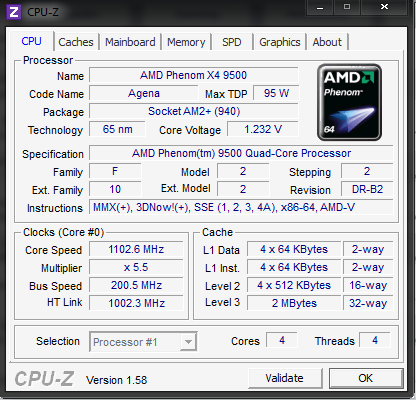
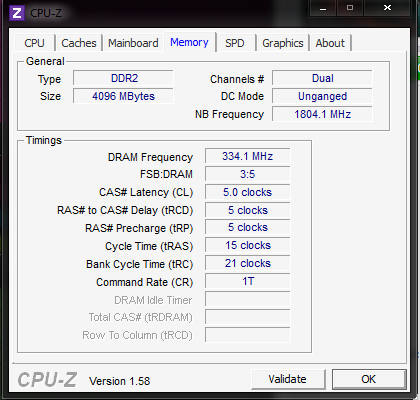
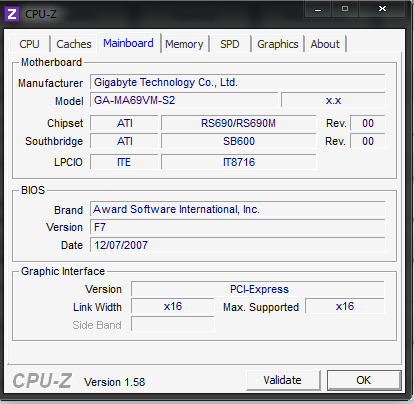
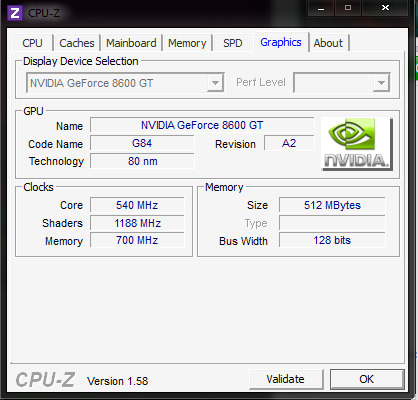
My specs:

gallery_271505_136_3316.png

gallery_271505_136_7887.png

gallery_271505_136_1032.png

gallery_271505_136_26069.png
 
happens to me sometimes when I play sonic generations, solid 45 fps to 5-15 fps. Dunno why.
 
You could post more specs, like: SLI?

I just got my Crossfire rig working (two 5870's) and I also sometimes have slowdowns from 110 FPS to 40 fps.
It just happens, your gpu will "chew" on something it doens't like, and spit it out (frame drop).
At least that's how it looks to me.
 
Well my best guess is overheating issue . I don't know much about AMD cpus but maybe overheating cause it to slow down to protect itself from damage.

A simple way to rule it out is to just use a temp monitor & see if the temp is high when the slowdowns occurs .
 
Well my best guess is overheating issue . I don't know much about AMD cpus but maybe overheating cause it to slow down to protect itself from damage.

A simple way to rule it out is to just use a temp monitor & see if the temp is high when the slowdowns occurs .

My Phenom II runs cooler @4GHz, than most Intel chips.
AMD uses a different material, which causes the chips to run at near 0 (intel fails at - 250? celcius).

However, this comes with one setback, the chips don't like anything above 60 and overclockers keep 65 degrees celcius as the maximum (above that, it's a OC failure).


Go and install MSI afterburner.
It's a Gpu overclock and monitoring tool that can read out nearly all gpu's sensors. it can give you an indication about what's going on, too high temperature or something els.
 
Well my best guess is overheating issue . I don't know much about AMD cpus but maybe overheating cause it to slow down to protect itself from damage.

A simple way to rule it out is to just use a temp monitor & see if the temp is high when the slowdowns occurs .

My Phenom II runs cooler @4GHz, than most Intel chips.
AMD uses a different material, which causes the chips to run at near 0 (intel fails at - 250? celcius).

However, this comes with one setback, the chips don't like anything above 60 and overclockers keep 65 degrees celcius as the maximum (above that, it's a OC failure).


Go and install MSI afterburner.
It's a Gpu overclock and monitoring tool that can read out nearly all gpu's sensors. it can give you an indication about what's going on, too high temperature or something els.
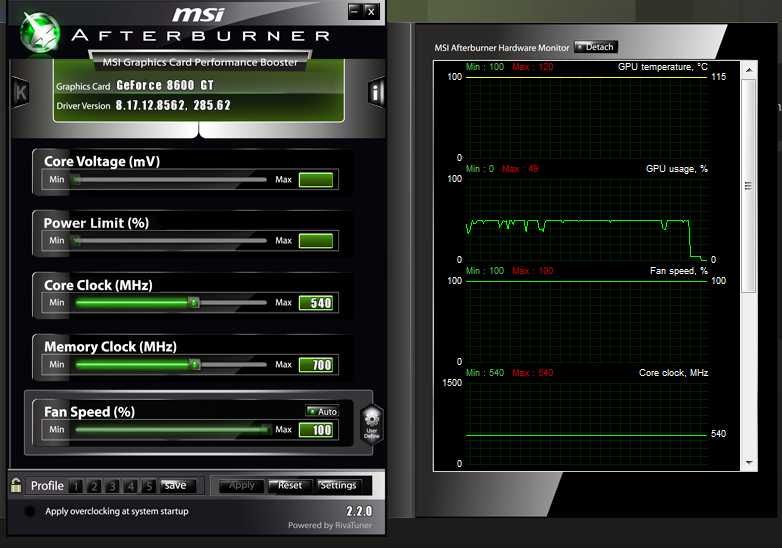
I played San Andreas, when the frame drop started i minimized the game and took a snapshot of MSI Afterburner.
gallery_271505_136_109515.png
 
Yes that is a high possibility.

If that is it you could do what I do with my computer. I leave the side off and my temps vary from 10 to 20 degrees cooler.
 
That's quite possible, actually.
Can you not set the in-game settings any lower?
I certainly would NOT put the clocks to max, as that is not going to help anything.
At best, you should just increase slightly over the default values, but if overheating is an issue,
this will only make things worse. Do you know anything else about your PC such as your power supply?
More often than not, people add video cards to their store-bought systems, thinking that it will suddenly be good
for gaming, however most stock power supplies are absolutely terrible, which can cause shutdowns
or slowdowns while in games.
 
Also, after doing some searching online, it looks like the normal frequency of your processor is
2.2ghz, so I don't understand why your CPU-Z is only showing 1.10ghz. If you've been screwing with
your clocks and you have no idea what you're doing, I would highly recommend resetting the BIOS.
If you CPU isn't running full speed that's a big problem and will definitely cause you to lag.
Of course, if your computer isn't in "high performance" power mode OR if your PSU is not adequate
(or if cool 'n quiet is enabled) you will see the frequency fluctuate.
 
Did I just see your freaking GPU reach 115°C?

Man, you should feel lucky that your system is even booting at all.

You probably get frame drops because of thermal throttling. And that has saved your GPU from certain death.

Go clean dat card and get some new high quality thermal paste for it! :angry:
 
I agree with Raulpica,

it was pretty obvious from the first post it was overheating and after you posted that picture there is no doubt; not sure why all of the uncertainty coming from some of the posts.
 
  • Like
Reactions: 1 person
o.O
Realy 115? that's more than enough to cook an egg (maybe you should make a vid XD)

setting everything to the max didn't do it any good.... so you'll realy have to get a new one.
I've got an AMD, but I hear the GTX 560 TI is a good preformer for it's price and it should run those games.

You could take a look on.
http://www.anandtech.com/
http://www.overclock.net/products/

And many more sites.
 

Site & Scene News

Popular threads in this forum