FireFox 5.0 Final released

  • Thread starter Thread starter Satangel
  • Start date Start date
  • Views Views 6,168
  • Replies Replies 67
Celice said:
Hopefully it's a lot better than 4, because 4 is an unstable piece of shit for me. And now I can't downgrade to 3.6 without my addons going to shit--as in, the add-on functionality ceases to function completely, no new add-ons, no disabling, no anything. I had a pretty nice one to control FireFox's horrible memory gobbling and it's pretty much useless now 'cause I can't revert to a version of FireFox that supports it. I hate giving updates a chance
frown.gif


Uh, whats wrong with FF's memory use? It'll use as much as is avaliable in order to help performance.

QUOTE(chartube12 @ Jun 23 2011, 12:52 AM) I only started using FF again because FaceBook purposely blocks certain features unless ur on ff.

More like IE doesn't support the required standards? What are these features anyway? (I don't use FB)

 
This new Firefox... It's new, the look is new, I don't like it. I miss my toolbars up top, this just feels odd. My realplayer video downloading add-on isn't compatible with this version either (it was awesome for downloading streaming video from 99% of all sites I went to).
 
Mine is at 196,576 k. What is the "normal" amount? I have noticed it go up (during FF 4 i was hitting, like, 1,000,000+ WTF) and through the versions it has slowly climbed down. I usually have only 5 windows max, and have only one each video/download going at once max.
 
Schlupi said:
Mine is at 196,576 k. What is the "normal" amount? I have noticed it go up (during FF 4 i was hitting, like, 1,000,000+ WTF) and through the versions it has slowly climbed down. I usually have only 5 windows max, and have only one each video/download going at once max.
I'm close to that. 177.(something) K, and I'm running Youtube, Gbatemp, and google at the same time.
 
Eckin said:
macgeek417 said:
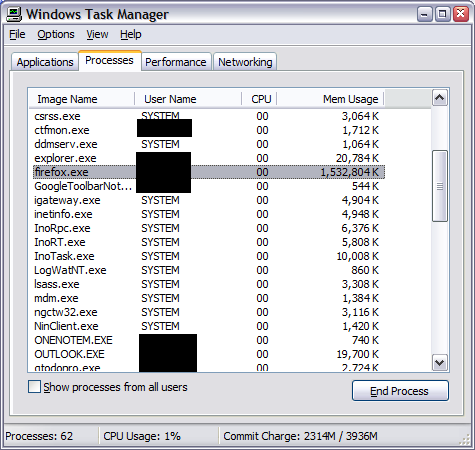
Uh, whats wrong with FF's memory use?
firefox-memory-leak-private.png

Jesus, what kind of shit does that person have running? I've used all the FireFox's for the longest time, before 3, and I get a lot of tabs going, and FireFox has never broken 200k for me. Hell it hasn't even gotten to 180k before.
 
M[u said:
ddy]
Slyakin said:
Well, I guess I'll have to wait a while. My most important add-ons aren't compatible, so... that sucks.

I'm excited though!
biggrin.gif

Most of the time the old plugins still work on the new versions.
There is a simple block thats deactivates them/keeps them from installing, to make sure the creator tested the plugin first and made sure it does work correctly.
To circumvent this block you can use another browser to download the plugin as xpi file.
Open it with 7zip or winrar and extract install.rdf.
With an editor you can now change the maximum version number, for example: CODE4.0.*toCODE5.*
Save the change and drag install.rdf back into the archive.
Then you can drag the xpi file into Firefox to install the plugin.
That's the hard way to do it.

you could just disable the check in about:config
http://gbatemp.net/index.php?act=findpost&...amp;pid=3663828

Edit: I did this to get greasemonkey working and it has been problem free
 
ShadowSoldier said:
Jesus, what kind of shit does that person have running? I've used all the FireFox's for the longest time, before 3, and I get a lot of tabs going, and FireFox has never broken 200k for me. Hell it hasn't even gotten to 180k before.
I have 2 instances of firefox running both with several tabs and a download and it is sitting on 132,216K

Edit: 3x windows, 2 tabs each, two youtube videos running and 2 downloads going - 159,684K

Edit2: Idling with GBAtemp open - 123,300K
 
For those who never had problems with memory leak, FF likes to eat a lot of memory if you open flash sites (youtube comes to mind) or sites with a lot of images. Plugins may also affect it.

I keep 6 tabs with Marvel Digital Comics open all the time (I'm trying to finish an event) so my FF is always around 250~350mb.

To know how much is "normal", start FF in 'safe mode' and take a look.
 
Israel011 said:
How do you update to the new version?

Go to the top left Firefox button (Orange by default) and then Help --> About Firefox. There it will check if you have the latest version, if not it'll give you an option to download.
 
The only thing that sucks is each time I update to a new version I lose support for Firefox add-ons I want.

When I went from 3.6 to 4 I lost a bunch and some custom theme's and now I think I lost most of what was left going to 5.
 
Updated, but my FF looks just like it did before, no Firefox tab or anything, Just the same old FF 4.
 
Hikaru said:
Updated, but my FF looks just like it did before, no Firefox tab or anything, Just the same old FF 4.

Yup, nothing changed in visuals. If you want something to change (I for one changed the theme and the orange button), just Google it or get some add-ons, you can basically modify Firefox exactly the way you want it.
 

Site & Scene News

Popular threads in this forum