Hacking Fake DSTT or Not (Picture)

  • Thread starter Thread starter alkirah
  • Start date Start date
  • Views Views 6,033
  • Replies Replies 17

alkirah

Member
Newcomer
Joined
Jan 27, 2007
Messages
12
Reaction score
3
Trophies
1
XP
66
Country
Canada
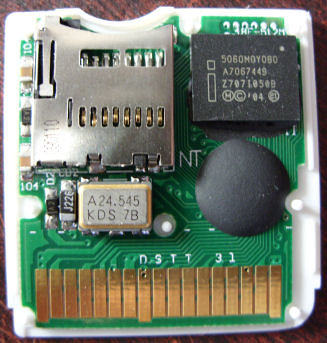
Hi guys, I just received my last order and they look weird ... they are supposed to be real ones but I can't compare exactly to the real one on dstt site.

here is an attached picture of the card (all of them are the same)

Click the image to get a bigger picture.


Is it genuine or fake?
 
Real.

It has a curved microSD holder.

Send an e-mail with your picture to [email protected] and they'll confirm. If it's fake, please let us know here (it would be the first fake I've seen with a curved microSD holder).

You can also try DsttFlashChecker and see if it will recognize the chip.

-Bri
 
If you'd seen the 'quality' of the fake cards you'd be pretty sure that you've got a real one there!
 
Already sent a picture to [email protected] but they have not answered yet.

I checked with flash checker and he tell me

unknown error
I don't know this cart

tongue.gif


I am adding a zoom picture

 
I'm guessing that it's real but it's new, so the Flash Checker doesn't recognize the chip. The DSTT team usually responds in a day or two, so let us know what they say.

-Bri
 
xist said:
If you'd seen the 'quality' of the fake cards you'd be pretty sure that you've got a real one there!
What do you mean xist? The build quality of the fakes is better than the real DSTT cards. The only problem with fakes is the issue of firmware compatibility which is arguably not currently a significant issue.
 
I meant internally....the fakes i've had just look like big blobby masses have been dropped inside of them...
 
That's an intel chip, haven't seen fakes using that. I think your's is probably real.
 
sorry for the late reply, service@ndstt haven't replied to me.

I just found out that those dstt are working in my new DSI so I guess they are just dstti with a dstt skin.

On the main screen the unique TTI VID appear and is different for each one of the cards I have left.

So I guess they are real ones but dsi versions.
 
Looking @ your picture & it looks the same as my DSTTi except you have 2.1 printed on circuit board while I have 3.1

3370808112_bc1dc02387.jpg


& I can tell you that I've been told in these forums that
QUOTE said:
DsttFlashChecker.nds checksflash rom type & bootloader status. Good (clean) or bad (mess up). not real/fake
New fake DSTT can bypass fake killer code & FakeDetector.

However just to be on the safe side I've been using the Fake-Killer Disabled firmware & YSMenu, & have had no trouble at all (All I'm waiting for now is for DSision response made 'faster' & I'll be over the moon - I DO miss the 'fancy graphical interface')
 
Hello there everybody!
I just got a Nds i today so i decided to buy a flashcart for it since i have an r4 for my ds lite but after finding out about fakes and real ones I can't seem to tell even by looking at pictures posted on the net. The Dstt card I got had games preloaded so I tried playing some and it says error something like file can not be saved or made some bs like that. So i decided to crack it open and research it and found out about the pictures of fake dstt so I wanted to post mine and see people's opinion.
Thanks

here are my 2 pics : http://img15.imageshack.us/gal.php?g=hni0001h.jpg
 
nerdy1 said:
I can't seem to tell even by looking at pictures posted on the net.
Looking @ your pictures, it looks genuine. If you look closely @ the pictures (@ http://www.ndstt.com/images/fake_pcb_1-6_large.jpg and http://www.ndstt.com/images/new_tt_en_large.jpg) you notice that DSTT have highlighted the areas of concern.
The main one that many people agree on is the MicroSD card slot (the Silver Square holder that the MicroSD card slots into.
If it's 'curved' - It's genuine, if it's 'Straight' - It's a fake

QUOTE(nerdy1 @ Apr 12 2009, 04:44 AM) The Dstt card I got had games preloaded so I tried playing some and it says error something like file can not be saved or made some bs like that.
I'm guessing that the 'error' you are getting is something like

No SAV File
Create it?
[Yes(A)][No(B)][Ignore(X)]


If so - This is 'Normal' (Just let it create one), however it seems to imply that the DSTTi is using YSMENU instead of the official DSTTi firmware - since when using DSTTi, it automatically makes a SAV file when it can't find one (Well the 'FAKE-Killer disabled' version firmware does)

IF it is NOT this (Can you post the EXACT message that's being shown - it may give us a better idea), then it's possible that you may need to reformat the MicroSD card

Remember to backup all the files from it first (Even any hidden ones) onto your PC THEN format it using the SDFormatting Program @ http://panasonic.jp/support/global/cs/sd/d..._formatter.html & NOT Windows own Formatting (There's something about Windows that doesn't comply with the MicroSD standard)
 
thanks a lot it gave me a better understanding now I was in panic all day trying to come to a decision whether it was fake or real. The error I get is usually when I click the game and it says "creating SAV.." then another message appears saying ERR:Load SAVE file failed. While some other roms may work about 90% of the games preloaded on the card doesnt work at all
unsure.gif

Thanks
 
nerdy1 said:
thanks a lot it gave me a better understanding now I was in panic all day trying to come to a decision whether it was fake or real. The error I get is usually when I click the game and it says "creating SAV.." then another message appears saying ERR:Load SAVE file failed. While some other roms may work about 90% of the games preloaded on the card doesnt work at all
unsure.gif

Thanks

Riiiight
unsure.gif
.... That error seems to indicate a few things to me.

Are they 'Homebrew' or 'Commercial' ROMS (Copies of Real Game Cartridges).
> If they are 'Homebrew' then it's possible that they need to be 'Patched' with DLDI library to work - I've read that DSTT (especially with the offical DSTT Firmware) can be a little fussy over certain Homebrew
> If they are 'Commericial' - It's possible that the games in question has either not been included in the latest Firmware update, or that it has 'special' copy protection added that prevents saving to SD Cards & this part of the code needs to be modified before it will save to a MicroSD (I know that 'Sonic Chronicles' is one such Game)

Seeing that you state that 90% DON'T work - I'm liable to think it's NOT a 'Copy protection' or 'Not covered by Firmware' on a Commercial ROM that's at fault

Are the games 'DS specific' (files ends in '.nds') or 'Gameboy' (files end in '.gba') games
If they are GBA games - you need an extra memory card in Slot-2 (& a DSi doesn't have a slot-2 so you can't run GBA games on it). I believe that you need one for running GBA games since GBA SAV are stored on the memory in Slot-2

How much space is left on the memory card ??
If the Card is nearly full then it's possible that some SAV are too large to fit in the remaining space, although I don't think this because all game SAV should be the same size (512Kb) - only more recent games have a larger files size (1Mb)

Have you tried to reformat the MicroSD card yet ??
It could be that the memory card got corrupted somehow.
Copy the files from the memory card onto your PC & use the formatter I've mentioned earlier in this thread to format the memory card, then copy back the files & try again
It could be that the memory card was formatted on a Windows PC in the wrong format (although why some games work & others don't is a puzzle)

Have you tried another MicroSD Card ?
I did have trouble with a cheap 'generic' MSD card & when I changed it for a named version (SANDISK) - intermittant problems just disappeared (however it wasn't on a DSTTi but another manufacturer of Flashcard)

If all this fails - Then I'm stumped. The only last thing I can think of is that your DSTTi card is actually f**ked - if so contact who you brought it off of & see what they say.
You may be lucky & they'll send you a replacement without you having to send the dodgy one back

Sorry I can't be any more help

 
kermitfrog said:
nerdy1 said:
thanks a lot it gave me a better understanding now I was in panic all day trying to come to a decision whether it was fake or real. The error I get is usually when I click the game and it says "creating SAV.." then another message appears saying ERR:Load SAVE file failed. While some other roms may work about 90% of the games preloaded on the card doesnt work at all
unsure.gif

Thanks

Riiiight
unsure.gif
.... That error seems to indicate a few things to me.

Are they 'Homebrew' or 'Commercial' ROMS (Copies of Real Game Cartridges).
> If they are 'Homebrew' then it's possible that they need to be 'Patched' with DLDI library to work - I've read that DSTT (especially with the offical DSTT Firmware) can be a little fussy over certain Homebrew
> If they are 'Commericial' - It's possible that the games in question has either not been included in the latest Firmware update, or that it has 'special' copy protection added that prevents saving to SD Cards & this part of the code needs to be modified before it will save to a MicroSD (I know that 'Sonic Chronicles' is one such Game)

Seeing that you state that 90% DON'T work - I'm liable to think it's NOT a 'Copy protection' or 'Not covered by Firmware' on a Commercial ROM that's at fault

Are the games 'DS specific' (files ends in '.nds') or 'Gameboy' (files end in '.gba') games
If they are GBA games - you need an extra memory card in Slot-2 (& a DSi doesn't have a slot-2 so you can't run GBA games on it). I believe that you need one for running GBA games since GBA SAV are stored on the memory in Slot-2

How much space is left on the memory card ??
If the Card is nearly full then it's possible that some SAV are too large to fit in the remaining space, although I don't think this because all game SAV should be the same size (512Kb) - only more recent games have a larger files size (1Mb)

Have you tried to reformat the MicroSD card yet ??
It could be that the memory card got corrupted somehow.
Copy the files from the memory card onto your PC & use the formatter I've mentioned earlier in this thread to format the memory card, then copy back the files & try again
It could be that the memory card was formatted on a Windows PC in the wrong format (although why some games work & others don't is a puzzle)

Have you tried another MicroSD Card ?
I did have trouble with a cheap 'generic' MSD card & when I changed it for a named version (SANDISK) - intermittant problems just disappeared (however it wasn't on a DSTTi but another manufacturer of Flashcard)

If all this fails - Then I'm stumped. The only last thing I can think of is that your DSTTi card is actually f**ked - if so contact who you brought it off of & see what they say.
You may be lucky & they'll send you a replacement without you having to send the dodgy one back

Sorry I can't be any more help

I can't believe you put that much effort into a post and don't even get an acknowledgement.
 
urbanfrit said:
I can't believe you put that much effort into a post and don't even get an acknowledgement.
It may be "nerdy" only looks @ the forums during weekends so he may not see my reply until then.
Having some sort of acknowledgement is great - but I'm a modest kind of fellow, & I don't help out JUST to get acknowledgement (Getting PAID for it - that's a different thing)
 

Site & Scene News

Popular threads in this forum