Hacking [Essentials] AceKard Skins

  • Thread starter Thread starter PanzerWF
  • Start date Start date
  • Views Views 162,261
  • Replies Replies 198
  • Likes Likes 1
Can you guys help me with small dilemma...

I downloaded three skins from NDSthemes for acekard, I am using newest Akaio (1.5.1) - and whenever I try to use any other skin than the two default ones it loads the image of lower screen, and nothing else, no menu elements, no image to upper screen - then it stays there even on reboot until I delete the skin...

What gives, should I convert skins for Akaio or what?

 
JereTHEend said:
Can you guys help me with small dilemma...

I downloaded three skins from NDSthemes for acekard, I am using newest Akaio (1.5.1) - and whenever I try to use any other skin than the two default ones it loads the image of lower screen, and nothing else, no menu elements, no image to upper screen - then it stays there even on reboot until I delete the skin...

What gives, should I convert skins for Akaio or what?
Can you give links to the skins you're trying - that way we'll be able to test for ourselves & see if we can solve the problem for you
 
CannonFoddr said:
JereTHEend said:
Can you guys help me with small dilemma...

I downloaded three skins from NDSthemes for acekard, I am using newest Akaio (1.5.1) - and whenever I try to use any other skin than the two default ones it loads the image of lower screen, and nothing else, no menu elements, no image to upper screen - then it stays there even on reboot until I delete the skin...

What gives, should I convert skins for Akaio or what?

Can you give links to the skins you're trying - that way we'll be able to test for ourselves & see if we can solve the problem for you

http://www.ndsthemes.com/themes/details/t/a8bcab3eb7
http://www.ndsthemes.com/themes/details/t/47747f1113
and
http://www.ndsthemes.com/themes/details/t/a1314060c9

- I did the calendar thing right. I put the skins to UI folder in the akaio files (where they should go no?)

I think there is more files on the AKAIO default skin files than in those, but only file I could see missing is GBAframe.bmp (and that is not requires... I presume?)

Seems like some themes work... About every theme from Acekard page works (but frankly I do not want to use them) and some from NDSthemes do. Shion & mion started working (or maybe it DID work all the time... I think I did not test it yet) - and Miku and Konata did not just work...

It is random And I do not want to take much changes since If the theme does not work It means me plugging the memory card to PC and manually remove theme...

Anyway, for now I am fine.
 
JereTHEend said:
CannonFoddr said:
JereTHEend said:
Can you guys help me with small dilemma...

I downloaded three skins from NDSthemes for acekard, I am using newest Akaio (1.5.1) - and whenever I try to use any other skin than the two default ones it loads the image of lower screen, and nothing else, no menu elements, no image to upper screen - then it stays there even on reboot until I delete the skin...

What gives, should I convert skins for Akaio or what?
Can you give links to the skins you're trying - that way we'll be able to test for ourselves & see if we can solve the problem for you
http://www.ndsthemes.com/themes/details/t/a8bcab3eb7
http://www.ndsthemes.com/themes/details/t/47747f1113
and
http://www.ndsthemes.com/themes/details/t/a1314060c9

- I did the calendar thing right. I put the skins to UI folder in the akaio files (where they should go no?)

I think there is more files on the AKAIO default skin files than in those, but only file I could see missing is GBAframe.bmp (and that is not requires... I presume?)

Seems like some themes work... About every theme from Acekard page works (but frankly I do not want to use them) and some from NDSthemes do. Shion & mion started working (or maybe it DID work all the time... I think I did not test it yet) - and Miku and Konata did not just work...

It is random And I do not want to take much changes since If the theme does not work It means me plugging the memory card to PC and manually remove theme...

Anyway, for now I am fine.
I've just been looking at the files you linked to - It seems as though there's something wrong with the 'uisettings.ini' files.
Haven't quite figured out exactly what it is, I've seen a few 'mistakes' like colours being '0' instead of '0x0000' - or 2 entries on one line but no matter what I edit it still won't work

By replacing the 'uisettings.ini' with one of the AKAIO default 'uisettings.ini' & they seem to work - except now all the time/date colours etc are all wrong

EDIT: FYI - I've found the following 'faults' in the skins 'uisettings.ini' - however even when I change/fix them it STILL won't work
  • [global settings] > listViewVarColor2 Should be [global settings] > listViewBarColor2
    [start menu] > itemWidth / itemHeight - these should be the other way round
    [main list]textcolor = should be on seperate lines
    [calendar day] > hightlightColor = should be [calendar day] > highlightColor =
    End should be [end]
The only way I can get it to work is by altering one of the AKAIO default 'uisettings.ini' and saving it into the faulty skins folder, replacing the existing one
 
OK.

I thought it was my akaio first because first two custom skins out of two made this, making me think it was my cart and not skins itself...

I have now A custom skin what I am thankful of, I may see into these skins too.
 
preview.jpg

Download
 
How come no one thought of such a skin before?

Matte Black

It's made for black DSis. I'm planning on making a bunch of similar ones for each color on each type of DS. Any help would be appreciated. Please do inform me if you are going to make one, just so that we don't end up making the same skin at the same time. Now that would be a mess, wouldn't it? Also inform me if you have any problems with this skin; I don't have an acekard yet.

Oh, could someone fix this? I never found out what made some buttons not appear.

Matte White

Thanks!
 
Xaphatro said:
Oh, could someone fix this? I never found out what made some buttons not appear.Matte White
I've had a look at your Matte white - It seems you've used 'pure black' (RGB:0,0,0) for the outlines of the buttons - Pure Black is used for 'transparency' on 16-bit colours graphics - Try changing the Black line to a very dark grey colour instead & see what happens (BTW I used AKEdit to check this out - haven't tried it on an acekard myself)
 
Simplified (Pink)

032571916.gif


Download


Simplified (Black)

040521663.gif


Download


I'm not a huge fan of very complex and visually loud themes, so I made my own. I've only tested it on my DSi with AK2i. Other accent colors may be added if there is any interest.
 
Anyone know where I can find the kakashi skin that shows him full body? I think it was by chris hair
 
im looking for windows 7 skin that shows the battery life icon and the time as 6:26pm , no 24hour clock..is there such skin for akaio? thanks
 
kleptodathief said:
im looking for windows 7 skin that shows the battery life icon and the time as 6:26pm , no 24hour clock..is there such skin for akaio? thanks
There's no 'Battery option' in any AKAIO skin - but to change from 24 to 12hr - change a setting in the globalsettings.ini to '1' called Show12hrClock
 
Rockstar said:
Im in love with this theme:
http://www.ndsthemes.com/themes/details/t/4e111c57ac
I really want a black or blue version can anybody make it?
i guess it shouldn't be to hard - loading it in & playing with 'colorization' function
How deep a blue do you want it ??Light blue, Dark blue, or more GBATemp blue
The black one might be a bit more difficult - would a 'greyscale' version do ??

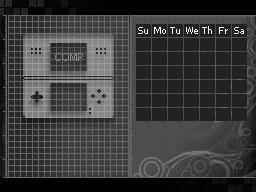
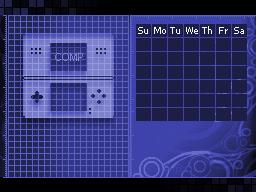
EDIT: Ok quick mockup of the screens
4511094426_2b773d22c0_o.jpg
4511094336_4f0db77f79_o.jpg

I've only done these 2 screens - I won't continue until I get feeedback
 
CannonFoddr said:
Rockstar said:
Im in love with this theme:
http://www.ndsthemes.com/themes/details/t/4e111c57ac
I really want a black or blue version can anybody make it?
i guess it shouldn't be to hard - loading it in & playing with 'colorization' function
How deep a blue do you want it ??Light blue, Dark blue, or more GBATemp blue
The black one might be a bit more difficult - would a 'greyscale' version do ??

EDIT: Ok quick mockup of the screens
4511094426_2b773d22c0_o.jpg
4511094336_4f0db77f79_o.jpg

I've only done these 2 screens - I won't continue until I get feeedback
Wow that looks great Cannon, I would really appreciate if you continue
toot.gif

Yeah I want Dark blue
tongue.gif

Greyscale is looking great to me
biggrin.gif
 

Site & Scene News

Popular threads in this forum