




Hacking Configurable USB Loader

  • Thread starter Thread starter oggzee
  • Start date Start date
  • Views Views 7,865,836
  • Replies Replies 18,482
  • Likes Likes 22
You do not need the ehcmodule in the usb-loader folder, as it is incorporated into the loader itself.
 
Other thing that i was wondering.. about "Today's Play History" in Wii Message Board.
Homebrew Channel, USB Loader Forwarders, etc.. log the name and time in Message Board.
For example, you go to Homebrew Channel, you quit to Wii Menu and you have in Message Board:
Homebrew Channel
00:01


The same thing with USB Loader fowarders.
Now, i want to ask, if is possible some things:

- Bypass USB Loader to not log USB Loader forwarder name and time (this is Fowarder fault, i know).
- In CFG USB Loader, a option to log a specific game. For example, i want to log "Wii Sports Resort" like a original game that appear in Wii Message Board. Is possible to do?
 
Dr. Clipper said:
kingtuk1 said:
40 does work but it's slower at loading the hard drive with my microphones also connected.
It actually starts counting to 30. cfg39c loaded right away!
Are the two mics the only reason you are using IOS223? Do your mics work if you boot with IOS249 and then configure the games that need them to use IOS223 and save the options? IOS249 should give you the fastest speed when starting the loader, and if the games work by using their separate options to change to IOS223 later, you have the perfect setup.

I have been using it IOS223 since before all the problems with IOS249 rev12, and rev13. Everything that is played works fine on my setup with IOS223 set for all games and cfg loader continued to get faster on each revision until cfg40.

I can try using multiple IOS for various games now that IOS249 rev14 is out and has problems with SSBB( I don't know what other games it has trouble with), but having just one IOS seems easier since it been working great for months and was really fast at loading off of the SD-card with a forward channel.
 
Hello,

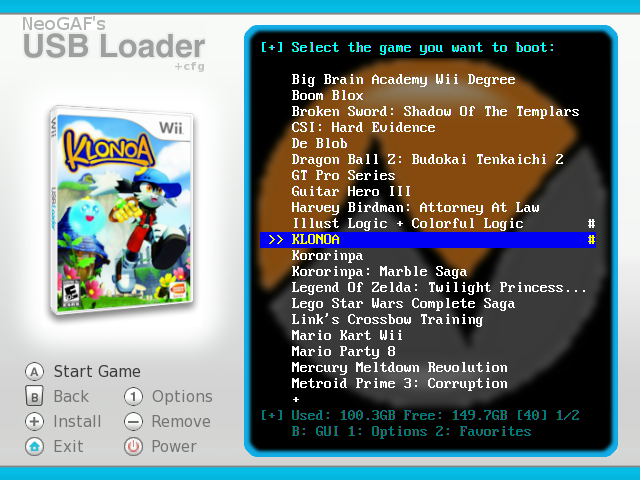
I'm using a forwarder and cfg39c. Apologies if this sound stupid but...is there a way to check the HDD space left via the loader?

Thanks!
smile.gif
 
kavid said:
TyRaNtM said:
Using cfg40, with cios_222v3 installer, installing IOS 223, 36 merged with 37, and using 223-mload, the loader keep freezing in:
IOS(223) mload .....

I don't know what to do to fix it.


1,download it ,then put it in SD:\usb-loader

http://sharebee.com/09d7fb99
2,install ios223 v3 as 37 merg with 36

Thanks, but doesn't work. Still freezes in the same part and doesn't read that file, like you show in a screenshot.
 
TyRaNtM said:
kavid said:
TyRaNtM said:
Using cfg40, with cios_222v3 installer, installing IOS 223, 36 merged with 37, and using 223-mload, the loader keep freezing in:
IOS(223) mload .....

I don't know what to do to fix it.


1,download it ,then put it in SD:\usb-loader

http://sharebee.com/09d7fb99
2,install ios223 v3 as 37 merg with 36

Thanks, but doesn't work. Still freezes in the same part and doesn't read that file, like you show in a screenshot.


Something is strange. I installed this way:

ios222 - 37 merge 36
ios223 - 38 merge 36

I can use either/or, and it works just fine. Is it freezing on loader boot-up or before a game starts?
 
zektor said:
TyRaNtM said:
kavid said:
TyRaNtM said:
Using cfg40, with cios_222v3 installer, installing IOS 223, 36 merged with 37, and using 223-mload, the loader keep freezing in:
IOS(223) mload .....

I don't know what to do to fix it.


1,download it ,then put it in SD:\usb-loader

http://sharebee.com/09d7fb99
2,install ios223 v3 as 37 merg with 36

Thanks, but doesn't work. Still freezes in the same part and doesn't read that file, like you show in a screenshot.


Something is strange. I installed this way:

ios222 - 37 merge 36
ios223 - 38 merge 36

I can use either/or, and it works just fine. Is it freezing on loader boot-up or before a game starts?

Freezes on loader boot-up.
 
I'm sorry if I missed it, but did you try the v40-222 version (that default loads 222)? It is linked under the release on the first post...
 
wallym said:
Hello,

I'm using a forwarder and cfg39c. Apologies if this sound stupid but...is there a way to check the HDD space left via the loader?

Thanks!
smile.gif
Ensure you don't have "simple=1" or "hide_hddinfo=1" in your config.txt and theme.txt and it will display at the bottom of the console view (push B to get there if you default to the GUI). Here's an example (check the text at the bottom):
screenshot10.png


It only shows space for the WBFS partition.
 
I find the problem.. is a little weird, but changing the usb to a diferent port, load the game (MH3) with 36 merged with 37.
The problem is that i cannot rename the character, music still sound, but the game freezes.

About USB ports.. can fix the problem of that Hermes cIOS requiere a specific USB port to plug in the other port?
 
kingtuk1 said:
I have been using ios=223-mload with a seagate drive and 2 mics connected.
updated to cfg40 and it counts 3 seconds to load the hard drive on 223 v3 and counts 1 sec on 223 v2
I went back to cfg39c and 223 v2 and it loads up fast without going to counting mode
I also installed v3 as 222 and used the special cfg40-222 and it counts also.
My hard drive and mics work it's just a lot slower at detecting.
so for now it cfg39c and 223 v2 for me...
Using cfg39c on cios222 rev3 is the equivalent of using cios222 rev2, since the ehcmodule in cfg39c is from cios rev2 uloader2.1.
You might as well down-grade your cios222 to the previous one (from uloader2.5) and keep using cfg40.
It would be helpful if you compared it with uloader2.5 and 2.8d as well, as i would expect you will experience the same slow-down.


Posts merged

QUOTE(TyRaNtM @ Aug 10 2009, 07:33 AM) About USB ports.. can fix the problem of that Hermes cIOS requiere a specific USB port to plug in the other port?
It's a very well known fact that you have to use the hdd in usb port 0.
So no, it can't be changed, and why do you think it needs fixing if using the correct port works for you?
 
Guys, like oggzee has said a few times now, if cIOS222 seems to be slow/not work correctly for you, try it in Uloader v2.8D (if using v3) or Uloader 2.5 (if using v2). If it makes no difference there, then it is most likely a hardware compatibility issue. If it works fine there, then you can report it back to oggzee and maybe he can find the problem...if one even exists.

I tend to believe it is a hardware or some other issue, as I have tested a 1TB Seagate, 1TB Verbatim, and a 500GB Samsung in a generic enclosure...and all work fine with the games loading almost immediately.
 
does this loader support disc graphics?

like when i press the game to boot,a little pictur eof the game disc spinning comes up complete with graphics?
 
bryandir said:
does this loader support disc graphics?

like when i press the game to boot,a little pictur eof the game disc spinning comes up complete with graphics?
It can display disc art in the console and non-coverflow GUI modes. Just set "cover_style=disc" in theme.txt or config.txt. They don't spin.
 
Dr. Clipper said:
bryandir said:
does this loader support disc graphics?

like when i press the game to boot,a little pictur eof the game disc spinning comes up complete with graphics?
It can display disc art in the console and non-coverflow GUI modes. Just set "cover_style=disc" in theme.txt or config.txt. They don't spin.


ahhh...then i would loss coverflow..and just be left with the standard menu.

thanks for your response,would have likes the disc art displayed when loading.
 
bryandir said:
Dr. Clipper said:
bryandir said:
does this loader support disc graphics?

like when i press the game to boot,a little pictur eof the game disc spinning comes up complete with graphics?
It can display disc art in the console and non-coverflow GUI modes. Just set "cover_style=disc" in theme.txt or config.txt. They don't spin.

ahhh...then i would loss coverflow..and just be left with the standard menu.

thanks for your response,would have likes the disc art displayed when loading.

No you wouldn't. If you have it set to display disks, coverflow will still use full covers / 2d covers (that can't be changed). If you have it set to display the game load screen, you will see the disk image there.

I swear someone just asked this same question.
wink.gif
 
some observations with 40 release version:

the text in flow mode is black on black, the text in iris etc. mode is white on black (much easier to read)

pressing 'home' appears to reset the wii? (no more exit HBC just bang straight to the wii channels)

when in locked / simple mode pressing '-' or '+' causes a flicker as the console gui shows for a split second (ie: it's checking to see if you have access after it displays the screen, not before)


some request / feature suggestions:

option to lock gui mode (flow, iris etc.)

remember last game played (write it out to config file) and start on that game in the list

thankyou for a great program!
 
gizmomelb said:
some observations with 40 release version:

the text in flow mode is black on black, the text in iris etc. mode is white on black (much easier to read)

pressing 'home' appears to reset the wii? (no more exit HBC just bang straight to the wii channels)

Add home=exit to config.txt as before.

QUOTE said:
when in locked / simple mode pressing '-' or '+' causes a flicker as the console gui shows for a split second (ie: it's checking to see if you have access after it displays the screen, not before)
Yes. It's on the todo list. thanks.

QUOTE said:
some request / feature suggestions:

option to lock gui mode (flow, iris etc.)

Add gui_lock=1 to config.txt as before.

QUOTEremember last game played (write it out to config file) and start on that game in the list

This is (probably) on the todo list.

QUOTE
thankyou for a great program!
You're welcome. We're glad you enjoy it
smile.gif
 
usptactical said:
gizmomelb said:
some observations with 40 release version:

pressing 'home' appears to reset the wii? (no more exit HBC just bang straight to the wii channels)
Add home=exit to config.txt as before.

QUOTE said:
some request / feature suggestions:
option to lock gui mode (flow, iris etc.)
Add gui_lock=1 to config.txt as before.

QUOTE
thankyou for a great program!
You're welcome. We're glad you enjoy it
smile.gif

thankyou for being so open to suggestions and ideas and giving / listening to feedback.

sorry I missed the 'home' and 'lock gui mode' options - there are now so many of them it's a little easy to do so!

what we need is a PC programmer to make a nice 'configurable usb loader' options gui so it'll then save the options out to the config file.

oh also last night while I was testing 40 and checking if hidden favourites were hidden (yes they are) I had the MP3 playback corrupt and go into a repeat loop playing garbage (I suspect from all the reading and writing to the SD card for the favourites / hidden lists) - but I was unable to replicate the error.
 

Site & Scene News

Popular threads in this forum