Hacking Comic book reader on DSI XL 1.4.1

  • Thread starter Thread starter jacobbones
  • Start date Start date
  • Views Views 3,578
  • Replies Replies 5

jacobbones

Active Member
Newcomer
Joined
Dec 9, 2010
Messages
35
Reaction score
0
Trophies
0
XP
36
Country
United States
I was just trying to put comic book reader 3.0 on my dsi XL firmware 1.4.1

I put the files in but when I start the supercard dstwo it isn't shown on the list (games, moon, iplayer etc..)

ANyone know if it works with it, or if I need to do something different?

 
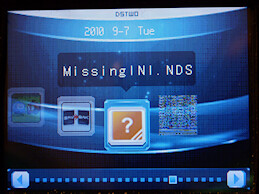
I take it you mean this screen ??
(don't worry about the 'blue background' - that's just the skin I was using when I did the graphics)
4968673136_36645da79e.jpg


If so - The ComicbookDS *.nds file HAS to be put into the '/_dstwoplug/' folder along with suitable 'plugin files' (consists of a BMP and a INI)

There's 3 versions available from the 'DSTwo Plugin page' or the Plugin WIKI pageIf you look on the Wiki page you can see what each graphic looks like - (you'll find them in the 'Multimedia' / 'Text Readers/Editors' section)
 
No I didnt even get that screen, it just didnt show anything on the supercard menu.

Ill try those links see how it goes
 
Ok so I added the plugins and nds to the plugin folder.

When I start the card "ComicBookDS.sc" is in the menue but when I click it both screens go black and I have to hit the power button to reset ds
 
ComicBook.sc (or 'comicbook.sc.nds') ??? - nope wrong file

In the ComicbookDS.zip download you should have
  • cbds (folder)
    ComicBookDS.ds.nds
    ComicBookDS.nds
    ComicBook.sc.nds
    Readme.txt
You NEED the 'cbds' (folder) in the root of the DSTwo and you need the 'ComicDS.nds' in the '_dstwoplug' folder (with the plugins *.bmp & *.ini files)
ComicDS.png

EDIT: Dam too late - still I'll keep the picture anyway
Oh & don't forget to make your own comicbook files you'll need pictoDS as well
 

Site & Scene News

Popular threads in this forum