
Homebrew battery drains while in sleep mode

  • Thread starter Thread starter psintek
  • Start date Start date
  • Views Views 17,424
  • Replies Replies 43

psintek

Member
Newcomer
Joined
Jan 27, 2021
Messages
10
Reaction score
2
Trophies
0
XP
128
Country
Mexico
I've recently hacked my switch and I've been using an emmc to use atmosphere but I've noticed that it warms up and the battery drains a lot while in sleep mode.
The battery goes from 100 to about 50 in 4 hours.
My console:
Atmosphere 1.5.4
Firmware version: 16.0.3
I don't have Auto-RCM on or any sys modules.
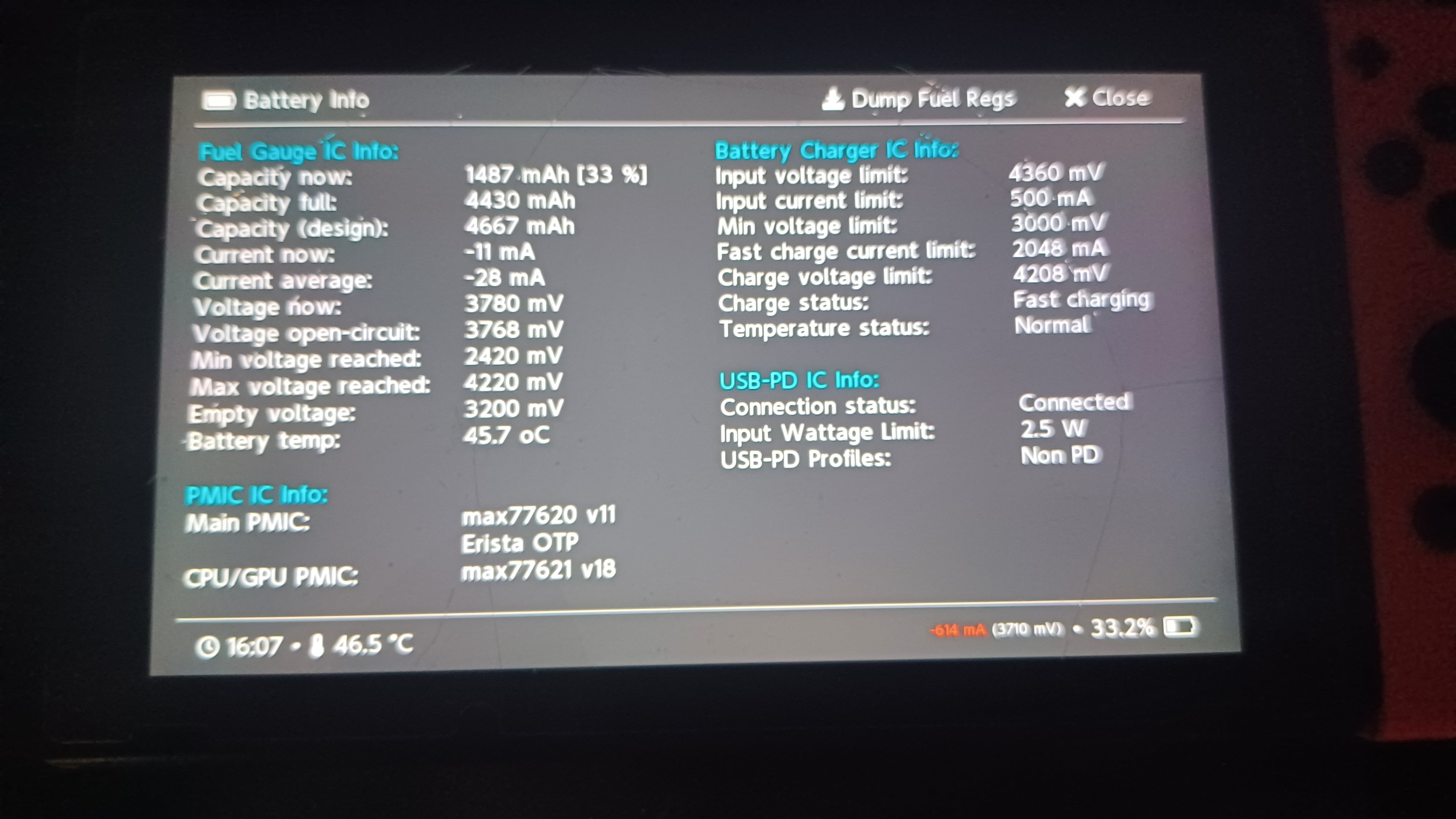
20230814_160756.jpg

Does anyone know how to fix this?

EDIT:
After some time I discovered that I had the pins required to enter RCM still shorted, after Removing that the battery life came back to normal. Thanks everyone for the help.
 
Last edited by psintek,

You can try to recalibrate the battery, by doing the following

Charge it back to 100% (4.2V), then to 0% (3.2V), then back to 100%. Check note below
This will count as 2 full charge cycles and the % will probably be fixed on its own, or at least get closer to the correct one.

Note:
Mind you, that when you reach 100% it's not actually 100%. You need to leave it at 4.2V so it can saturate. Leave it charging for additional ~1-2 hours after you see 100% (time depends on the charger used).
 
You can try to recalibrate the battery, by doing the following

Charge it back to 100% (4.2V), then to 0% (3.2V), then back to 100%. Check note below
This will count as 2 full charge cycles and the % will probably be fixed on its own, or at least get closer to the correct one.

Note:
Mind you, that when you reach 100% it's not actually 100%. You need to leave it at 4.2V so it can saturate. Leave it charging for additional ~1-2 hours after you see 100% (time depends on the charger used).
I'm pretty sure it's not a problem with battery calibration, during normal use the battery lasts about 3 or 4 hours, something normal for a v1 switch. The problems only come when the console is in sleep mode.
 
I'm pretty sure it's not a problem with battery calibration, during normal use the battery lasts about 3 or 4 hours, something normal for a v1 switch. The problems only come when the console is in sleep mode.

Emunand would drain slighty more than sysnand CFW just keep that in mind if you are using one.
 
Last edited by Hayato213,
50% in 4h standby isn't normal.

Do you use Emunand?
Is it the same in Stock Sysnand (OFW)?

Hopefully only a software problem.

Disable all unnecessary system modules and you can try this config if you don't use the online service:

add it to atmosphere\config\system_settings.ini
It should help with power saving in standby mode.

Code:
[bgtc]
enable_halfawake = u32!0x0
minimum_interval_normal = u32!0x7FFFFFFF
minimum_interval_save = u32!0x7FFFFFFF
battery_threshold_save = u32!0x64
battery_threshold_stop = u32!0x64

[npns]
background_processing = u8!0x0
sleep_periodic_interval = u32!0x7FFFFFFF
sleep_processing_timeout = u32!0x0
sleep_max_try_count = u32!0x0

[ns.notification]
enable_download_task_list = u8!0x0
enable_download_ticket = u8!0x0
enable_network_update = u8!0x0
enable_random_wait = u8!0x0
enable_request_on_cold_boot = u8!0x0
enable_send_rights_usage_status_request = u8!0x0
enable_sync_elicense_request = u8!0x0
enable_version_list = u8!0x0
retry_interval_min = u32!0x7FFFFFFF
retry_interval_max = u32!0x7FFFFFFF
version_list_waiting_limit_bias = u32!0x7FFFFFFF
version_list_waiting_limit_min = u32!0x7FFFFFFF

[account]
na_required_for_network_service = u8!0x0
na_license_verification_enabled = u8!0x0

[account.daemon]
background_awaking_periodicity = u32!0x7FFFFFFF
initial_schedule_delay = u32!0x7FFFFFFF
profile_sync_interval = u32!0x7FFFFFFF
na_info_refresh_interval = u32!0x7FFFFFFF

[capsrv]
enable_album_screenshot_filedata_verification = u8!0x0
enable_album_movie_filehash_verification = u8!0x0
enable_album_movie_filesign_verification = u8!0x0

[friends]
background_processing = u8!0x0

[notification.presenter]
snooze_interval_in_seconds = u32!0x7FFFFFFF
connection_retry_count = u32!0x0
alarm_pattern_total_repeat_count = u32!0x0
alarm_pattern_with_vibration_repeat_count = u32!0x0

[prepo]
;background_processing = u8!0x0 (shutdown directly when entering sleep mode)
transmission_interval_min = u32!0x7FFFFFFF
transmission_retry_interval_min = u32!0x7FFFFFFF
transmission_retry_interval_max = u32!0x7FFFFFFF
transmission_interval_in_sleep = u32!0x7FFFFFFF
statistics_save_interval_min = u32!0x7FFFFFFF
statistics_post_interval = u32!0x7FFFFFFF
save_system_report = u8!0x0

[olsc]
default_auto_upload_global_setting = u8!0x0
default_auto_download_global_setting = u8!0x0
autonomy_registration_interval_seconds = u32!0x7FFFFFFF
network_service_license_info_cache_expiration_seconds = u32!0x7FFFFFFF
postponed_transfer_task_processing_interval_seconds = u32!0x7FFFFFFF
retry_offset_seconds = u32!0x7FFFFFFF
network_trouble_detection_span_seconds = u32!0x7FFFFFFF
network_connection_polling_interval_seconds = u32!0x7FFFFFFF
is_save_data_backup_policy_check_required = u8!0x0
is_global_transfer_task_autonomy_registration_enabled = u8!0x0
is_on_event_transfer_task_registration_enabled = u8!0x0
is_periodic_transfer_task_registration_enabled = u8!0x0

[ntc]
is_autonomic_correction_enabled = u8!0x0
autonomic_correction_interval_seconds = u32!0x7FFFFFFF
autonomic_correction_failed_retry_interval_seconds = u32!0x7FFFFFFF
autonomic_correction_immediate_try_count_max = u32!0x0
autonomic_correction_immediate_try_interval_milliseconds = u32!0x7FFFFFFF

[systemupdate]
bgnup_retry_seconds = u32!0x7FFFFFFF

[ns.rights]
skip_account_validation_on_rights_check = u8!0x1
next_available_time_of_unexpected_error = u32!0x7FFFFFFF

[pctl]
intermittent_task_interval_seconds = u32!0x7FFFFFFF

[sprofile]
adjust_polling_interval_by_profile = u8!0x0
polling_interval_sec_max = u32!0x7FFFFFFF
polling_interval_sec_min = u32!0x7FFFFFFF
 
Something's not right as it's discharging at 600mA sitting in hekate, usually it should be around 200mA. Try to drain the battery completely in hekate and recharge it to 100%, repeat a few cycles and see if the problem is gone.
 
I've recently hacked my switch and I've been using an emmc to use atmosphere but I've noticed that it warms up and the battery drains a lot while in sleep mode.
The battery goes from 100 to about 50 in 4 hours.
My console:
Atmosphere 1.5.4
Firmware version: 16.0.3
I don't have Auto-RCM on or any sys modules.


Does anyone know how to fix this?

I occasionally get the same problem from my un-patched Erista, I leave the tablet in sleep mode while it's @ 100% battery, I do some chores like fix me some breakfast, shower then come back 2 hours later to find the tablet extremely hot with battery drained @ like 30%

I usually reboot by switching off for like an hour until the tablet is completely cool.
Temporary fix coz it'll overheat again after a month or so.

When I leave the house I make sure to completely switch off coz I think it's a fire hazard, the overheating could ignite the battery.

Hope you get a permanent solution coz switching off is a hustle to have to do the jailbreak over and over again.
 
i have same issue.. v2, hekate, atmosphere, sx-core chip, sx-gear. (everything is latest 16.0.3)
and most of the time if i leave it on standby for a day, it drained the battery completely. airplane mode on doesnt helps. it also regularly unable to wake up normally. you need to force shut down and turn it on again..

is there any settings or i completely messed up with the files.

here's what i do whenever i update firmwares,

fusee.bin place in bootloader/payloads/
hekate_ctcaer_x.x.x.bin renamed to payload.bin (in root folder)
 
Last edited by lipanz,
The issue is mostly due to wireless signals (BT + Wifi + NFC), set console to airplane mode and you'll see battery drain is fixed and also hot console is solved. I solved both with this, now I only disable airplane mode whenever I'm going to use wireless, and even whenever I'm not gonna use internet I leave airplane + BT enabled.
 
Last edited by garzacorporations,
  • Like
Reactions: denullz
Similar issue here, batteri went from 80% to 5% whilst playing pikmin 4 in flight mode. V1 with hwfly.
 

Attachments

  • IMG_20230831_193018.jpg
    IMG_20230831_193018.jpg
    3.4 MB · Views: 216
Had the issue with lites/OLEDs mostly, the wifi was draining the battery while in sleep mode. You can go airplane mode, delete your APs or use emunand with HATS pack. Emunand and HATS pack has worked for me on all systems that had this issue
 
Similar issue here, batteri went from 80% to 5% whilst playing pikmin 4 in flight mode. V1 with hwfly.

You have 3737 mAh as current full capacity, and the design was 4667 mAh, so 3737/4667 that is about 80%, what is your current now and average when it is discharging?
 
Ok so looks like it's showing the wrong information. This time when it came to 1%, I was able to play 1 hour of Mario Kart. Now I'm trying to fully charge and let it drain again.
 

Site & Scene News

Popular threads in this forum