Hacking Acekard 2i NOT working on dsi?

  • Thread starter Thread starter shnish
  • Start date Start date
  • Views Views 3,518
  • Replies Replies 22

shnish

Member
Newcomer
Joined
Nov 30, 2009
Messages
12
Reaction score
0
Trophies
0
XP
21
Country
United States
I just got my acekard 2i and formatted my micro sd multiple times and i can't get it to work on 1.4U.
I have the newest update and I updated it from the ds lite but I still can't get the danny phantom (or any icon for that matter) to show up on my dsi. I've tried OS Update and a manual update, both the dsi and dsl files for the udpate but no matter what I do the DSi won't recognize the acekard...
Is there anything I'm doing wrong?
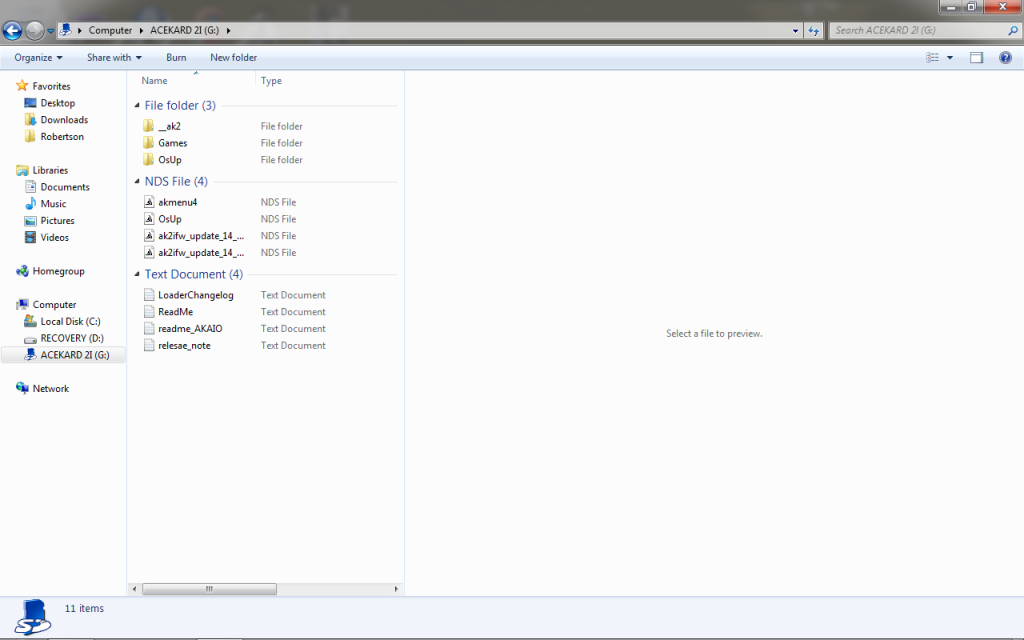
Here's a picture below of what my SD card looks like:
Untitled.png

Please... anybody?
 
Doesn't sound like you are doing anything wrong.
I would suspect a bad Acekard flashcart.
I would contact the vendor and see about getting a replacement unit.

Yeah, it is a major bummer when these things happen.
 
No, I don't get any symbol whatsoever.
I got it off dealextreme.com... could there seriously be a problem?
 
You probably ran the unbricker instead of the update thing, Go run the other file on a dsl. (ak2ifw_update_14_dsi.nds)
 
I didn't run the unbricker... I used both files too.
I tried the dsi one and the dsl one and neither one works...
 
You're saying there is no image at all? Try running it the same way again, Run the DSL one then DSi, But dont format.
 
MadClaw said:
You're saying there is no image at all? Try running it the same way again, Run the DSL one then DSi, But dont format.
Still doesn't work, I get no image at all on my nintendo DSi and I don't think it's an error with the flash cart because it works fine on my ds lite.
 
What region is your dsi?

-PS if we take this to IRC i can help ya a lot quicker..
irc.x1n.org #MadClaw
 
im having this same exact issue, i think i am just going to return my acekard back to the vendor and hope they send me a good one back
 
First - if your dsi detects ak2i - it shows in menu as acekard and cant be started (an error appears)
Second - update it with that files (DSL or DSi lower than 1.4)

If the first step shows NOTHING or NO CARD IN SLOT or anything else - AK2i card is bad, not microsd...
 
Before you do that I suggest you:

Clean the contacts on the cart with rubbing alcohol

Pad the front side of the cart at the bottom with 1-4 pieces of tape (keep checking after each layer)
 
What do you mean cracker?
Like the contacts being the bottom part and pad the front side at the bottom like to hold it down in case it's not being pressed down hard enough or something?
 

Site & Scene News

Popular threads in this forum