Hacking 4 TB Seagate / DIOS MIOS issues

  • Thread starter Thread starter Elliander
  • Start date Start date
  • Views Views 24,315
  • Replies Replies 149
The hdd arrived in NTFS. First I used FAT 32 GUI Formatter to do a quick format to FAT32 of the entire hard drive. Then I used "MiniTool Partition Wizard Technical Edition v7.8" to resize the first partition down to 998.57 GB, and created a new Primary FAT32 partition with the remaining 2726.44 GB, also in MiniTool. I made sure that both partitions have a 32k cluster size.

I read the information about hybrid MBR here: http://www.rodsbooks.com/gdisk/hybrid.html

I decided to create a Hybrid MBR so that DIOS MIOS will see the 1 TB as MBR, and that USB Loader GX will see the 2.7 TB as GPT so that, in theory, it will all work.

The problem I am running into is that I don't really understand the commands in gdisk and although the website is informative about underlying information, it doesn't have any simple instructions on how to actually do it.

The walkthrough here: http://www.rodsbooks.com/gdisk/walkthrough.html

Has a nice screenshot, but when I type in \\.\physicaldrive3 to access the physical drive it closes itself. (yes, running in administrative mode). Even the command "?" for help (which is listed in the documentation) results in the same.

I am pretty much stuck at this point.
 
never used the windows version
will give it a try in a moment
you sure drive 3 is the right number?

Drive 3 is what is reported in MiniTools Partition Manager at least.

Also, I did a quick test with the drive as it is just to see what would work. I put one Gamecube game on the 1 TB partition, and one Wii game on the 2.7 TB partition. USB Loader was able to see both games, but the Wii game loaded a black screen and the Gamecube game gave me the 512 byte sector size error.

This drive has a weird construction. The power cable and USB 3.0 port plugs into a base that itself is plugged into what appears to be a SATA port. I took a look again at the review I looked at. It said:

"Plugging a shaved SATA cable straight into the drive enclosure reveals that the internal hard drive is not an Advanced Format hard drive with 4KB sectors. Rather, the drive actually makes use of classic 512-byte sectors and relies on the GoFlex dock to translate this into 4KB sectors for Windows."

I have a SATA external hard drive enclosure, but this drive is a little too big for something like that. I will likely need to buy something like this to convert SATA to USB 3.0 in order to get this dream to be read as having 512 byte sector size. That, or I will need to find an older version of the Goflex Dock which does not convert 512 byte sector sizes into 4k sector sizes. hmm. Or maybe a newer model? It would stand to reason that newer Goflex Docks wouldn't need to do something like that, assuming of course any Goflex drives were made with 4k sector sizes.
 
yes you will need a different adapter
usb 2.0 is cheaper and less problematic
wii can only do 2.0 speeds anyway

Inside the enclosure probably is a normal 3.5 or 2.5 inch sata drive
then the best way best would probably be to put it into an normal empty usb2 enclosure
(there are 3.5 ones too, even if the 2.5 ones are more common)
 
Ah! That's a good point! A USB 2.0 dock is unlikely to have anything to do with 4k sector sizes, so I went ahead and ordered a USB 2.0 Goflex Dock. Part Number: 9ZH9P9-RAA

Ya, judging from the size (and the heat) I am fairly certain that it's just a fancy enclosure. Definitely a 3.5" size. Unfortunately, it's clearly not designed to be opened up so I will save that for a last resort.

As a side note, I really hope documenting the part numbers of everything I try will help someone else in the future who happens upon this thread and wants to do the same.
 
I would expect all goflex adapters to do this
else you would need to reformat the drive between adapters and I think thats exactly what they don't want
 
I would expect all goflex adapters to do this
else you would need to reformat the drive between adapters and I think thats exactly what they don't want

Not necessarily. I found references to articles as early as 2010 in regards to the 3 TB drive that the Goflex adapters would do this, but I also found a reference in this article that the 1 TB was seen as 512 bytes, which suggests that they probably didn't see a reason to convert them to 4k in drives smaller than 2 TB. The adapter I found was only $15.00 so I will find out for sure. I also contacted Seagate about this.

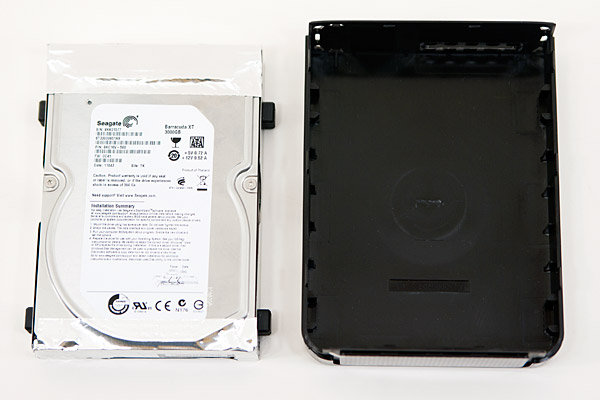
Here's what's inside the 3 TB Goflex: A standard 3.5” Seagate Barracuda XT drive. The 4 TB should be similar so I would feel confident in taking it apart if the above fails. It obviously produces more heat than most external drives, so if I can't properly stand it up in a working Goflex Adapter I would likely want to take it apart and get a special cooling case to put it in.​
drive.jpg
 
it's anything over 2TB, as it requires GPT and/or Advanced format.
But some early 2TB+ HDD didn't use Advanced format, that's what he is trying here.

Just want to tell that it will depend on how the drive is detected (512 or 4096) by the Wii. USBLoaderGX will check what the IOS/usb/ finds and will refuse to boot the game if it reports 4096 even if it's supposed to be 512 HDD.
If you want to try booting DM without USBLoaderGX detecting it incorrectly, use a beta version before 1208.
Then tell me if 1208+ detects it incorrectly as 4096.
 
it's anything over 2TB, as it requires GPT and/or Advanced format.
But some early 2TB+ HDD didn't use Advanced format, that's what he is trying here.

Just want to tell that it will depend on how the drive is detected (512 or 4096) by the Wii. USBLoaderGX will check what the IOS/usb/ finds and will refuse to boot the game if it reports 4096 even if it's supposed to be 512 HDD.

Interesting. Well, at this point I am sure that the dock is interpreting it as 4k physical bytes and it's formatting reflects it. So I am sure that it is reporting 4k and working as if it is 4k.

If you want to try booting DM without USBLoaderGX detecting it incorrectly, use a beta version before 1208.
Then tell me if 1208+ detects it incorrectly as 4096.

That's a good idea. I'll keep that in mind if it gives me any trouble after getting it to stop converting to 4k.

.......

OK, so I got a weird response from Seagate when I asked them which, if any, Goflex Docks will NOT convert a 512 physical byte drive to 4k physical bytes:

The older GoFlex units are the same as today, and that is, the docks emulates the 512 for all windows operating systems. Once you format the drive, you lose the 512 sector and it becomes 4K because the drive has to be initailized as 'GPT' instead of 'MBR'. MBR is what DOS and Windows uses, primarily. MBR doesn't see any drive larger than 2.2TB, and that is why drive industries went to 4K sector. In order to see the full size of drive, the drives has to be formatted as 'GPT'.
The docks on the GoFlex drives do emulate 512 sector and the only to format it back to 512, you will need to format it on a Windows XP because it doesn't understand 'GPT'.​

But I know that this drive doesn't work this way. This drive is a complete opposite. It's probably the case then that a Goflex Dock made for a new Advanced Format Goflex would work, since it would be converting 512 physical bytes to 512 physical bytes.

I still haven't received the old USB 2.0 Dock yet, but as soon as I do I will let you all know if it works or not.

EDIT: I got another response from Seagate, and apparently their technical help folks don't believe that any 4 TB drives ever existed in 512 physical bytes. Even after providing part number and serial number they insist that, and I quote:

"As previously indicated the bases for the GoFlex drives actually provide the 512 sector emulation. None of bases make windows see the drive as 4k sectors. All of the bases for our desktop drives are the same in this regards."

Which is complete contradiction to every review I could find about this drive. And also, if it used 512e, wouldn't there be some indication of that on the machine?
 
I received the new Goflex dock, but now I have a new problem.

This drive has no MBR, and even when formatting it to two 1.8 TB partitions it is stuck with GPT.

hmm. It definitely does have an MBR. Looks like this new dock also shows it as having 4k sectors after all.
 
considered to attatch the enclosure directly to sata without a dock?
(or, if easier, the drive without even the enclosure)
I think thats the only way to find out what its logical and physical sector sizes are.

edit: :ph34r:
 
That's going to be my next step: connecting it directly. I tried leaving it in the case and connecting it directly to my desktop since it's obviously a SATA connection. Although they fit, they won't stay inserted. So even a normal SATA to USB converter wouldn't work with the case on.

There is no way to take it out of the case without breaking the case, but at this point I don't see any alternatives. I will do that as soon as I get a new SATA external case. When I do I will take a video of the process. Besides, even if it turns out to be 4k bytes after all this case is junk. It gets way hotter than my newer 4 TB and a proper SATA cooling case would be better.

What's funny is that they keep insisting that *ALL* the docks convert to 512 bytes, when I have yet to find one that does so.

EDIT: After looking carefully at the hard drive, it looks like there is a simple way to take it apart WITHOUT destroying it. (which makes sense, now that I think about it.) Going to take pictures of each step for the benefit of anyone else who tries to do the same.
 
Not to rain on your parade but wouldn't just figuring out how to add 4k support to dios mios be cheaper and better for everyone than trying to find a 512B converter case?
 
Yes, adding 4k support would most certainly be easier, but in the mean time it is very important to identify which drives use 512 byte sectors. The only hard drives that use 512 bytes are the ones physically produced before the shift to 4k. It's not even certain anymore than if you buy a smaller capacity drive that it will work with DIOS MIOS. Of course, even if what I am attempting now ends up working perfectly it will fail eventually, and buying used hard drives is risky. I almost always see used and refurbished drives fail much faster than new ones. That means that if anyone can get 4k drives to work it would be great. Until then...

I finally managed to take apart this Goflex drive. It was a pain to take apart! When you get one edge up and move to another the first edge snaps itself back down again. I had to use 2 screw drivers, a knife, and my finger nails just to get it apart. Then I had to actually pull with force and hope for the best.

Anyway, it's definitely a Barracuda XT 3.5" SATA hard drive. I took pictures of the process. Going to hook this drive up to my external enclosure and see what happens.

EDIT: I forgot to mention that the hard drive is held in place by Torx screws, so I am waiting on a Torx screw driver to proceed.
 
Progress! I was able to successfully remove the 4 TB Barracuda from the Goflex enclosure (without permanently damaging said enclosure), put it inside a USB 2.0 enclosure with fan, and connected it to my computer that way. It does indeed have a 512 byte sector size. At this point it is being seen as a 1.6 TB hard drive by windows. It will need GPT partitioning to be seen as 4 TB so at this point I am going to try to set it up as a hybrid GPT/MBR and see if I can get this to work. If and when it works I will post pictures of how to take the drive apart since all the online guides are for later versions of the drive that use a 4k sector size.

jdcq8fj0280ffzifg.jpg


Interesting thing to mention: Before taking the drive apart it had a valid partition, but now it doesn't. The base not only interprets the drive as 4k it seems to actually lock the partition for use with itself. Naturally it goes without saying that all data on the drive will be lost if anyone tries doing what I am doing.

never used the windows version
will give it a try in a moment
you sure drive 3 is the right number?

Turns out I was wrong. The partition manager reported it as disk 3 because it starts with 1 instead of 0, but according to My Computer > Manage > Disks there is no disk 3. It's disk 2 I want to work with.

Unfortunately, entering the correct number produces this error:

"Problem opening 2 for reading!"

I am not really familiar with this program. How should I proceed? It currently only has an MBR. Does it have to be in GPT first?

EDIT: After converting the drive to GPT it still only shows 1.6 TB. I know the BIOS of my computer supports larger larger drives since it showed the 4 TB when it was in 4k mode.

EDIT 2: Updating the BIOS didn't help. I did a bit of reading and found others with a similar. I am in the process of cleaning the hard drive (will take about 12 hours) to remove any trace of previous partitions. Will report back either way.

EDIT 3: Nope, cleaning the hard drive didn't help. The computer BIOS does correctly see the drive (I checked), but Windows just can't seem to. I wonder if maybe an older version of windows, like Windows XP could. Or maybe I could get Ubtuntu to see it? Lacking any other options I am going to take a few days to put my old desktop back together and see if it could.

 

Site & Scene News

Popular threads in this forum