PS2 Expansion Bays questions

Windows_10_User

Well-Known Member
Member
Joined
Dec 31, 2018
Messages
2,153
Reaction score
118
Trophies
0
XP
3,898
Country
Portugal
What are the differences between the official Expansion Bay type Network Adaptor and the non-official ones? Do the latter only provide a HDD/SSD/SSHD connection and no ethernet while the former provides both?

Does the official Expansion Bay type Network Adaptor only support IDE HDDs/SSDs/SSHDs and the non-official ones only support SATA's?

If switching the official Expansion Bay type Network Adaptor's IDE interface for a SATA one, will it make it support SATA HDDs/SSDS/SSHDs, and if so, would it support up to 2 TB SATA HDDs/SSDs/SSHDs, like the non-official Expansion Bay type Network Adaptors?

Do all SATA interfaces work on the official Expansion Bay type Network Adaptor?

Do official and non-official Expansion Bay type Network Adaptors support all IDE/SATA HDDs/SSDs/SSHDs?

What's the official and non-official Expansion Bay type Network Adaptors maximum supported file size, 1 TB for the former and 2 TB for the latter?

How can I add PS1 and PS2 games to the PS2's HDD/SSD/SSHD? Do I always need to take it from the Expansion Bay type Network Adaptor and connect it to the PC or may it be done without taking it? If the latter, wouldn't it be too slow?

How can I make an internal HDD/SSD/SSHD work on the SCPH-70004 (PS2 Slim) model (according to what I read, the drive would have to stay outside the console)?
 
Last edited by Windows_10_User,

If you set it on the PC it applies to all networks you connect to (if it's a desktop you just leave at home that matters less) and you have to manually change it back to auto when you connect to another network, depends on your router but usually the router page is at 10.0.0.1 or 192.168.0.1 or 192.168.1.1 and there should be a page called something with DHCP or DNS where you can add a static IP.

Shouldn't be. If you're using FileZilla to connect to the PS2 that means the PS2 is the host.

Like I said, I don't want to set a static IP on the PC and on the PS2 (at least on the PC) when connecting to the PS2, regardless if it's on Windows or in the router page and if it's every time I connect to the PS2 or not.

What about having to set those network settings on Windows' Control Panel every time I want to connect to the PS2? Is there a way to prevent that since I don't want to keep those settings forever?
 
Last edited by Windows_10_User,
Like I said, I don't want to set a static IP on the PC and on the PS2 (at least on the PC) when connecting to the PS2, regardless if it's on Windows or in the router page and if it's every time I connect to the PS2 or not.

What about having to set those network settings on the Control Panel every time I want to connect to the PS2? Is there a way to prevent that since I don't want to keep those settings forever?

Personally, I would either use a different device (e.g. RPi, NAS, etc.) or something like a Virtual Machine, particularly given the security issues I've heard about with SMBv1 and how you don't want to constantly mess around with your computers configuration.

If you set it correctly, you can give the VM a static IP address, different to the host PC.
 
Personally, I would either use a different device (e.g. RPi, NAS, etc.) or something like a Virtual Machine, particularly given the security issues I've heard about with SMBv1 and how you don't want to constantly mess around with your computers configuration.

If you set it correctly, you can give the VM a static IP address, different to the host PC.

So, there's no other way? I want to buy anything or install a VM just for this.
 
Last edited by Windows_10_User,
Like I said, I don't want to set a static IP on the PC and on the PS2 (at least on the PC) when connecting to the PS2, regardless if it's on Windows or in the router page and if it's every time I connect to the PS2 or not.

What about having to set those network settings on the Control Panel every time I want to connect to the PS2? Is there a way to prevent that since I don't want to keep those settings forever?
I suggest setting a static IP on the router as it makes it easier for you when you want to connect to that PC from another one on your network (say you are playing a LAN game for example, or you wanna connect to a SMB share like in this case) or you need to port forward. I have static IPs set on all my PCs and my NAS. It doesn't hurt anything.
You don't need a static IP, but then you have to type the IP into the PS2 each time it changes (whenever your PC has been powered off, rebooted or woken up from sleep mode)
 
I suggest setting a static IP on the router as it makes it easier for you when you want to connect to that PC from another one on your network (say you are playing a LAN game for example, or you wanna connect to a SMB share like in this case) or you need to port forward. I have static IPs set on all my PCs and my NAS. It doesn't hurt anything.
You don't need a static IP, but then you have to type the IP into the PS2 each time it changes (whenever your PC has been powered off, rebooted or woken up from sleep mode)

I don't know how to set an IP address for my PC on the router, nor do I know how to connect to my PC via FTP from another.

What about Windows' Control Panel network settings?

Also, do the PC's, PS3's, PS4's, PS5's, PSP's, PS Vita's, PS TV's, TV's, set-top box's, etc., IP addresses change every time the consoles are powered off, restarted or woken up or only sometimes?
 
Last edited by Windows_10_User,
I don't know how to do set an IP address on my PC on the router nor to connect to my PC via FTP from another.

What about Windows' Control Panel network settings?

Also, does the PC's/PS3's/PS4's/PS5's, PSP's, PS Vita's, PS TV's, TV's, set-top box's, etc., IP address change every time when they are powered off, restarted or woken up from sleep mode or only some times?
That's a bad idea, cause it applies to every network. Doing it on the router is the only right way. I told you approximately how to do it, but to give you any better directions, I need to know what router you have.

That depends on your router. The IP will change when the lease runs out, the lease lasts some amount of hours from when the device first connects, and once it disconnects and the lease has run out, the IP is freed for use by other devices and it will get a new one the next time it connects.
 
That's a bad idea, cause it applies to every network. Doing it on the router is the only right way. I told you approximately how to do it, but to give you any better directions, I need to know what router you have.

That depends on your router. The IP will change when the lease runs out, the lease lasts some amount of hours from when the device first connects, and once it disconnects and the lease has run out, the IP is freed for use by other devices and it will get a new one the next time it connects.

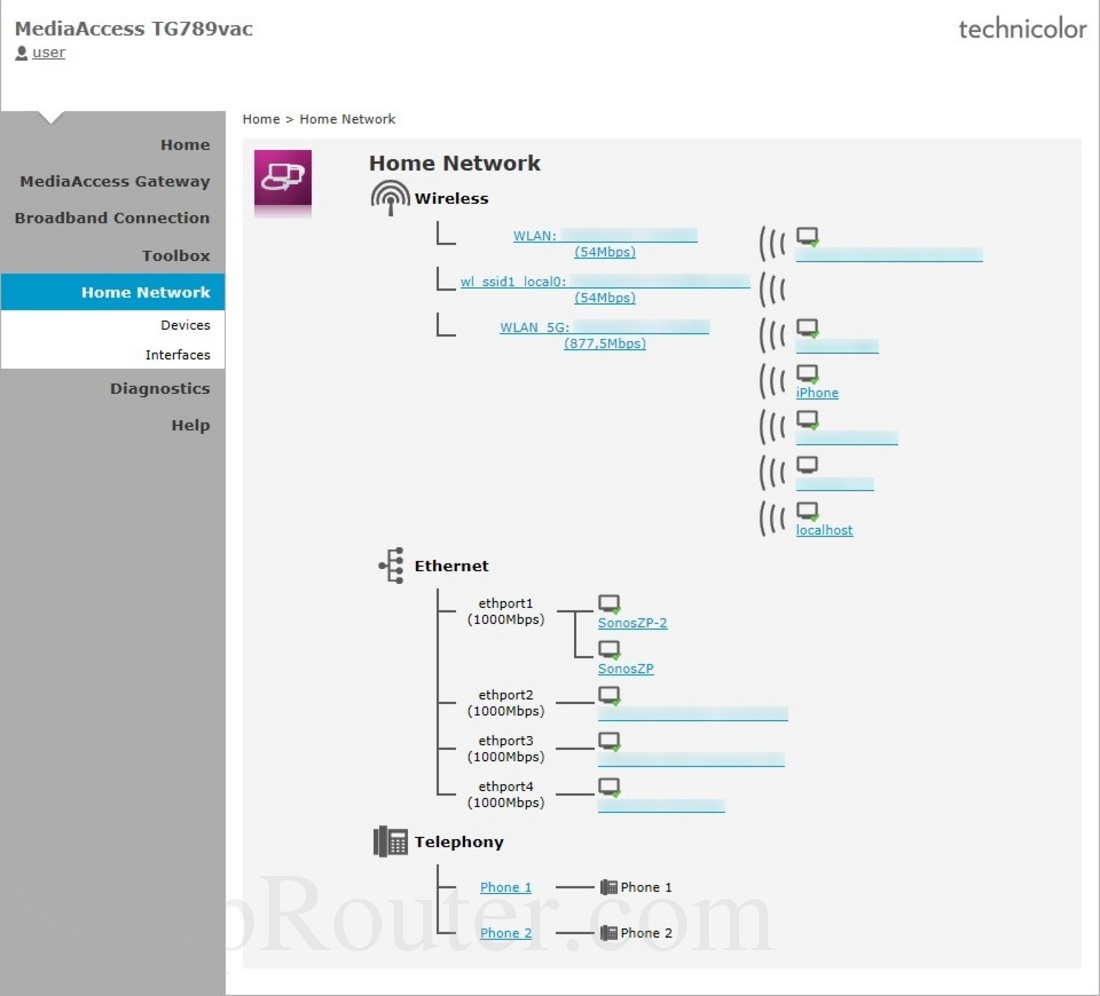
Technicolor TG789vac v2. What I wanted was to upload files via FTP from my PC to another as well as to download from another PC to mine via FTP too.
 
Last edited by Windows_10_User,
Technicolor TG789vac v2. But like I said, I don't know how to FTP to and from this PC to other PC's on the same network. It should be possible with FileZilla.
Ok, found a screenshot:
https://setuprouter.com/router/technicolor/tg789vac-mediaaccess/attached-devices-82610-large.jpg
attached-devices-82610-large.jpg


It's probably under Devices.

To FTP to another PC you need a FTP server. FileZilla Server is easiest to set up I think.
But I don't know why you'd want to do that when you can use a SMB share. Much easier.
 
Last edited by Windows_10_User,
Thanks. To be honest, what I'd want was to FTP files from PC to PC instead of having to carry USB devices or send emails. In this case, both PCs have to have a program like FileZilla installed, right? And does it have to be running in both PCs at the same time or just in the one where the files will be sent? What about FileZilla Client, which I use to FTP files from PC to the PS3/PS Vita/ PS TV and that I want to use from the PC to the PS2?
1652220493237.png

Click the Share button.
Share any folder you like or an entire drive (not recommended)
Then you can use the "Map network drive" option in Computer to mount it on another PC and you can access any files as if they were local.
Much easier/better than FTP.
For example I have my media folder as a SMB share so I can watch stuff on my TV (using my Shield TV)
But I use a NAS for that. Same difference though.
 
View attachment 309526
Click the Share button.
Share any folder you like or an entire drive (not recommended)
Then you can use the "Map network drive" option in Computer to mount it on another PC and you can access any files as if they were local.
Much easier/better than FTP.
For example I have my media folder as a SMB share so I can watch stuff on my TV (using my Shield TV)
But I use a NAS for that. Same difference though.

Thanks, but I already know how to do that. Like I said, what I really wanted was to upload files from the PC to another PC like I do from the PC to the PS3/PS Vita/PS TV.
 
Last edited by Windows_10_User,
But why? SMB is more capable.

So, the PS2 doesn't have an IP address, though an ethernet cable is connected? If so, how can PS2Net and OPL set one when the PS2 itself can't?

Also, why do we have to go to FileZilla Client's "Site manager" and set a new "site" to connect the PC to the PS2 instead of only setting PS2Net's IP address on FileZilla Client's "Host" box like we do to connect the PC to the PS3/PS Vita/ PS TV?
 
Last edited by Windows_10_User,
So, the PS2 doesn't have an IP address even though a RJ45 cable is connected? If so, how can PS2Net and OPL set one when the PS2 itself can't?

Also, why do we have to go to FileZilla's site manager and set a new "site" to connect the PC to the PS2 instead of only inserting PS2Net's IP address on FileZilla's "Host" box like we do to connect the PC to the PS3?
The PS2's firmware isn't updatable and online support didn't launch at the same time as the PS2 so they likely just hadn't written the online functionality yet, so it couldn't be built into the firmware.

As for how, it's pretty simple, the PS2 doesn't run a full OS like modern consoles or a PC, games have direct access to the kernel so they can do anything without the need for firmware support or drivers. Essentially the driver is built into the game and the game has to do everything the OS would normally take care of, like managing the connection.
 
The PS2's firmware isn't updatable and online support didn't launch at the same time as the PS2 so they likely just hadn't written the online functionality yet, so it couldn't be built into the firmware.

As for how, it's pretty simple, the PS2 doesn't run a full OS like modern consoles or a PC, games have direct access to the kernel so they can do anything without the need for firmware support or drivers. Essentially the driver is built into the game and the game has to do everything the OS would normally take care of, like managing the connection.

What settings are you changing on the PC? Is it just the IP address? If so what was the IP address of the PC before the change and the static IP address you're assigning?

I just tested with ULE and my computer and the only setting I had to change was in Filezilla to enable insecure FTP.

PC IP: 192.168.0.45
PS2 IP: 192.168.0.10

No, you can leave the PC on auto (DHCP), it doesn't matter
And it only needs to be done once. As long as nothing on the network is using the same IP you should never have to change it again (you can set a static IP in your router that way it's reserved so nothing else will use it - or figure out what IP range your router's DHCP uses, often it's like x.x.x.100-x.x.x.250 so you can set the static IP on the PS2 outside that range to make sure nothing else will use it)

So, I tried connecting the PC to the PS2 by FileZilla Client and I had to do what I do when I want to run OPL, I mean, set a static IP address on the PC and change Windows' Control Panel's network settings (which is annoying) and I also had to go to FileZilla Client's "Site Manager" and set a new "site" (instead of just setting wLE's IP address on FileZilla Client's "Host" box like it's done to connect the PC to the PS3) because if I do the latter it wouldn't also work (I don't know why). Is there really no other way?
 
Last edited by Windows_10_User,
So, I tried connecting the PC to the PS2 by FileZilla and I had to do what I do when I want to run OPL, i.e., set a static IP address on the PC and change Windows' Control Panel's network settings (which is annoying) and I also had to go to FileZilla's site manager and set a new "site" (instead of just inserting PS2Net's IP address on FileZilla's "Host" box like we do to connect the PC to the PS3) because if I do the latter it wouldn't also work (I don't know why). Is there really no other way?

Are you trying to do both FTP and SMB at the same time?

Although like I said, presuming your pc is capable enough, a VM sounds like a better solution for you and it's free.
 
No, just FTP. Why don't some websites work with a static IP address?

If you're FTPing to the PS2, you don't need to change any settings on the Windows computer, you just need to use Filezilla.

It's only when using SMB with OPL that you need to worry about the computer's IP address and other settings.

Did you set the Static IP address with the correct gateway (usually the routers IP address) and DNS (check your ISP or use something like 1.1.1.1)?
 
If you're FTPing to the PS2, you don't need to change any settings on the Windows computer, you just need to use Filezilla.

It's only when using SMB with OPL that you need to worry about the computer's IP address and other settings.

Did you set the Static IP address with the correct gateway (usually the routers IP address) and DNS (check your ISP or use something like 1.1.1.1)?

I tried it but it didn't work.

What did you do exactly? Did you change any Windows' Control Panel's network setting? I set the PS2's IP address on the PS2 but it showed no partitions.

Which static IP address and gateway? On the PS2?
 
Last edited by Windows_10_User,

Site & Scene News

Popular threads in this forum