Hardware M92T36 or BQ24193

  • Thread starter Thread starter nerirififi
  • Start date Start date
  • Views Views 128,506
  • Replies Replies 279
And this is the reason, just for fun check original power supply output and you would be surprised it's almost like a laptop up to 30-Watts.
Main reason why ppl. blow their switches by using regular iPhone charger...
You need PowerBank with fast charge at least, does ur support it?
 
I can't solve the problem. In the dock it charging perfectly but on the usb C cable that neither it nor it organizes in win 7 or 10 and on the switch it appears the message that it cannot charging. I tried several cables on several laptops.......:wacko::cry:
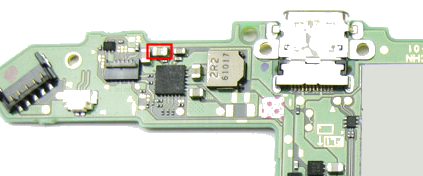
I measured with the multimeter everywhere I was advised to measure. I didn't find anything right. The only anomaly is at the diode near the usb c port which shows me 5v on both sides although I know it has to 5v with 3v.
 

Attachments

  • di.jpg
    di.jpg
    83.5 KB · Views: 304
Last edited by Mardare,
I can't solve the problem. In the dock it charging perfectly but on the usb C cable that neither it nor it organizes in win 7 or 10 and on the switch it appears the message that it cannot charging. I tried several cables on several laptops.......:wacko::cry:
I measured with the multimeter everywhere I was advised to measure. I didn't find anything right. The only anomaly is at the diode near the usb c port which shows me 5v on both sides although I know it has to 5v with 3v.

The part closest to the usb port is a fuse not a diode, voltage coming in should be the same on both sides.
 
  • Like
Reactions: Agilato and FXDX
Last edited by FXDX,
  • Like
Reactions: edwardsalazar97
Is the diode, here's the discussion....https://gbatemp.net/threads/trinket-internal-install.509633/page-16#post-8133481
Bad diode = Similar values in boths direction and i think that's my problem. Tomorrow i will try to replace it and come back as a result.

So your plugging your switch in to the usb port of a computer or power bank or what ever else, which all give out 5 volts and because you've got 5 volts on the top of the fuse/diode you think that could be your issue.
Sorry but i don't think changing that part will make any difference.
 
  • Like
Reactions: FXDX
I had a short on a cap near BQ24193 and thought perhaps it was the chip - the short however is still present once I removed the chip. It is this cap:

switch_cap.png


Anyone know what this could relate to?
 
I had a short on a cap near BQ24193 and thought perhaps it was the chip - the short however is still present once I removed the chip. It is this cap:

Plug the charger in and see if that cap get's hot, don't leave it in for age's though.

Check in the usb port to make sure all pins are ok
 
Last edited by Pintglass,
  • Like
Reactions: FXDX
hi guys i finally tested my switch with a doc and it does not output anything to the screen. so a little recap i change the usb charge port and the p13usb ic. what do i need to check now ?

is there anyway to check if there its the usb charge port or the p13usb ic?
 
Last edited by solac,
Now I feel ripped off again. I had a day one Switch that I sent to repair by a member on this site over at the trading forums, and when he said he was gonna send it back cause he couldn't repair it, he didn't reply after that and never did send it back. Lost my chances of hacking a Switch or repairing it. Sad.
 
  • Like
Reactions: Agilato and Mardare
hi guys i finally tested my switch with a doc and it does not output anything to the screen. so a little recap i change the usb charge port and the p13usb ic. what do i need to check now ?

is there anyway to check if there its the usb charge port or the p13usb ic?

Check chokes near p13 chip, those are usually got fried with shorted USB-C
 
  • Like
Reactions: FXDX

Site & Scene News

Popular threads in this forum