Hacking [Guide] Kafluke's HardMod CBHC Unbrick guide

  • Thread starter Thread starter Kafluke
  • Start date Start date
  • Views Views 150,568
  • Replies Replies 412
  • Likes Likes 33
I knew it was called something like that. :P eyekey made like 5 tools for dumping and fixing the NAND. I used them to fix mine that were made with the fw.img which I'm assuming you made yours the same way. however, I also redumped the slc and slcmpt partitions with the new NAND dumping tool. unfortunately, I'm not sure about your problem. I wouldn't think the image type would matter. there are ways to convert it, but that might corrupt the image. try one of eyekey's tools. iirc, the one that allows u to extract content with the otp works with the img files.

 
I knew it was called something like that. :P eyekey made like 5 tools for dumping and fixing the NAND. I used them to fix mine that were made with the fw.img which I'm assuming you made yours the same way. however, I also redumped the slc and slcmpt partitions with the new NAND dumping tool. unfortunately, I'm not sure about your problem. I wouldn't think the image type would matter. there are ways to convert it, but that might corrupt the image. try one of eyekey's tools. iirc, the one that allows u to extract content with the otp works with the img files.

I made my slc, slccmpt and mlc with sdio nand manager and then the bins with OTP2SD from the app store. NANDbincheck already verified the slc as good, although I'm not sure what image type it should be (bin/img), either ways it should flash.
 
yeah, that's probably from the fw.img while making redNAND. I did mine the same way, but I redid them just to be sure they were correct in case I brick. I've been using cbhc for several months, but there's always the possibility of making a mistake or if the game becomes corrupted somehow... I got my otp the same way as well. I redumped it using the NAND dumper tool on the wii u, but u can browse the file system of the slc using the otp and eyekey's tool. I think he's also the dev that made the nand dumper on the system. I'm not sure about your issue. I'm sure @Kafluke , @Leeful , or @EyeKey will know the answer to that. you're right, it should flash...not sure why it won't.
 
Ok @Kafluke I redid all the connections, checked them all with multimeter, no shorts and I'm pretty confident in my soldering skills but it's still giving me the wrong info. There's something I'm missing. I checked the pins at 5V and GND and it's giving me 3.2V, no bridge between the cut track.
 
Ok @Kafluke I redid all the connections, checked them all with multimeter, no shorts and I'm pretty confident in my soldering skills but it's still giving me the wrong info. There's something I'm missing. I checked the pins at 5V and GND and it's giving me 3.2V, no bridge between the cut track.
This is really odd. I don't know why it is detecting the wrong size nand.
Can you confirm that you have ONLY connected RB2 & CE2 from the WiiU to RB & CE on the teensy and that RB1 & CE1 are not connected to anything.
Also are you using the NANDway.py & NANDway_SignalBoosterEdition.hex from the link in the guide?
 
I knew it was called something like that. :P eyekey made like 5 tools for dumping and fixing the NAND. I used them to fix mine that were made with the fw.img which I'm assuming you made yours the same way. however, I also redumped the slc and slcmpt partitions with the new NAND dumping tool. unfortunately, I'm not sure about your problem. I wouldn't think the image type would matter. there are ways to convert it, but that might corrupt the image. try one of eyekey's tools. iirc, the one that allows u to extract content with the otp works with the img files.
The link to all of eyekey's tools have been in the OP since day one. :D

It's in step 3.3 release.zip contains all eyekey's tools
 
Last edited by Kafluke,
  • Like
Reactions: godreborn
This is really odd. I don't know why it is detecting the wrong size nand.
Can you confirm that you have ONLY connected RB2 & CE2 from the WiiU to RB & CE on the teensy and that RB1 & CE1 are not connected to anything.
Also are you using the NANDway.py & NANDway_SignalBoosterEdition.hex from the link in the guide?

Yes, RB2 is connected to E7 and CE2 is connected to GND just like in the diagram, nothing on RB1 & CE1. I connected CLE to B0, ALE to D0, WE to C0 and RE to A0, if that means anything.
And yes I'm using NANDway.py & signalbooster from the link in this guide, followed it to the T.

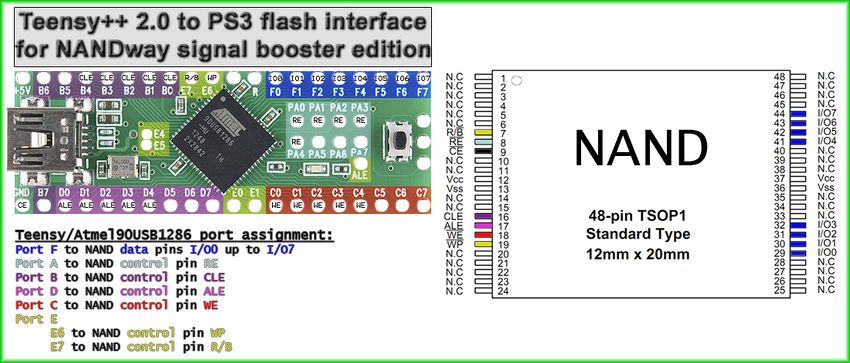
Found this browsing around but for PS3, the CE point is at the top GND, could that be looked into?
850px-Teensy_2.0_to_PS3_flash_interface_for_NANDway_signal_booster_edition_zpsnnmhkmtv.jpg


--------------------- MERGED ---------------------------

Did you follow the powering instructions (do you get a blue light and the fan spins?)

Yes, of course, otherwise I wouldn't be able to ping or dump.
 
@Anonyamalious Are all of the ALE points (D0, D1, D2, D3, D4) on the teensy bridged / joined together? Same goes for WE, CLE & RE.
 

Attachments

  • Teensy-joined.jpg
    Teensy-joined.jpg
    91.8 KB · Views: 402
Last edited by Leeful,
@Anonyamalious Are all of the ALE points (D0, D1, D2, D3, D4) on the teensy bridged / joined together? Same goes for WE, CLE & RE.
I should update the OP to clarify this point. I soldered all mine together based on the wiring guide and it worked. I figured that was clear but I should make it more clear
 
I should update the OP to clarify this point. I soldered all mine together based on the wiring guide and it worked. I figured that was clear but I should make it more clear
Good Idea. I remember when I was reserching how to do this all I had to go on were the PS3 guides and I was not sure at first if it was all the points or just one of the points that needed to be connected.
 
Good Idea. I remember when I was reserching how to do this all I had to go on were the PS3 guides and I was not sure at first if it was all the points or just one of the points that needed to be connected.
Done
 
@Anonyamalious Are all of the ALE points (D0, D1, D2, D3, D4) on the teensy bridged / joined together? Same goes for WE, CLE & RE.

@Leeful I joined them together like you asked but unfortunately getting the same thing
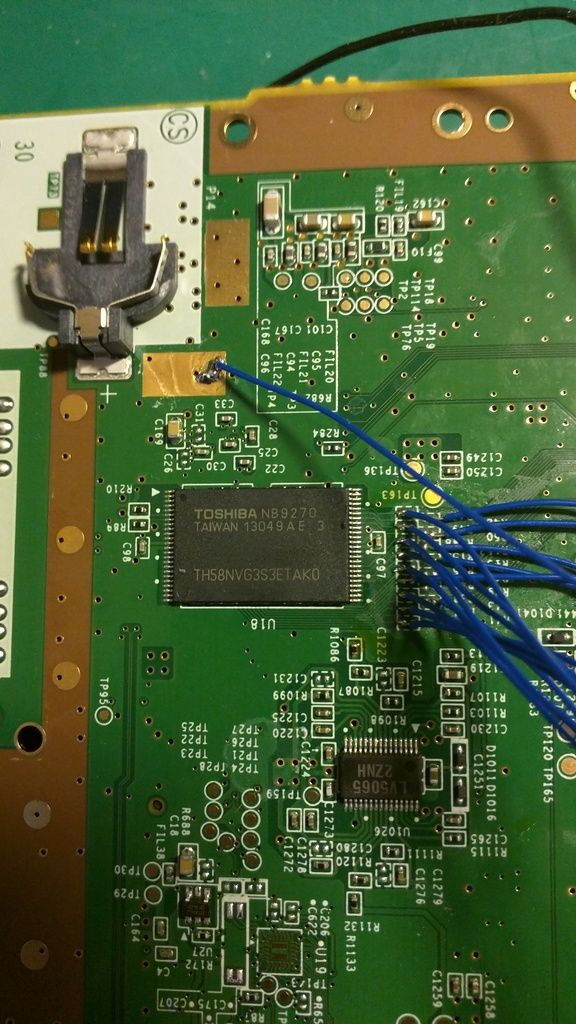
Here's the picture of the IC
IMG_20170713_105510_zpszon0liup.jpg
It reads:
TOSHIBA NB9270
TAIWAN 13049AE 3
TH58NVG3S3ETAK0
 
Last edited by Anonyamalious,
Try redownloading the nandway files that I just updated in the OP. I don't remember if I posted the files that Leeful gave me after I started this so I went back and found the post where he told me to use these specific versions. I just fixed the OP with those exact files from Leeful.
 
I used the nandway files from your latest link, same result.

@Kafluke , your link to the teensy windows drivers is dead https://www.pjrc.com/teensy/serial_install.exe

You might also want to add the code is for Python 2.7 and you need pip install pyserial to make it all happen.

I also got a trick to make windows device manager recognize the teensy and also assign it a port because if you flash the booster hex manually it will only recognize it as USB input device (with no port), the trick is to flash it with auto mode in teensy loader.
 
I used the nandway files from your latest link, same result.

@Kafluke , your link to the teensy windows drivers is dead https://www.pjrc.com/teensy/serial_install.exe

You might also want to add the code is for Python 2.7 and you need pip install pyserial to make it all happen.

I also got a trick to make windows device manager recognize the teensy and also assign it a port because if you flash the booster hex manually it will only recognize it as USB input device (with no port), the trick is to flash it with auto mode in teensy loader.
Crap I forgot about the python install thanks. I'll add your other steps to troubleshooting. Thanks for the input!
 
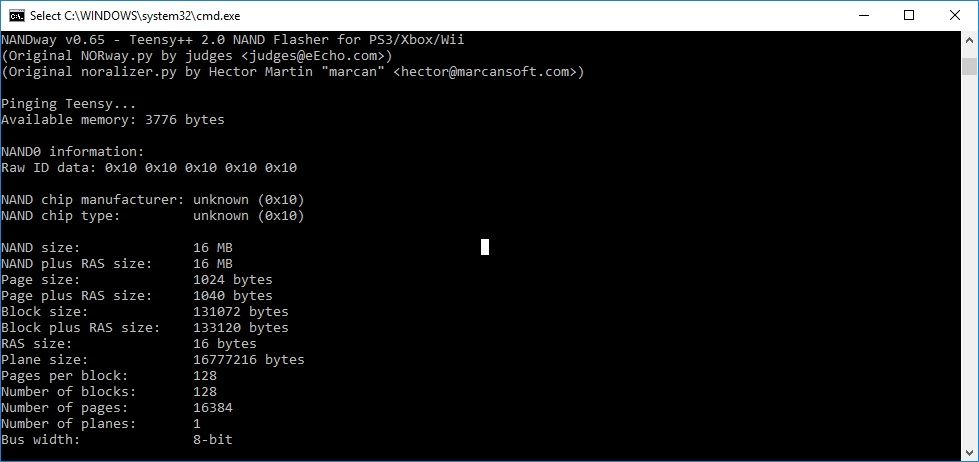
@Leeful Weird...now it's showing 16mb after I left it sitting...I already checked all the joined points with multimeter, they bridge...

16mb_zpsydkfk2t3.jpg

UPDATE:
Nevermind CLE came off
 
Last edited by Anonyamalious,
@Leeful Weird...now it's showing 16mb after I left it sitting...I already checked all the joined points with multimeter, they bridge...

16mb_zpsydkfk2t3.jpg

UPDATE:
Nevermind CLE came off
The only thing I can think of is that nandway.py is not compatable with the Toshiba TSOP nand that you have.
I have only ever seen Samsung or Hynix TSOP chips used in the WiiU before. I cannot find a datasheet for the Toshiba chip but obviously the nand size should only be 512MB like the others because it was the correct size when you dumped it with the nand dumper software.
 
Last edited by Leeful,
I am glad that you found time in your schedule to finish this tutorial.
The only thing I can think of is that nandway.py is not compatable with the Toshiba TSOP nand that you have.
I have only ever seen Samsung or Hynix TSOP chips used in the WiiU before. I cannot find a datasheet for the Toshiba chip but obviously the nand size should only be 512MB like the others because it was the correct size when you dumped it with the nand dumper software.
I used to have issues reading and writing toshiba chips using an infectus on the wii even when programming the nand chip while it was removed from the board. The toshiba chips seem to have a weaker signal voltage for some reason. What I had to do at times was put a samsung chip in first, identify it, hot swap it with the toshiba, and then read or write it. Not sure if this is possible with the software for the teensy 2.0++.
 
Last edited by DeadlyFoez,
  • Like
Reactions: Leeful

Site & Scene News

Popular threads in this forum