Hacking Wii U USB loading - install WiiU games to USB or internal memory

  • Thread starter Thread starter BurningDesire
  • Start date Start date
  • Views Views 1,676,968
  • Replies Replies 5,226
  • Likes Likes 64
Data management, you can transfer data in between 2 storage devices in case you need to INCREASE your external storage device size

As you can see in the picture below, I am using two Wii u formated USB drives in my Wii U

cbb624f7a25c0b1e818da4fc27f7f21d.jpg


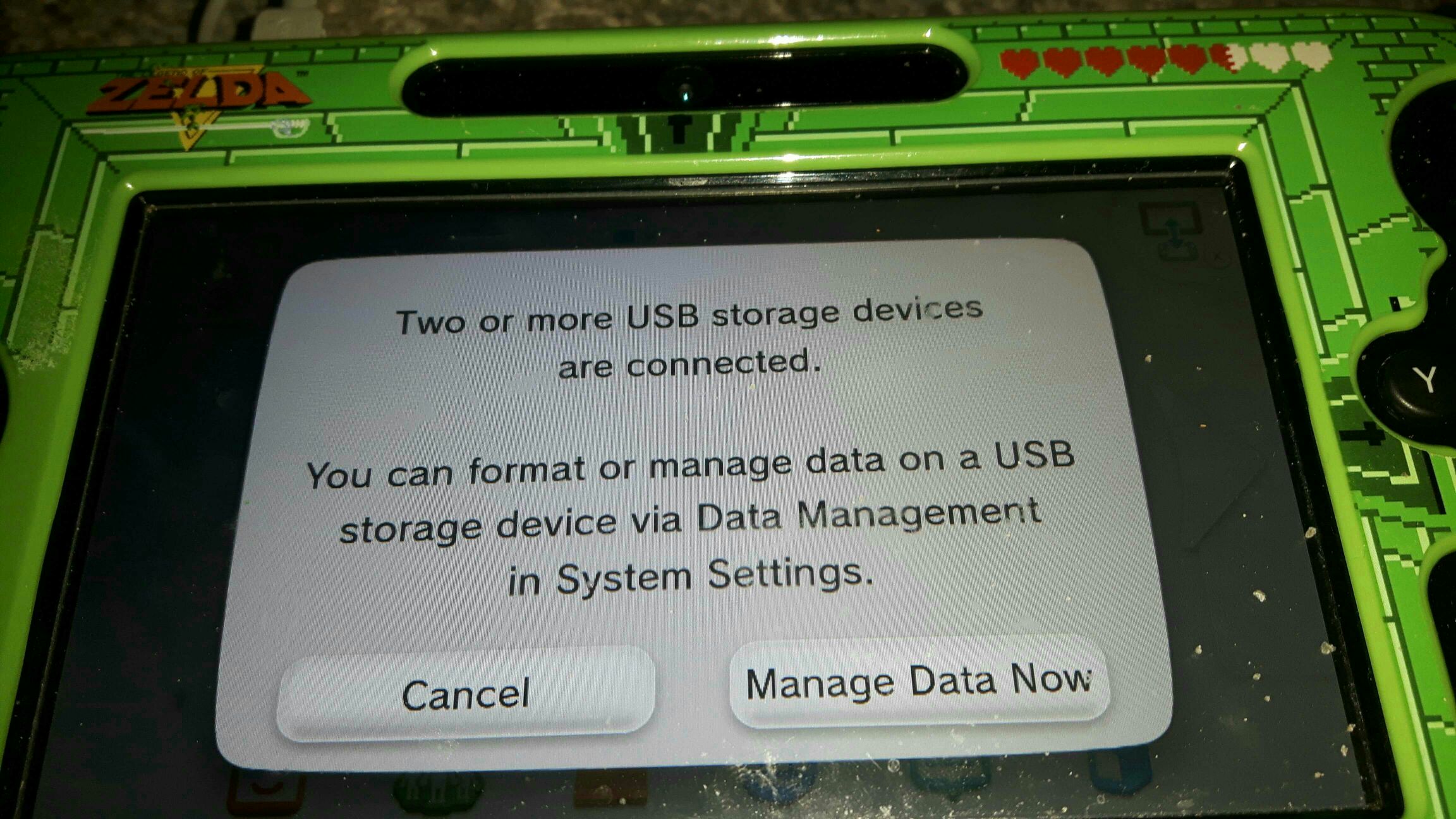
How ever, my Game Pad displays this message, and if I click "Cancel" it will refresh the Home Menu like if I closed a software and this message pops up everytime unless I take a Flash drive out.
42efb8b625cf4593c6d13cdde96cdad0.jpg


EDIT: I moved a title to my second flash drive that had nothing on it, but now get this message.

9c2414d11bcfff1be7b1d96aa119aa4e.jpg


Nintendo, why would you give us multiple slots for external storage when we can use only one external storage at a time???

 
looks like he just grabbed a random picture that he found on google that looked the same......although by what he is describing i too would still suggest he checks with h2testw if its fake, although i would have thought they would have moved on from making fake 16GB sd cards by now :rolleyes:


If it is a random image, but it is exactly the same card. finds its status with the program. I live in Venezuela and here surely still sell these fake cards:(. Thanks for your comment:)
 
Question:
I install Bit Runner2: Future Legend of Rhythm Alien and it install 100% but the icon does show on the Wii U home menu. If I go into the data management menu and then into the copy/Move/Delete Data menu the games is there. The game is USA region as my console.
 
Question:
I install Bit Runner2: Future Legend of Rhythm Alien and it install 100% but the icon does show on the Wii U home menu. If I go into the data management menu and then into the copy/Move/Delete Data menu the games is there. The game is USA region as my console.
This method ONLY works if there is a physical disk version of the game. Please read the first page. This is explained clearly.


**********"but the icon does show on the Wii U home menu" - it does show?
 
So, I've got Twilight Princess HD and Minecraft on the internal memory, and decided to throw on Xenoblade Chronicles X as well to squeeze out the fastest loading times I can get. Whenever I try to install Xenoblade the process ends at around 60-70% with no error. It cycles through like it had installed properly but of course there is no icon and data management finds dead data and asks to delete it.

Any ideas? From the first post, it seems I'd be getting error dialogue if it was something easy like corrupted files. I used uTik to grab it, it is the correct region, etc.
 
This method ONLY works if there is a physical disk version of the game. Please read the first page. This is explained clearly.


**********"but the icon does show on the Wii U home menu" - it does show?
No, the icon does not show. Thank you for letting me know. SO it does not matter if the Title.tik of the games is out because if the game was never released on a disc it will not work correctly?
 
So, I've got Twilight Princess HD and Minecraft on the internal memory, and decided to throw on Xenoblade Chronicles X as well to squeeze out the fastest loading times I can get. Whenever I try to install Xenoblade the process ends at around 60-70% with no error. It cycles through like it had installed properly but of course there is no icon and data management finds dead data and asks to delete it.

Any ideas? From the first post, it seems I'd be getting error dialogue if it was something easy like corrupted files. I used uTik to grab it, it is the correct region, etc.
Are you using the latest WUPinstaller y Mod 1.2.1?
It may give more info. Majority of the time your files are bad/incomplete/0-size, or try power down, or reformat SD at 32k blocks.
 
That's not the point I am getting at, newbie.
The point of detecting two devices is that, you can transfer the data in case you need to change/increase your storage device size. I don't know why you have to attack me calling me a newbie, I was respectful to you.
 
Ah, nope. I'm a bit behind, using 1.1.1. I'll update and try again. SD is already correctly formatted.
it might actually be your sd card I just had my 3rd install error and it is with 32k blocks, moving the same games dl'ed with NUSgrabber to a different SD card and the installation went fine.

sd card that failed was a Sony one and sd card that still works fine is a sandisk ultra 64GB microsd
 
Last edited by Yeloazndevil,
  • Like
Reactions: TotalInsanity4
it might actually be your sd card I just had my 3rd install error and it is with 32k blocks, moving the same games dl'ed with NUSgrabber to a different SD card and the installation went fine.

sd card that failed was a Sony one and sd card that still works fine is a sandisk ultra 64GB microsd

The one I used is a SanDisk Ultra Class 10 SDHC UHS-I card. I guess I could try it with my other one with higher read/write and capacity, but haven't had any problem with either of them previously.
 
it might actually be your sd card I just had my 3rd install error and it is with 32k blocks, moving the same games dl'ed with NUSgrabber to a different SD card and the installation went fine.

sd card that failed was a Sony one and sd card that still works fine is a sandisk ultra 64GB microsd
did try reformatting the Sony SD card?
 
that's why it's marked as "don't use it".
people are wondering why there is not what they want, because you rely on user-driven outdated database.
particularly for updates (but I agree, in this thread users don't want updates, they want games. but that doesn't change the fact that your program don't have latest updates)

you want the latest up-to-date version of each titleID on NUS?
parse Nintendo's update server xml file.

edit:
step1:
https://tagaya.wup.shop.nintendo.net/tagaya/versionlist/EUR/EU/latest_version
https://tagaya.wup.shop.nintendo.net/tagaya/versionlist/USA/US/latest_version
https://tagaya.wup.shop.nintendo.net/tagaya/versionlist/JPN/JP/latest_version

you'll get a xml for each.
<version>1305</version>
<fqdn>tagaya-wup.cdn.nintendo.net</fqdn>

you'll get the "latest version".
I don't know the use of that url.

step2:
https://tagaya.wup.shop.nintendo.net/tagaya/versionlist/<region>/<lang>/list/<version>.versionlist

replace the "latest version" you got in step1 into the URL in step 2
example:
https://tagaya.wup.shop.nintendo.net/tagaya/versionlist/EUR/EU/list/1305.versionlist

You'll get a list of "last version" available on NUS for each titleID.
it's also XML format.

step 3:
Code:
<?xml version="1.0" encoding="UTF-8" standalone="yes"?>
<version_list format_version="1.0">
	<version>1305</version>
	<titles>
		<title>
			<id>0005000E10100600</id>
			<version>16</version>
		</title>
		<title>
			<id>0005000E10101B00</id>
			<version>16</version>
		</title>
...
TitleID 0005000E10100600 (an update, because it's 0005000E) has version 16 available. so an update can be downloaded.
NUSGrabber 0005000E10100600 16
or JNUSTool.jar 0005000E10100600 v16 -dlencrypted

it's not your program which is outdated, but the database.
users can just use NUSGrabber (without GUI) and type the ID and version they want. Of course, if they rely manually on that website to get their info, that's not better.
 

Site & Scene News

Popular threads in this forum