Tutorial  Updated

Region changing a DSi on NAND

1710713351804.png

(iQue cover photo since DS iQue firmwares are kinda my "thing" now lol)

This guide will walk you through region changing your DSi. You're essentially "cloning" the firmware and all files from another NAND. :!: This is a very dangerous operation :!: and I do not recommend for most people to try it. If you do not have a way to recover from a brick (eg. ntrboot), DO NOT FOLLOW THIS GUIDE

Note - you will not be able to remove unlaunch while having the region change

Prerequisites:
- SafeNANDManager to dump your NAND​
- ninfs to read NANDs​
- OSFMount to edit NANDs​
- ntrboot compatible flashcart in case you brick​
- A donor NAND backup for the region you want to install (archive.org is your friend)​
- Be an adrenaline junkie (idiot) with no concern for your DSi or the consequences of editing NAND​

Dumping your NAND:
- You will need a hacked DSi. If your DSi isn't hacked already, follow this guide.​
- Run SafeNANDManager and back up your NAND​
- Save your NAND on your computer, cloud storage, and some thumb drives. You will regret not having backups

Editing your NAND:
- Open the target DSi's NAND and delete every folder​
To open your NAND: mount your nand.bin in ninfs, then open the resulting twl_main.img with OSFMount. Make sure you enable write access for both tools.
- Open the donor NAND and copy everything to the target NAND. **You will no longer need the donor NAND**​
- Locate your launcher (somewhere in the NAND:/title/00030017/ folder)​
- Mark the launcher app as read only​
- Copy the attached unlaunch TMD to NAND:/title/00030017/484e4141/content/title.tmd
- Mark the unlaunch TMD as read only​
- Delete NAND:/Shared1/TWLCFG0.dat and TWLCFG1.dat
- Unmount twl_main.img from OSFMount, then nand.bin from ninfs​

Flashing the NAND:
- Copy your edited nand.bin to your SD card and overwrite your first backup
- Calculate the SHA1 hash of your nand.bin
- Open nand.bin.sha1 in a hex editor.​
- Replace the contents of nand.bin.sha1 with the SHA1 hash you just calculated​
- Save your edited nand.bin.sha1 and copy it back to the SD​
- Run SafeNANDManager again, but this time please select "NAND restore"​
- When complete, reboot and you're done!​


Common issues:
- My DSi worked the first time, but now I get a black screen!
You did not set the unlaunch TMD as read only. You will need to fix that or flash your original NAND backup with ntrboot
- I can't find the home menu!
You did not set the launcher as read only. You'll need to install a new copy with NTM
- I can't do updates or connect to the DSi Shop!
This is normal. You will have to restore your original NAND backup to use those again.
- Unlaunch gives me the following error: Cannot load WiFi Firmware
Your WiFi board is not compatible with the installed WiFi firmware. You'll need to update your WiFi firmware (located at NAND:/title/0003000f/484e4341/) with a version from a newer NAND.​

How it works:

The console region is defined in a file called HWINFO_S.dat. This file is console specific (contains the serial) and is signed with an unleaked key. Changing any contents will break the signature and stop your console from working.

Normally when you turn on your DSi the stage2 bootloader will check HWInfo for the Title ID of the launcher. Stage2 has trouble reading modified or different HWInfos and will fail to get the launcher TID. Thankfully stage2 was programmed to load a "backup" launcher (HNAA/484e4141) if the first one fails. This is a leftover feature from factory/prototype firmware.

Placing an unlaunch TMD in the location of the backup launcher means that stage2 will always be able to boot unlaunch, even if HWInfo is completely broken. From there unlaunch will patch the launcher to fix any HWInfo checks and allow booting another DSi's HWInfo.

It's pretty simple!


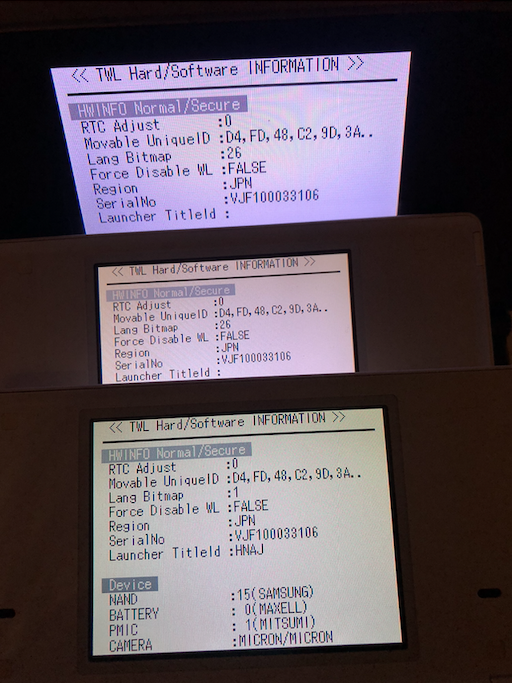
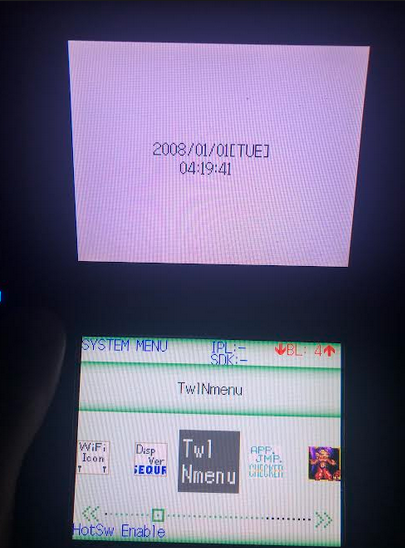
You can actually "clone" a DSi with this guide. I've cloned my dev DSi NAND to a couple other DSis. It works pretty well! (obviously no real dev support, but nice to see all the apps not getting deleted on boot like is normal for retail)

Also kinda weird having 3 consoles with the exact same serial...
1710713611438.png
1710713710428.png

Thank you for testing!
- @Dionicio3
- ArcheyChen
- stl25
 

Attachments

Last edited by rvtr,
for the record, hiya has been completely obsolete for... a long time, now. and even back before twilightmenu was a thing, it was never required for running homebrew, because unlaunch will run homebrew directly from its file browser anyway
Obsolete? I still use it to this day. I thought it was good practice to use Hiya since the less you touch the NAND the better. In my case, I only have Unlaunch installed in NAND, everything else is in SDNAND using Hiya and I had no problems so far (expect Unlaunch being incompatible with my firmware version in newer releases than 1.8).

I would like to know if there is any serious disadvantage in using Hiya anyways.
 
  • Like
Reactions: rvtr
Obsolete? I still use it to this day. I thought it was good practice to use Hiya since the less you touch the NAND the better. In my case, I only have Unlaunch installed in NAND, everything else is in SDNAND using Hiya and I had no problems so far (expect Unlaunch being incompatible with my firmware version in newer releases than 1.8).
I think it's mostly considered obsolete because wrong SD sizes make it too slow/crash, twilight menu can do the same thing, NTM can install to real NAND, etc. Though as with everything, if it works for you then keep using it.
 
  • Like
Reactions: JORGETECH
I think it's mostly considered obsolete because wrong SD sizes make it too slow/crash, twilight menu can do the same thing, NTM can install to real NAND, etc. Though as with everything, if it works for you then keep using it.
I'm using a 32 GB SD, I guess that's why I never had any problem. I don't need more space anyways.
 
  • Like
Reactions: rvtr
you dont have problems because hiya takes care of the problem by making dummy files, to fill up your sd card to a point where the problem isn't happening

this isnt a hiya bug also, it's a nintendo bug, but it only happens when using hiya, because the only time "nand" has high storage space is when you're using sd card as redirected nand

hiya will waste anywhere up to 2gb of space on your card to work around this bug, but it might not be a problem because I would imagine it reduces the size of the dummy file when you put your own files on the card (and if you needed to use the full 32 gb, you remove the dummy files to make space, and hiya won't recreate them because by that point, they arent needed anymore)
 
  • Like
Reactions: JORGETECH and rvtr
is the ninfs file safe? my pc is freaking out because it thinks its a virus
Post automatically merged:

Look
Post automatically merged:

Nevermind
Do i really need to have experience on coding for this? Cuz idk how to calcuulate shared1 hash files
 

Attachments

  • IMG_20240902_090812.jpg
    IMG_20240902_090812.jpg
    8.3 MB · Views: 74
Last edited by _collectorsrarity,
If aren't able to figure that out, it may not be a good idea for you to be editing NAND.

Regardless, you can get the hash with this site.
https://emn178.github.io/online-tools/sha1_checksum.html
I can accually understand a bit of hex editing but not that experienced lol thanks tho,
Post automatically merged:

I can accually understand a bit of hex editing but not that experienced lol thanks tho,
also where do you get your ique firmwares? do you dump them by ypur own?
 
Last edited by _collectorsrarity,
Some from online, some from people sending them to me. (psst, if anyone here has an interesting firmware, do send)
You said that i need a newer nand. I have a 1.4j dsi im trying to install a 1.4j_kst dev firmware. Is it compatible?
 
You said that i need a newer nand. I have a 1.4j dsi im trying to install a 1.4j_kst dev firmware. Is it compatible?
That works. I only mean "new" as in different than the current NAND. You can upgrade or downgrade as much as you want, just make sure to keep a newer copy of the WiFi Firmware as mentioned here.
- Unlaunch gives me the following error: Cannot load WiFi FirmwareYour WiFi board is not compatible with the installed WiFi firmware. You'll need to update your WiFi firmware (located at NAND:/title/0003000f/484e4341/) with a version from a newer NAND.
 
That works. I only mean "new" as in different than the current NAND. You can upgrade or downgrade as much as you want, just make sure to keep a newer copy of the WiFi Firmware as mentioned here.
I decided to try a factory dsi, i mounted both in ninfs and the twl main in osf mount, When it comes to copying the donor nand to the target nand, Its saying that its write protected even i gave write access. Why is this?
 
I decided to try a factory dsi, i mounted both in ninfs and the twl main in osf mount, When it comes to copying the donor nand to the target nand, Its saying that its write protected even i gave write access. Why is this?
Make sure you set write access in ninfs and in OSFMount. If you still have issues, idk. Try another NAND or different tools.
 
Hm.. How will i know if my wifi board is updated? Do i need a special app or just do it by unlaunch?
You'll need to open up your DSi and check the label on physical board. If you have DWM-W015 then you do not need to worry about WiFi firmware.

If you have DWM-W024 or J27H020 and want to downgrade below v1.4, just make sure to download the latest WiFi firmware with NUSGet and copy the app + TMD to the following directory as "000000xx.app" and "title.tmd".
NAND:/title/0003000f/484e4341/content/

You need to make sure to enable "create decrypted contents" in NUSGet otherwise you won't get the app + TMD, just the built TAD.

1725330147777.png
 
  • Love
Reactions: _collectorsrarity
I calculated the nand sha1 and put it in. am i doing it right
(ngl im scared rn bcs on what im doing to this dsi but anyways)
Post automatically merged:

I calculated the nand sha1 and put it in. am i doing it right
(ngl im scared rn bcs on what im doing to this dsi but anyways)
Aaaaannd were writing
Post automatically merged:

I calculated the nand sha1 and put it in. am i doing it right
(ngl im scared rn bcs on what im doing to this dsi but anyways)
Post automatically merged:


Aaaaannd were writing
This is weird.. I put the launcher and the TMD on write only. Stuck on black screen..
 

Attachments

  • IMG_20240903_140836.jpg
    IMG_20240903_140836.jpg
    5.6 MB · Views: 63
Last edited by _collectorsrarity,
Did you add unlaunch?
Is you WiFi board plugged in?
Firmly
Post automatically merged:

Wifi board is connected.
I used the SHA1 File from my own nand (not donor nand)

Luckily i had another board laying around so i managed to run my backup nand in hiyacfw
 

Site & Scene News

Popular threads in this forum