Hacking Using the DS Headset on a PC

  • Thread starter Thread starter fwelr
  • Start date Start date
  • Views Views 3,552
  • Replies Replies 7

fwelr

Member
Newcomer
Joined
Sep 14, 2007
Messages
10
Reaction score
0
Trophies
1
XP
93
Country
United States
Hey guys,
I was wondering if there was a way to use the DS headset on my computer for Skype and what not.
Has it been done?
If not, could I possibly connect the DS to my PC using wireless and have the microphone inputs be transferred that way?
If not, possibly an adapter could be made to go from the Lite's propieitery slot to USB or something?

You guys are the experts, hope you can help me.

 
Demonbart said:
I don't think so, a ds headset only has 1 jack, right?
You'll need seperate jacks for input and output if you wanna use it on your pc.

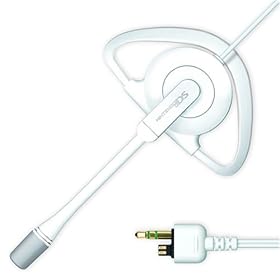
Well, its got the standard 3.5mm audio and then some proprietary jack that it uses for the mic, so I'm not sure how I could connect that to my PC.
 
41kgPuzONIL._SL500_AA280_.jpg

the 3.5mm jack is for the audio output, the tiny "connector" next to it is for the audio input.

this could be possible, you should buy a audio jack (normally used for replacement) and look how it connects.


edit: buying a microphone or a headset is alot cheaper than trying this method. ;-)
 
grimtooth said:
41kgPuzONIL._SL500_AA280_.jpg

the 3.5mm jack is for the audio output, the tiny "connector" next to it is for the audio input.

this could be possible, you should buy a audio jack (normally used for replacement) and look how it connects.


edit: buying a microphone or a headset is alot cheaper than trying this method. ;-)

Well, I already have one; I'm just trying this for fun.
biggrin.gif
 
other forum said:
I just cut the headset off of the Datel
DS headset mic.

I stripped the wire and there are 3 colors of wire within. (copper, red, and blue)

The audio plug looks like it's stereo even though the Datel is a mono headset. (not sure on this the plug has the ridges on it like a stereo plug though)

Copper and red lead to the speaker.

Copper and blue lead to the headset's boom mic.

Can anyone shed any light on what this means? (regarding what wire does what...why copper is used in both the speaker and mic) I am stumped.

What I want to do is make a "dongle adapter" that would allow me to plug in a PC mic headset or an instrument cable into the DS for chat or bringing instruments into Electroplankton or Nitro Tracker.

Any help would be appreciated!

-----------------------------------------------------------------------

copper must be the ground. Red is speaker +. Blue is Mic +.
Pc microphones need a power input, I don't think it'll work.

Surely datel used the same connections.
 

Site & Scene News

Popular threads in this forum