Hacking USB Loader... my turn ;)

  • Thread starter Thread starter WiiShizzza
  • Start date Start date
  • Views Views 817,648
  • Replies Replies 4,239
hungyip84 said:
@wiishizzza

did you put the option before layout?

Maybe I didn't include the option in the build. Anyway, thanks for testing =)

I have commented out layout.
Code:
# USBLoader config
images_path=SD:/images/
background = bg.png
# layout = ultimate2
entry_lines = 5 
covers = 0
download = 1
home = reboot
simple = 0
console_coords=40,71,340,290
console_color=7,15
# color values: 0-15)
covers_coords=446,109
QUOTE(j.m.g.a @ Apr 13 2009, 09:19 PM) Can anyone send me the .psd of the default background please?????????

No PSD from default background one. It's lost.
 
hungyip84 said:
sess said:
Got two bugs:

1) Link's Crossbow Training used to work using all three video options, now only "game default" works. The others just green screens.

2) When a game is corrupted (ret = 0), there's that box retry bug, yeah, but even if I set download=0, it tries to download the "missing" box(es).

What is box retry?

About the Crossbow Training, which version was it working?

Have you tried V6(1.1)?

By box retry, I mean when you plug in/turn on the HDD when that countdown is on the screen. I don't remember the name you guys gave to that bug, so I just said "box retry"
tongue.gif


I remember playing LCT on V4, and yes, tried the latest one. Tried reinstalling it, too.
 
cybergenie35 said:
I just tried the beta 6, its also the first time using this loader. When I start it, it goes directly to "initializing network" then tries to download something at which points it crashes. What exactly is it trying to download. I don't have a internet connection to my Wii. I've got CIOS v10 installed
It will try and download covers for your games. Beta 6 isnt out yet for any version but Version 6 beta 3 is out, so i will assume you mean that. There is a config file that you can create that will turn off teh automatic download of covers. in the config file add, "download = 0" without the quotes. That should sort you out.
 
sess said:
hungyip84 said:
sess said:
Got two bugs:

1) Link's Crossbow Training used to work using all three video options, now only "game default" works. The others just green screens.

2) When a game is corrupted (ret = 0), there's that box retry bug, yeah, but even if I set download=0, it tries to download the "missing" box(es).

What is box retry?

About the Crossbow Training, which version was it working?

Have you tried V6(1.1)?

By box retry, I mean when you plug in/turn on the HDD when that countdown is on the screen. I don't remember the name you guys gave to that bug, so I just said "box retry"
tongue.gif


I remember playing LCT on V4, and yes, tried the latest one. Tried reinstalling it, too.

For LCT, did you use V6(1.1) or V6(1.4)?

Let me know if they behaves the same or different.
 
Created some backgrounds for the loader. I was bored.
tongue.gif


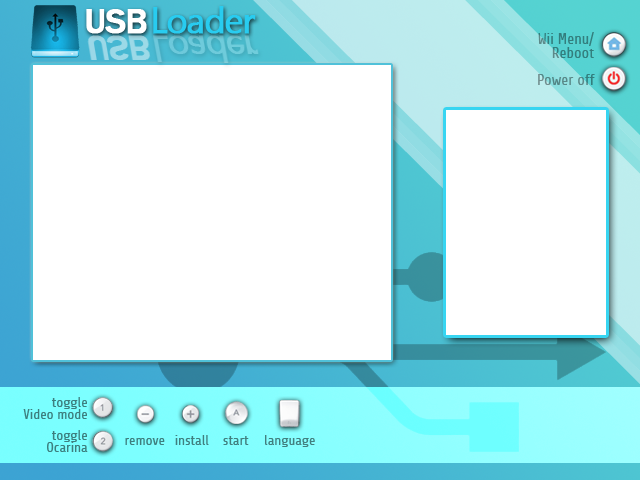
Light version
49e38713a3bca-lightmystery.png

Required settings:
Code:
console_coords=40,71,340,285
console_color=6,15
covers_coords=446,110

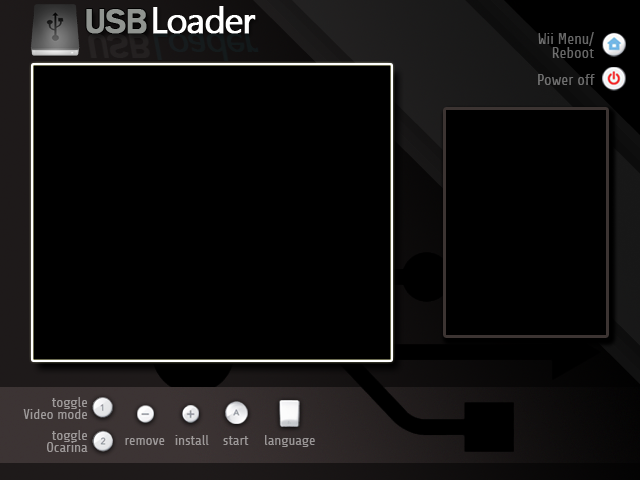
Dark version
49e3871c16332-darkmystery.png

Required settings:
Code:
console_coords=40,71,340,285
console_color=15,0
covers_coords=446,110
 
@Darkmystery

i've change the settings in the config.txt , but he show me the old stile on my wii?!?

sry for bad english ^^
 
char *cfg_path = "SD:/apps/usbloader/";

isnt it easier to break out of the /apps/usbloader structure for future use
it's probably turning into a wad soon (already happend) and it is confusing putting the cfg in /apps/usbloader
while the images are in /images/ also.. its one cfg better make it usbloader.cfg in the root of the SD card

just thinking ahead
smile.gif
 
Do you HAVE to install rev10 to make the new loader work? I thought most of us were under the impression that SDHC support isn't all that necessary.

If it is required, can someone PM it to me?
 
wii94 said:
@Darkmystery

i've change the settings in the config.txt , but he show me the old stile on my wii?!?

sry for bad english ^^

Are you sure that the image is correctly stored in your images folder?
And that the correct background is being used in config.txt?
(And that config.txt is in your apps/[usbloader name here] folder?)
I'm going to bed btw, so I can't help further for the next 12 hours or so.
tongue.gif
 
Hi, looking really nice this latest revision, will try it in a moment, I was just finishing a quick editing for a background in my own tastes.

I was wondering, can we set a transparent color for the list? Or only solid colors?

Do we still need to use blank.png, or noimage.png? does it grab it if it's there?

Suggestions:
It would be nice to be able to set it not to paint the list color as it removes the possibility to use (like in my case) soft gradients, or similar effects
Also the list could be populated according to height, it would remove the need to set a layout

If anyone wants my back, go grab it.

backgroundzbe.png


if anyone wants details for the thing it should be something like this (untested)
console_coords=42,280,324,376
console_color=15,0
covers_coords=60,96
 
Darkmystery said:
wii94 said:
@Darkmystery

i've change the settings in the config.txt , but he show me the old stile on my wii?!?

sry for bad english ^^

Are you sure that the image is correctly stored in your images folder?
And that the correct background is being used in config.txt?
(And that config.txt is in your apps/[usbloader name here] folder?)
I'm going to bed btw, so I can't help further for the next 12 hours or so.
tongue.gif
THX, now it woks
wub.gif
^^
 
alfatreze said:
Hi, looking really nice this latest revision, will try it in a moment, I was just finishing a quick editing for a background in my own tastes.

I was wondering, can we set a transparent color for the list? Or only solid colors?

Do we still need to use blank.png, or noimage.png? does it grab it if it's there?

Suggestions:
It would be nice to be able to set it not to paint the list color as it removes the possibility to use (like in my case) soft gradients, or similar effects
Also the list could be populated according to height, it would remove the need to set a layout

If anyone wants my back, go grab it.

http://img11.imageshack.us/img11/7540/backgroundzbe.png

if anyone wants details for the thing it should be something like this (untested)
console_coords=42,280,324,376
console_color=15,0
covers_coords=60,96


WTF, awsome style. i like that simple and clean style.... thumbs up
yay.gif
i love it
 
the mario said:
Do you HAVE to install rev10 to make the new loader work? I thought most of us were under the impression that SDHC support isn't all that necessary.

If it is required, can someone PM it to me?
Someone wanna answer this very simple question?

Also, I have the following setup, and the background still remains the default. What am I doing wrong?
 
Here's the custom BG I made for my own system, I hope you guys enjoy it as much as I do. Looks great onscreen. I made it as OEM-ish as I could, as I'm working to make my Wii look as pristine and unhacked as possible.

bgbytripellex.png


Rename to bg.png (or whatever name you set the BG to be in your config)


Also, here is my config file to work with this BG

Code:
images_path = SD:/images/
background = bg.png
layout = ultimate2
home = exit
download = 1
ocarina = 1
video = system
covers = 1
simple = 0
console_coords = 40,71,340,290
console_color = 0,15
covers_coords = 446,109
 

Site & Scene News

Popular threads in this forum