Hardware Unknown devices....

Sonic Angel Knight

Well-Known Member
Member
Joined
May 27, 2016
Messages
14,550
Solutions
1
Reaction score
10,407
Trophies
5
Location
New York
XP
14,184
Country
United States
I am not sure how to explain this but I keep getting notified of unknown devices from my notification bat. This laptop I'm using i bought a month ago, and it came with drivers i already installed. So i dunno what the unknown devices are or what to do to fix this. How do i figure out what the device is that is telling me about and how do i know what driver to get to fix it?
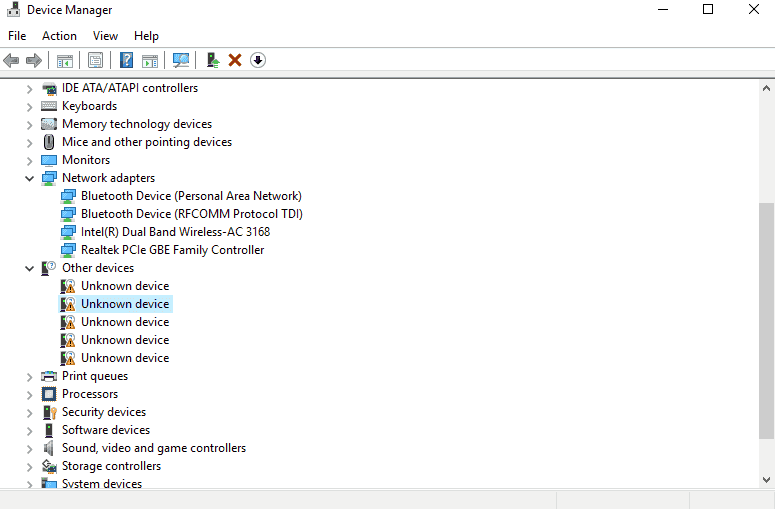
Untitled4.png
 
Okay, i have no idea what these are supposed to be. If they were included with the pc i bought, they weren't on the disc i had used to install drivers.:unsure:

Untitled4.png Untitled3.png Untitled2.png Untitled1.png Untitled0.png
 
Never seen anything like that, if you check on google it leads you to "hyper v" afaik it's some kind of virtual thing like virtualbox made just for win 10 pro. You have the home version of win 10 right? Or did you try to update all windows updates to see if it's gone?
I'd wait for other replies, if not try to ask on other tech websites but meanwhile do not try to fix it by yourself unless you know what you're doing.
It doesn't seem to create a problem for you, you can maybe ignore it.
 
Last edited by RaMon90,
Never seen anything like that, if you check on google it leads you to "hyper v" afaik it's some kind of virtual thing like virtualbox made just for win 10 pro. You have the home version of win 10 right? Or did you try to update all windows updates to see if it's gone?
I'd wait for other replies, if not try to ask on other tech websites but meanwhile do not try to fix it by yourself unless you know what you're doing.
It doesn't seem to create a problem for you, you can maybe ignore it.
I'm running windows 10 Home 64 bit and is updated, windows update has nothing to offer, and is freshly installed a month ago.
 
yeah generally just google the VEN&DEV to find out what they are so for example just google
"VEN_14E4&DEV_1570" and you should find the driver (obviously just change them to what they are on your PC
 
Last edited by gamesquest1,
I am not sure how to explain this but I keep getting notified of unknown devices from my notification bat. This laptop I'm using i bought a month ago, and it came with drivers i already installed. So i dunno what the unknown devices are or what to do to fix this. How do i figure out what the device is that is telling me about and how do i know what driver to get to fix it?
View attachment 87075
check in other parts of the driver downloads... in the case you only downloaded basic stuff like wifi\internet\gpu
there are some stuff like ACPI drivers or fancy stuff we usually skip..
like mentioned earlier, some of them may be related to virtual box\vmware stuff.. or even some vpn software creating it's own network drivers etc..
 
check in other parts of the driver downloads... in the case you only downloaded basic stuff like wifi\internet\gpu
there are some stuff like ACPI drivers or fancy stuff we usually skip..
like mentioned earlier, some of them may be related to virtual box\vmware stuff.. or even some vpn software creating it's own network drivers etc..
I never downloaded such things, i don't even know what vpn is, I got them from the disc the vendor gave me that came with the clevo drivers on it. That how i even got my wifi installed.
 
I never downloaded such things, i don't even know what vpn is, I got them from the disc the vendor gave me that came with the clevo drivers on it. That how i even got my wifi installed.
that's why i recommend you to get into the website and download the updated drivers and software that may be related to that..
 

Site & Scene News

Popular threads in this forum