Homebrew [Tutorial] How to install 2.5 on themehax manually.

  • Thread starter Thread starter Pandaxclone2
  • Start date Start date
  • Views Views 170,326
  • Replies Replies 455
  • Likes Likes 35
hello i want to install this, what i need to do i dont have any themeHAX installed
anyone can share the link to a tutorial or something


O3DS sysNAND 9.4.0-21U
 
I was upset to see that, even though I never used it, really. Honestly, I thought forced auto updates were against the 3DS terms. I assumed that though since all updates were optional. Suddenly they're being shoved into our systems little by little without our consent. I'm keep my 3DS completely off when I'm not using it just to be safe. Honestly, if the code was already there, this was probably planned anyway, to keep users from being on too low of a FW. In the same sense as to why cartridges have updates in them. So that kinda contradicts that idea.
I suppose the change of ownership doesn't always imply that their invasive methods will be the same. While Iwata might have been against that and kept it the way it is for a long long time. The new president might be thirsty af for game sales which is probably why the AP flags are being pushed out like hotcakes to counter Sky and forced updates to counter Gateway, from what I know, as long as they haven't implemented some secret way to update your 3DS while it's in sleep mode were all fine, but that sort of nightmare would be against their policy, one can never tell.
 
I am trying to get this to work but every time I boot it says an error has occured please restart the 3DS
I downloaded my version payload which came as N3DS_E_20480_9221.bin
I am using a N3DS and rename my payload ropbinpayload_menuhax_EUR20480_new3ds.bin and put it on the root of my SD but it still doesn't work.
What do I do?
 
@Lopunny1 I guess try the o3DS method. To be fair I'm not sure which one works for the n3DS.

@AugustoKazt There is a link to a post showing you how to install themehax via browserhax on the OP. Since you're on a much older version the browserhax shouldn't be affected.

@torchick11 There isn't any easy way to use other themes as the exploit uses the theme. You could repackage the themehax installer or some other to show like a different theme, but it's complicated and is best left to another thread.

If it's any consolation, themes IMO have no benefit and are purely cosmetic. Homebrew at least has a purpose so it outweighs themes by a long shot.
 
Last edited by Pandaxclone2,
Thank you that worked. Kind of confusing considering OP told me to use other wise. Maybe it is different between US and non US N3DS's?
 
Thank you that worked. Kind of confusing considering OP told me to use other wise. Maybe it is different between US and non US N3DS's?
Yeap, there is regional differences, which is why the payload generator isnt just for firmware but for region aswell
 
Thanks for this tutorial! I'm on a 9.9 EUR N3DS. When I went to copy over the 2.5 ropbin payload I found that the one installed by ThemeHax 2.1 was called menuhax_ropbinpayload.bin as described for O3DS. I named it the 2.5 ropbin ropbinpayload_menuhax_E19456_new3ds.bin as described in the tutorial, but it still loaded 2.1. I overwrote the 2.1 menuhax_ropbinpayload.bin with the 2.5 version and it then loaded 2.5. Is that normal on a N3DS? According to the tutorial menuhax_ropbinpayload.bin is not the correct filename on a N3DS.
 
Well, first of all, what version are you running and what are you trying to install themehax on?

I have an old 3DS running 9.9.0.26U

Using Smea's website ( https://smealum.github.io/3ds/ )
First obtain the starter kit, and put this on the root of your SD (don't forget to also download the offline version of themehax from op, install that after the kit and confirm the file overwrite), then, obtain the otherapp payload corresponding to your version, it should be a bin file (mine was named POST5_U_20480_usa_9221.bin for example), this file goes to the root of your SD card, you should also grab the ropbin payload since we'll need it for later, it'll have the same exact name as the otherapp payload but with a (1) appended at the end, rename it to menuhax_ropbinpayload.bin

Next, turn off your 3DS' wireless capabilities, go to your browser, clear your cookies/history and back out,
use L+R to turn on the camera and scan this QR code


3dsbrowserhax_auto_qrcode.png


Confirm to launch browser, you will get an error message saying wireless communications are disabled, that's fine, now back out of your browser, turn on wireless, and go back to your browser, if your 3DS uses sliderhax, you will see a small slider on the top left corner of your screen, zoom in as much as possible while holding up left, when you cant zoom in anymore, tap the slider, and your bottom screen should flash a few colors, and if done correctly the homebrew menu should boot up allowing you to install themehax offline version (for me it was at the very bottom of the list), notice that we are not dont just yet.

Now, after all of this is said and done, the menuhax_ropbinpayload.bin file that we downloaded earlier, place it in the root of your SD card and confirm the overwrite process.

Now when booting up your 3DS, hold down the L button, and you should now boot into the Homebrew launcher menu, first thing I would try is running HANS and selecting the eshop just to confirm that everything is working as intended, or selecting the eshop app from the homebrew menu.

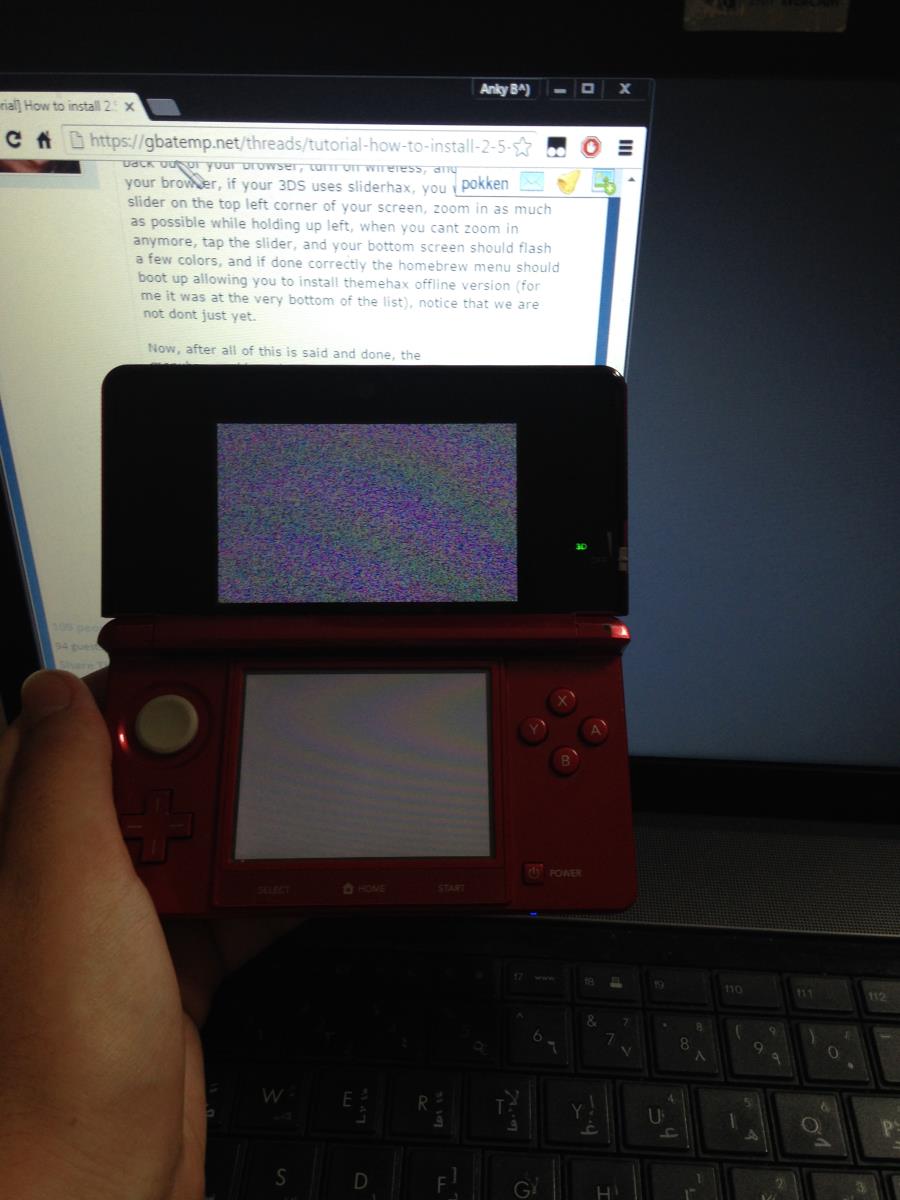
This seemed like it was working... until I held L after doing everything. I held L and now my 3DS is stuck on the weird grey fuzz part and it stays stuck. I'm on a O3DS version 9.4.0.21E . Any luck?

(A photo of my 3DS whenever I hold L on boot:
1a964523b786fc08d20ad87cecead0e8.jpg

yes my name is Anky)
 
Last edited by pokken,
I was upset to see that, even though I never used it, really. Honestly, I thought forced auto updates were against the 3DS terms. I assumed that though since all updates were optional. Suddenly they're being shoved into our systems little by little without our consent. I'm keep my 3DS completely off when I'm not using it just to be safe. Honestly, if the code was already there, this was probably planned anyway, to keep users from being on too low of a FW. In the same sense as to why cartridges have updates in them. So that kinda contradicts that idea.
Well, technically, no updates are being forced onto you. They just made a server-side change and you can't use the browser until you update your 3DS. It's still entirely your decision to update your 3DS or not.

I have 10.1.0, is that good?
Install ThemeHax ASAP
Oh, I see you already did. Well, be super careful to never lose it, then :p
 
Last edited by ,
For N3DS users, Take note of the number and region on your payload file. You'll be renaming your payload to "ropbinpayload_menuhax_********_new3ds.bin" and pasting those numbers and region into the asteriks area. (e.g. 20480_usa is copied from the original name of the ropbin payload you downloaded, and pasted into the asteriks when you rename it. The end result: "ropbinpayload_menuhax_USA20480_new3ds.bin")Then simply copy the 2.5 payload and paste into the root of the SD card.
Hmm... somehow it is working for me only naming the payload file ropbinpayload_menuhax.bin on my n3DS.
 
Everything is working fine eShop, Standby, Hans and so on.

I named it the 2.5 ropbin ropbinpayload_menuhax_E19456_new3ds.bin as described in the tutorial, but it still loaded 2.1. I overwrote the 2.1 menuhax_ropbinpayload.bin with the 2.5 version and it then loaded 2.5. Is that normal on a N3DS? According to the tutorial menuhax_ropbinpayload.bin is not the correct filename on a N3DS.
Same for me :)
 
So I booted up the HBL without BrowserHax via opening Pokemon X > Holding the power button to the menu about sleep mode > Press the Home button AND hold L and I got the HBL up. Do I now install Themehax? I used only the ropbin and starter kit and no old themehax.
 
quick question how do you start the offline themhax?
In HBL, you need to paste the folder and it's contents in the 3DS folder. Then run it in HBL.


Also if you use the 1.3 themehax installer from a post #7 it automatically does the rename process if you have an existing ropbin file in there.
 
Okay, I have I understand that since I have no themehax currently installed that I need to start by getting the offline themehax installed which will put 2.1..but I have no idea how to install it once i get the installer on the SD. Could someone help meh... I'm on O3DS 9.9.0-26U
 

Site & Scene News

Popular threads in this forum