

Welcome to my tutorial on converting .cia roms to .3ds to run in Citra 3DS Emulator! If you have any problems please do not hesitate to PM me or post a reply on this thread for some assistance, Enjoy!
Part 1 - Tools
To convert your ROM for the Citra Emulator, you will need some tools. Below, you will find the tools needed for ROM conversion.
Part 2: Step 1 "Python" - If you do not already have Python 2.7, Download and install it (Link in Part 1). (If already installed, you may skip this step)
Part 2: Step 2 "Almost ready!" - Now that you have Python 2.7 installed, you need to extract the "3DS to CIA Converter v4.1.rar" with an extractor that extracts RAR files (WinRAR recommended)
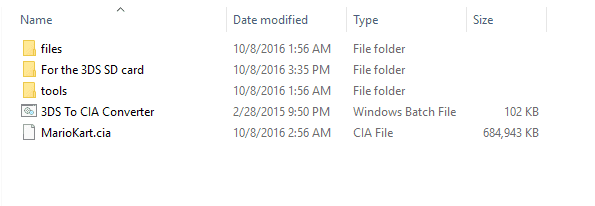
Part 3 - Preparing .CIA for Convert - Now that you have the 3DS to CIA Converter extracted, take your CIA file, and put it in the same folder as the "3DS to CIA Converter.bat" file and name it something simple like for example, Mario Kart 7 could be renamed to MarioKart.cia.
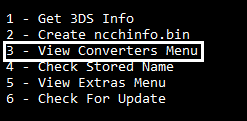
Part 4 - Converting the ROM - Now it is finally time to convert the ROM! Open up "3DS to CIA Converter.bat" and you will see some options going from one to six. Type 3 and press enter.
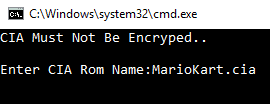
Once you are in the converters menu, you will see 9 options. Type 6 and press enter. Now that you're in the "CIA to 3DS Convert" option, enter the name of the CIA file and press enter.
Be patient and just wait for the ROM to convert. Once the ROM is converted, it will say "Congratulations You're Done!".
Part 5 - Running the file on Citra - Once you are finished in the 3DS to CIA Converter, go back to your folder and you will see something like this
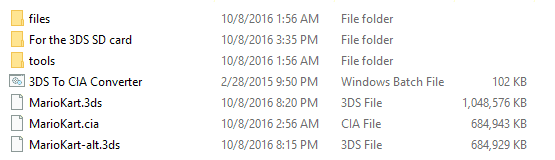
Now take the .3ds file and launch it in Citra (if it doesnt work, try the -alt file) and it should run as planned.
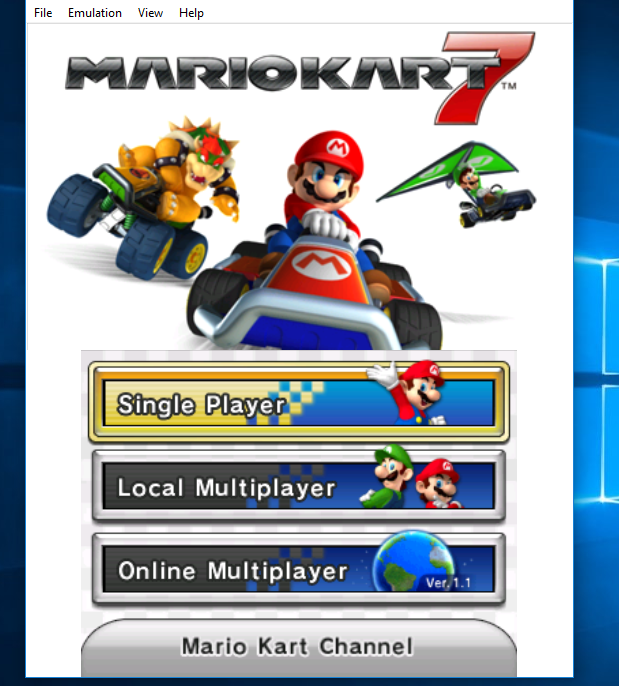
Part 6 - Proof that it works - And now we see it in Citra! (You may need extra files dumped from 3DS to run certain games on Citra, though.)
Part 1 - Tools
To convert your ROM for the Citra Emulator, you will need some tools. Below, you will find the tools needed for ROM conversion.
- 3DS to CIA Converter v4.1 https://mega.nz/#!UME0xJJR!Vp64Xp7mpfU_ApF8wRXVBcY3-3hTlzKO1nNEyYVp7t4
- Python 2.7 - https://www.python.org/downloads/
- A 3DS game in .CIA format for convert (Obviously)
Part 2: Step 1 "Python" - If you do not already have Python 2.7, Download and install it (Link in Part 1). (If already installed, you may skip this step)
Part 2: Step 2 "Almost ready!" - Now that you have Python 2.7 installed, you need to extract the "3DS to CIA Converter v4.1.rar" with an extractor that extracts RAR files (WinRAR recommended)
Part 3 - Preparing .CIA for Convert - Now that you have the 3DS to CIA Converter extracted, take your CIA file, and put it in the same folder as the "3DS to CIA Converter.bat" file and name it something simple like for example, Mario Kart 7 could be renamed to MarioKart.cia.
Part 4 - Converting the ROM - Now it is finally time to convert the ROM! Open up "3DS to CIA Converter.bat" and you will see some options going from one to six. Type 3 and press enter.
Once you are in the converters menu, you will see 9 options. Type 6 and press enter. Now that you're in the "CIA to 3DS Convert" option, enter the name of the CIA file and press enter.
Be patient and just wait for the ROM to convert. Once the ROM is converted, it will say "Congratulations You're Done!".
Part 5 - Running the file on Citra - Once you are finished in the 3DS to CIA Converter, go back to your folder and you will see something like this
Now take the .3ds file and launch it in Citra (if it doesnt work, try the -alt file) and it should run as planned.
Part 6 - Proof that it works - And now we see it in Citra! (You may need extra files dumped from 3DS to run certain games on Citra, though.)
Last edited by EdwardElric,