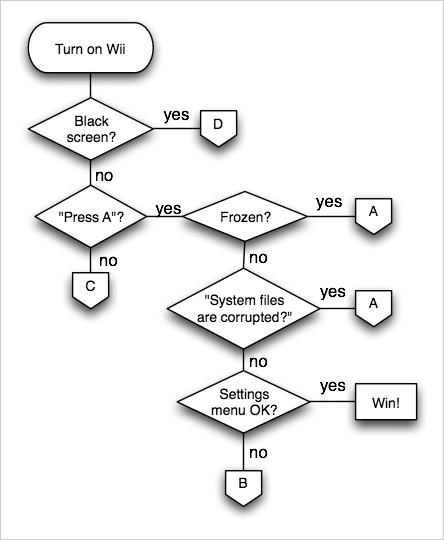
Hacking The System Files are Corrupted

farfromsubtle said:
Tried to go into maintenance mode (+/- held then A) mode did not work for me.
frown.gif

I actually enter maintenace mode by holding + and - at the same time, without touching the A button. I just keep them down till it goes into manteinance mode.
and have you tried with a GC controller (up/down/left/right same time)?

and i think zerof means that you have a bricked wii now, not after using cios downgrader
 
i would try waninkoko's firmware downgrader to reinstall a firmware

if that doesn't work try using nintendo's leaked repair disc. forsaekn has been using that to recover but i don't know how exactly to use it myself.
 
Cammy238 said:
LOL!!! Your like: it says the sytem files are corrupt. what should I do?
so he says: try uncorrupting the sytem files.
and then you say: I can't believe i didn't think of that.
YOU ARE A RETARD!!!!

lol wow somebody can't detect sarcasm.....
 
jam3972 said:
i would try waninkoko's firmware downgrader to reinstall a firmware

if that doesn't work try using nintendo's leaked repair disc. forsaekn has been using that to recover but i don't know how exactly to use it myself.

It seems that the downgrader just perpetually reboots my Wii. I am looking for the Wii Repair Disc now.
 
right what firmware are you on, usually you get that message, if you are trying to use TRUCHA DISCS on 3.3+ also you can get it if you delete "certain wads" through management... but if it;s not that id try downgrading..

QUOTE said:
Hmm. It seems to me like your system files are corrupted.
If I were you, I'd try uncorrupting the system files.
Nice and easy Army, you cock!
 
djdynamite123 said:
right what firmware are you on, usually you get that message, if you are trying to use TRUCHA DISCS on 3.3+ also you can get it if you delete "certain wads" through management... but if it;s not that id try downgrading..

Well, lets see... Guitar Hero World Tour was in the drive the first time this appeared... yet it happens everytime now regardless of what is in the drive.

I had 3.2 installed also... unless a guest went so far as to accept an update when I wasn't here... but I doubt anybody would have done that.
 
Doing a google search, it seems this error can be caused by WADs. Were any of the WADs you installed from another region?

I'd suggest trying to upgrade to 3.3. If you have HBC installed, you can downgrade back to 3.2 after your system is running again.
 
QUOTE said:
Well, lets see... Guitar Hero World Tour was in the drive the first time this appeared... yet it happens everytime now regardless of what is in the drive.

I had 3.2 installed also... unless a guest went so far as to accept an update when I wasn't here... but I doubt anybody would have done that.

ok,
you had 3.2
well tell us what you have "NOW"
Have you ever trucha signed any games???
 
Rykin said:
Doing a google search, it seems this error can be caused by WADs. Were any of the WADs you installed from another region?

I'd suggest trying to upgrade to 3.3. If you have HBC installed, you can downgrade back to 3.2 after your system is running again.

To my knowledge, all of the wads were from the proper region... I even tested them all. I will upgrade to 3.3 now, and see if that works. Thanks!
 
djdynamite123 said:
ok,
you had 3.2
well tell us what you have "NOW"
Have you ever trucha signed any games???

I guess what I meant to say is that when all of this began I had 3.2, and I still have 3.2 as far as I know.

I have never signed any games... I don't think there would have been any reason for me to have, since I have a working mod chip?

Regardless, I am upgrading to 3.3 now, via the ciOS downgrader.
 
Nonono you should upgrade to 3.2 with the cIOS downgrader
tongue.gif

Also I think the semi-unbricker bushing released reinstalls 3.2E so that should probably work too.

EDIT: Maybe you have a missing IOS. That does certainly sound like a banner brick though but since you said you deleted all the stuff you installed recently it couldn't be.

I don't really know a lot about bricks, since it hasn't happened to me
laugh.gif
 
jdbye said:
That does certainly sound like a banner brick though but since you said you deleted all the stuff you installed recently it couldn't be.

To clarify, can you be "banner bricked" from installing WiiWare WADs? No home brew, remember.
 
farfromsubtle said:
jdbye said:
That does certainly sound like a banner brick though but since you said you deleted all the stuff you installed recently it couldn't be.

To clarify, can you be "banner bricked" from installing WiiWare WADs? No home brew, remember.
If they messed with the banner I suppose you could.
If it's a clean dump it shouldn't.
 
You've already removed all installed WADs, right?
If there was a glitch in the download, WiiWare titles could brick your system. The file may have been corrupted before you installed it.


These are the unbrickers that jdbye was talking about:
http://hackmii.com/2008/05/semi-brick-fix-discs/
You may need to downgrade back to 3.2 for this to work.
 
chart_start.gif

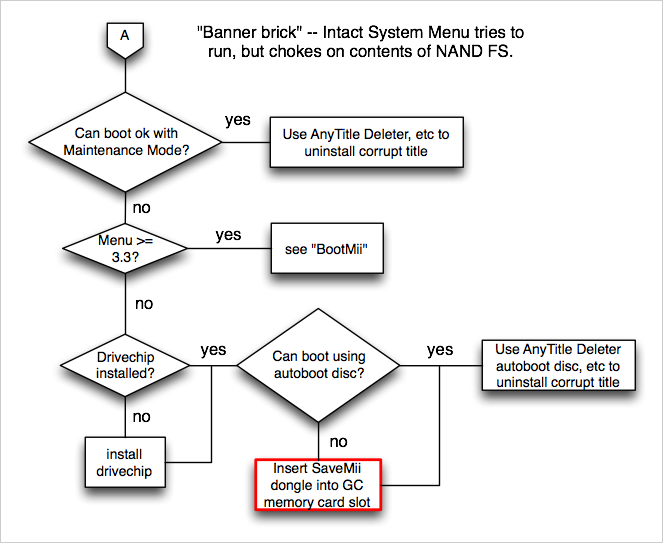
chart_a.png

You have a banner brick.
The unbricker probably won't work, I think it'll only upgrade, not downgrade.
 
Rykin said:
You've already removed all installed WADs, right?
If there was a glitch in the download, WiiWare titles could brick your system. The file may have been corrupted before you installed it.


These are the unbrickers that jdbye was talking about:
http://hackmii.com/2008/05/semi-brick-fix-discs/
You may need to downgrade back to 3.2 for this to work.

Will try these now.
 

Site & Scene News

Popular threads in this forum