SysDVR - Stream gameplay directly to a pc

SysDVR
Stream/record gameplay to a PC via USB or network.
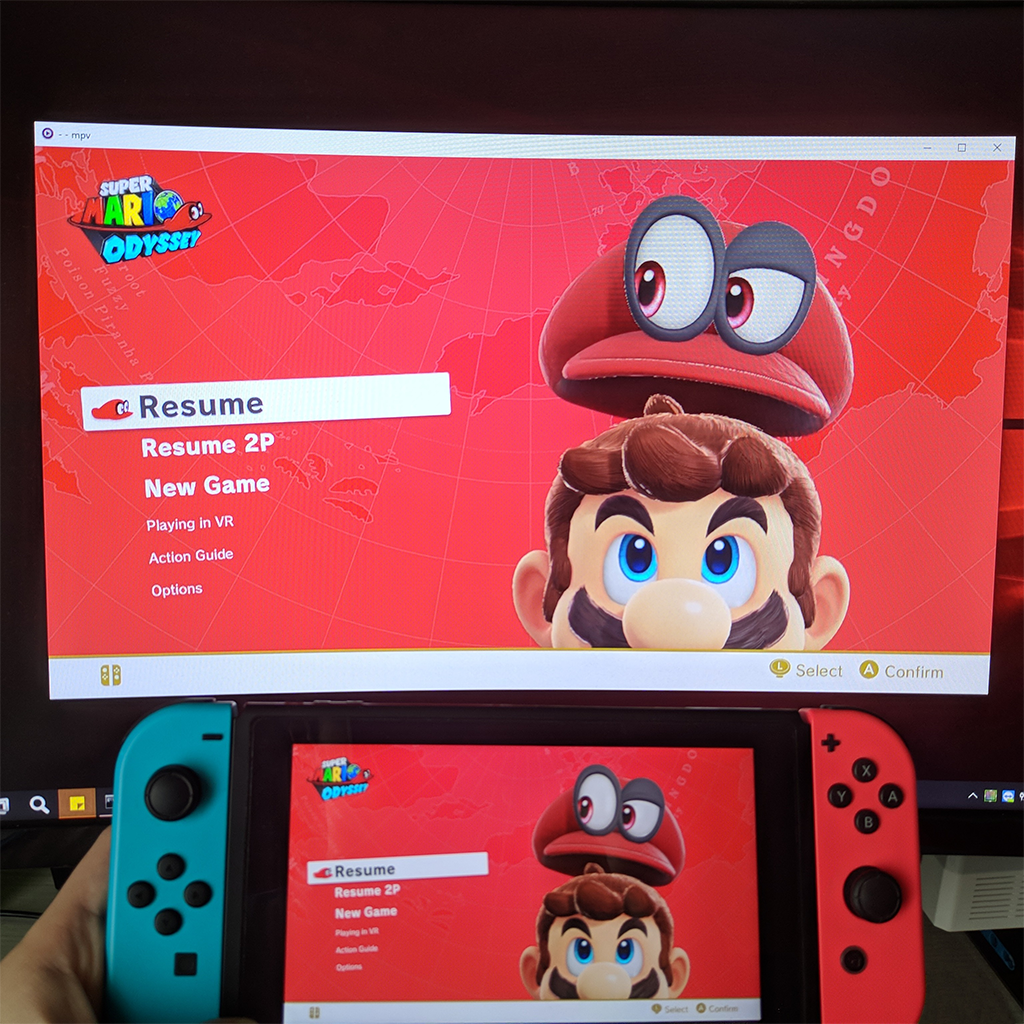
upload_2019-10-21_9-21-20.png

Update: Version 5.0 has been released with low latency streaming, be sure to check it out on github.

This is an experimental sysmodule that allows capturing the running game output on a pc.
As this uses switch's built-in game recording feature it has the same limitations: 720p@30fps and only works on the games that enable it, but by sending the video to another device there's no time limit to the recording.

There are two modes: USB and Network, both work fine but USB is slightly better, at least compared to wifi, didn't try with a LAN adapter.
Players like mpv or vlc can play the stream directly so you can use any screen recording applications but it's also possible to write the stream directly to a file.
To use the USB version you need the UsbStream program you'll find on the github page, it's built using .NET 5 and works on both windows and linux, haven't tried mac but in theory it should work too.

You can see it in action in the two teasers i posted while working on it:

As you can see it's not meant for remote play, but it can work as a basic capture card, audio output is uncompressed so it can be useful for ripping OSTs .

Download and wall of text guide on github: https://github.com/exelix11/SysDVR/
To get notified of updates you can follow this thread or join my new discord server (i also have a twitter account where occasionally post development updates).

Please make sure to read the full readme before reporting issues as it explains the most common problems you may encounter.
 
Last edited by exelix11,
I've made a direct boot of sysdvr with hidplus (pc controller support) using autohotkey just by double clicking. The only thing I can't figure out is where to add the --fullscreen command. Do I add it to sysDVR launcher.bat (and if so where?)

Run, "SysDVR Launcher.bat"
Run, %ComSpec% /K "irb", %A_Documents%\Switch,,this_console
WinWaitActive, ahk_pid %this_console%
SetKeyDelay, 0, 10
Send py input_pc.py 192.168.1.11 {Enter}


It says here the command line --fullscreen works https://www.gamebrew.org/wiki/SysDVR_Switch
 
I've made a direct boot of sysdvr with hidplus (pc controller support) using autohotkey just by double clicking. The only thing I can't figure out is where to add the --fullscreen command. Do I add it to sysDVR launcher.bat (and if so where?)
I'm not well versed with AHK but since you are calling the Launcher instead of Launching the SysDVR-Client directly you would need to edit the "SysDVR Launcher.bat" file and add the --fullscreen parameter there.

Open the SysDVR Launcher.bat file in a text editor and add "--fullscreen" to the last line
It should look like this
Code:
"C:\Program Files\dotnet\dotnet.exe" "G:\Switch Modding\SysDVR\SysDVR-Client.dll" bridge 192.168.100.103 --fullscreen
 
  • Like
Reactions: Jayinem
Thanks i got it working by just adding send {F11} to the ahk script (F11 makes it fullscreen) and it does it automatically after launch.

If someone wants to use PC controllers and have them working and also SySDVR at the same time with a simple double click you could use my script. Ask me for any help with ahk.
 
  • Like
Reactions: HinaNaru Cutie
Tried out the latest and it works great on USB but it once had an error on Android. Something was released twice. It happened on non rooted tablet on Android via otg->USB 2.0 cable. Was not able to replicate it again.
 
Best settings for video capture?
I feel like my video capture last year was pretty good in terms of quality but I captured some footage recently and it was awful. Bitrate was ass.

My setup hasn't changed. Im using a USB wired connection. I don't think network has anything to do with it.
 
I hope this isn't the wrong place to ask this, but how safe is this on SysMMC? I know it's fine on EmuMMC
 
I hope this isn't the wrong place to ask this, but how safe is this on SysMMC? I know it's fine on EmuMMC

Two week old question, but you probably can't use it on SysMMC at all because it only works when a Switch is hacked.
Post automatically merged:

So there's no support for 18.1 correct? It's not wokring for me even though everything is set up correctly.
 
Last edited by Jayinem,
Two week old question, but you probably can't use it on SysMMC at all because it only works when a Switch is hacked.
Post automatically merged:

So there's no support for 18.1 correct? It's not wokring for me even though everything is set up correctly.
I use this on sysmmc all the time on my switch with a broken HDMI chip. No pirated games or anything of the sort. Been doing it since about April on that switch and no ban, and usage about biweekly.
 
  • Like
Reactions: Yumeno
From ver 6.0 changelog:

Some client features were dropped during the rewrite:
...
  • Command line video recording with the --file option

This update removed the only feature I was using. I'm running sys-dvr client on a linux server that has no display, so capturing with player is impossible.

Can we get it back, please?
 
i just updated to 6.2 on both ends, switch and oc client on laptop, but for the life of me i cannot get the sysdvr settings homebrew app on my switch to open to change the settings anymore.

i also cannot get it to find my switch when i open up sysdvr on my laptop either, no matter if i use usb mode or tcp mode it cant detect my switch anymore

i keep getting the qr code screen saying "couldnt connect to sysdvr"
 
Has anyone tried using this to stream to a PC then use frame gen or any other enhancements on what's displayed? Seems that even through USB there can be some screen tearing and well, any game that's 60fps seems limited to 30fps, is that a limitation?

Using Lossless scaling on my own PC at least, with a 120Hz TV I was able to push the switch to roughly 100fps (frame gen, not native of course). Wouldn't say it looks better than using the dock but it certainly for the most part feels a lot smoother.

Only doing this out of interest of the switch 2 and it's capability of 1080p 120Hz and it's "enhanced" switch games when in combination of using this to display on a PC outputting to a high refresh rate display can push for a frame-gen framerate higher than the switches own capability. Maybe using an emulator for most games would give a better experience than natively using the switch with this technique to try enhance the output when it already seems quite degraded.

Love this anyways, was able to seamlessly stream my switch via USB to my PC.
 
I really like this software; it’s just a pity that it can’t stream to the desktop part
 
In your release notes it states "Since 21.0 further reduced the available memory for sysmodules remember that you can load and unload". That is not accurate. It has no less than 20.x did.
 
  • Haha
Reactions: masagrator

Site & Scene News

Popular threads in this forum