Sync Joy-Cons to PC

This is the easiest way to do it

First of all sync joy cons to pc using windows bt stack
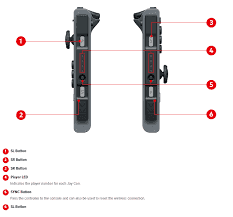
upload_2018-1-9_12-43-42-png.110826

Hold 1 sec the sync button and then search it on bluetooth device manager
Tip: install vjoy driver
This will make your joycons easier to pair succesfully
If yor joycons are connected go to next step
If they aren't repeat from step 1
Now download wiinupro 0.9.2
https://github.com/KeyPuncher/WiinUPro/releases/download/WiinUPro0.9.2/WiinUPro.0.9.2.zip

Execute it

And click connect
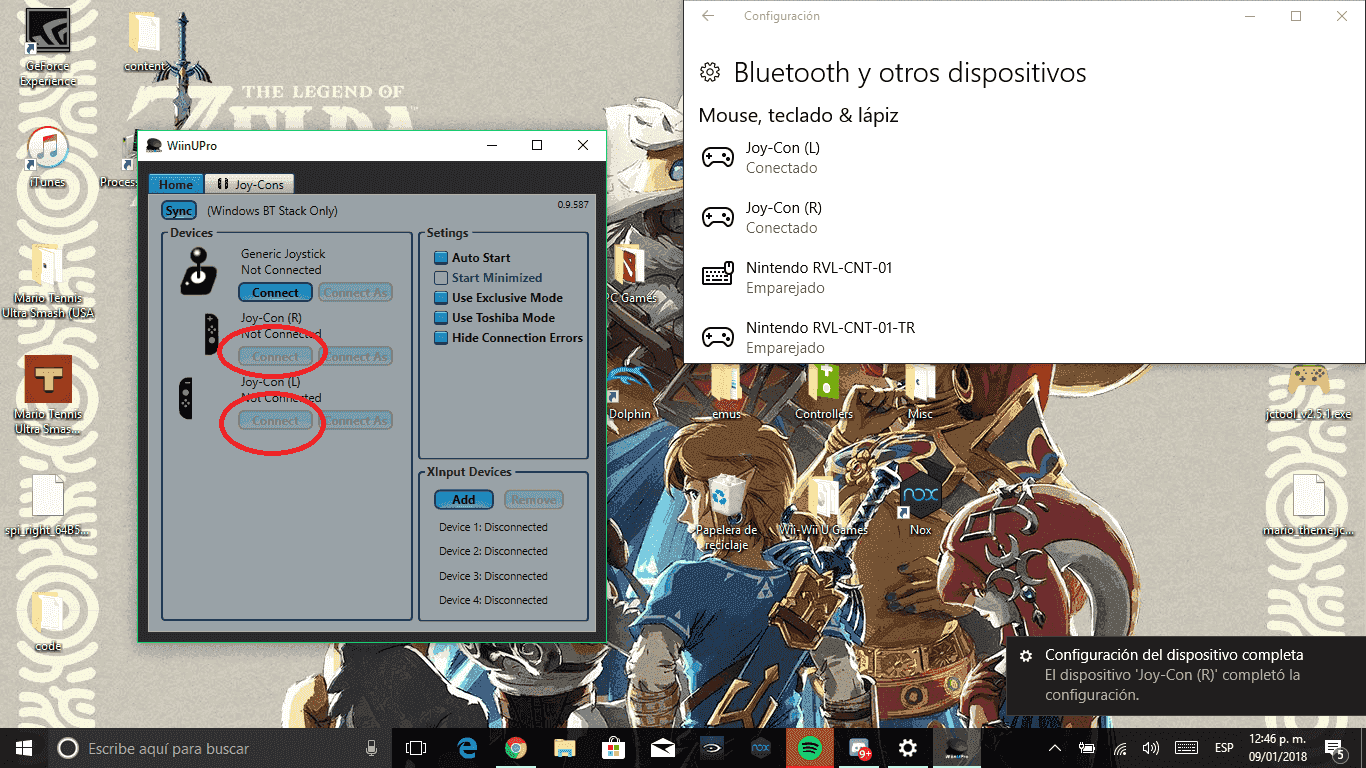
sin-t%C3%ADtulo-png.110829


Next, go to joy-cons tab and click on load profile
Select Joy-cons_Xinput.wup
(located inside wiinupro folder)

Now, go back to home and click add on Xlnput devices

And you are ready to go
 
This is the easiest way to do it

First of all sync joy cons to pc using windows bt stack
upload_2018-1-9_12-43-42-png.110826

Hold 1 sec the sync button and then search it on bluetooth device manager
Tip: install vjoy driver
This will make your joycons easier to pair succesfully
If yor joycons are connected go to next step
If they aren't repeat from step 1
Now download wiinupro 0.9.2
https://github.com/KeyPuncher/WiinUPro/releases/download/WiinUPro0.9.2/WiinUPro.0.9.2.zip

Execute it

And click connect
sin-t%C3%ADtulo-png.110829


Next, go to joy-cons tab and click on load profile
Select Joy-cons_Xinput.wup
(located inside wiinupro folder)

Now, go back to home and click add on Xlnput devices

And you are ready to go

Nice
 
Thank you so much for this, i've been trying to do the whole vjoy and UCR method and it never worked
 
Wait WiinUPro allows Joycon connection?

They might want to rename the program to avoid confusion then lol. Maybe they could add official GC Adapter support and just package it as a Nintendo controller management app?
 
I wish we could get analog controls working with the sticks. Thanks for the tutorial as it all worked perfect but you cannot aim at anything because the joysticks act as Dpads so no precision aiming.
 
Nifty! I'll have to try this sometime. The only problem is, I removed the Bluetooth antenna from my computer's motherboard. Now I have to dig it up. :rofl2:

Edit: I just tried connecting my phone to my computer through Bluetooth. Maybe only the WiFi radio on my motherboard's Bluetooth/WiFi combo adapter needs the antenna? :huh:
 
Last edited by Argonitious,
Do the Joy-Cons work as a single controller? Do the analog sticks work properly or are they interpreted as dpads? Any lags?

Hmm.. will have to test this later how it fares against the existing Joy-Con driver vJoy combo.
 
Q&A
Can this software use the 2 joycons as 1 controller??
Yep, It can
Do the analog sticks work properly or are they interpreted as dpads? Any lags?
.
They work properly but they are like dpads turned into analogs
so they only work fine on things that don't require high presicion
like emu's
There's no lag
rip my hopes and dreams of a easy way of doing this
Try to reinstall the app
 
This have Input Lag to with the Arrow Buttons one have Input Lag but not so extremly like the others i tryed. But still Thanks for realese this.
 
Wait WiinUPro allows Joycon connection?

They might want to rename the program to avoid confusion then lol. Maybe they could add official GC Adapter support and just package it as a Nintendo controller management app?
It has for a while, I guess no one has posted a thread about it until now. I'm quite content with just using my Pro Controller on PC and that works out of the box without any drivers or software (still need something to emulate XInput though, XOutput is great for that) so I haven't looked too much into it, but I did come across WiinUPro supporting it a couple months ago.

no Switch Pro Controller profile?

--------------------- MERGED ---------------------------

@SwitchFriki ?
Pro Controller works perfectly out of the box.

Is there a way to make an andorid device to act like a joycon and connect to the switch?
I don't know if an Android phone can emulate other BT devices. Probably not, JoyCon mode would need to be supported by the BT chip since it's not entirely standard.

Can this software use the 2 joycons as 1 controller??
Do the Joy-Cons work as a single controller? Do the analog sticks work properly or are they interpreted as dpads? Any lags?

Hmm.. will have to test this later how it fares against the existing Joy-Con driver vJoy combo.
I believe you can choose whether to use them as separate controllers or combine them, just like the other method.

Nifty! I'll have to try this sometime. The only problem is, I removed the Bluetooth antenna from my computer's motherboard. Now I have to dig it up. :rofl2:

Edit: I just tried connecting my phone to my computer through Bluetooth. Maybe only the WiFi radio on my motherboard's Bluetooth/WiFi combo adapter needs the antenna? :huh:
If you are talking about the antennas that stick out of the back of the PC then those are just for wifi. BT normally doesn't have an external antenna, it's just Integrated into the PCB.

Q&A

Yep, It can

They work properly but they are like dpads turned into analogs
so they only work fine on things that don't require high presicion
like emu's
There's no lag

Try to reinstall the app
Wait, what? I thought people had figured out how to get the analogs working properly by now. Doesn't the other method have proper analogs either?

Edit: To be specific, I meant this method:
https://github.com/mfosse/JoyCon Driver
Page doesn't load right now though, Github seems to be overloaded.
@quazimojo @WiiUBricker Maybe give that one a try, I think it works with analog control.
 
Last edited by The Real Jdbye,
  • Like
Reactions: Ritsuki
It has for a while, I guess no one has posted a thread about it until now. I'm quite content with just using my Pro Controller on PC and that works out of the box without any drivers or software (still need something to emulate XInput though, XOutput is great for that) so I haven't looked too much into it, but I did come across WiinUPro supporting it a couple months ago.


Pro Controller works perfectly out of the box.


I don't know if an Android phone can emulate other BT devices. Probably not, JoyCon mode would need to be supported by the BT chip since it's not entirely standard.


I believe you can choose whether to use them as separate controllers or combine them, just like the other method.


If you are talking about the antennas that stick out of the back of the PC then those are just for wifi. BT normally doesn't have an external antenna, it's just Integrated into the PCB.


Wait, what? I thought people had figured out how to get the analogs working properly by now. Doesn't the other method have proper analogs either?

Edit: To be specific, I meant this method:
https://github.com/mfosse/JoyCon Driver
Page doesn't load right now though, Github seems to be overloaded.
@quazimojo @WiiUBricker Maybe give that one a try, I think it works with analog control.
}

Yep i know that method but this is extremely easier to set-up
 

Site & Scene News

Popular threads in this forum