Hacking Homebrew Switchroot - Android 11 - Lite - Recalibrate after replace Joystick?

  • Thread starter Thread starter leloc900
  • Start date Start date
  • Views Views 9,814
  • Replies Replies 30
  • Likes Likes 3

leloc900

Member
Newcomer
Joined
Aug 19, 2020
Messages
14
Reaction score
20
Trophies
1
Age
29
XP
269
Country
Vietnam
Hello, I replaced my joystick with the set from Gulikit for my Switch lite and calibrated them on the main OS. However, when I boot into Switchroot, both stick are still not calibrated and have default offset (please see the attached image for more details)
I'm wondering if there is anything I can do to calibrate them on Switchroot. I have tried to use program like Tincore but to no avail.
I'm currently using Switchroot Android 11 on Switch lite.
Any suggestion is much appreciated. Thank you!
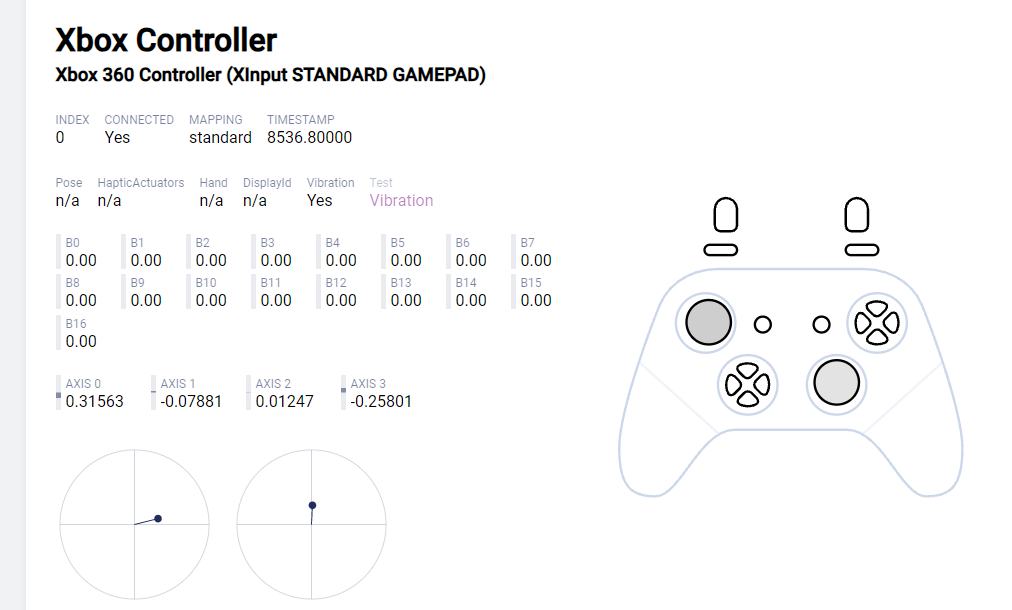
Untitled.png


UPDATE #1:
If anyone encounter this issue in the future, please see the following guide to calibrate the joystick for switchroot. Please note that this only apply to switchroot on Switch lite only
1. Connect the Switch to PC (or use a File Explorer like Mixexplorer on Android)
2. Goto SD root/ Switchroot/ and open switch.cal file
3. Input the Data into the the template: https://docs.google.com/spreadsheets/d/1VdwfTqspDoRaviHHWnntWiQiKReoAf8BWGyJYpnr_q0/template/preview
4. Open a gamepad tester (e.g https://hardwaretester.com/gamepad) and input the data into the template
5. Follow the guide in the Template to calibrate the joystick
Credit to the dev on Switchroot Discord. You can follow there for more details.
 
Last edited by leloc900,
Hello, I replaced my joystick with the set from Gulikit for my Switch lite and calibrated them on the main OS. However, when I boot into Switchroot, both stick are still not calibrated and have default offset (please see the attached image for more details)
I'm wondering if there is anything I can do to calibrate them on Switchroot. I have tried to use program like Tincore but to no avail.
I'm currently using Switchroot Android 11 on Switch lite.
Any suggestion is much appreciated. Thank you!

View attachment 445720
Have you dumped your joycon info from hekate again? I believe you have to redo that if a major change like this is made
 
@TheStonedModder @thesjaakspoiler
Thank you for your reply. Unfortunately, it seems that this issue sterm from the fact that the joystick also offset in hakete and result in the switch.cal dump file retains the offset.
I have tried using the nyx file from ctear but to no avail (https://github.com/CTCaer/hekate/issues/890)
I'm currently looking in calibrate the joystick in hakete (or the switch.cal file) and will update the thread with any solution I come across.
Thank you!
Post automatically merged:

Any luck?
I have not able to find any solution so far. You can try your luck with updating nyx to the latest version or try the nyx.bin file here (https://github.com/CTCaer/hekate/issues/890)
I will update the thread with any solution I find in the future
 
Last edited by leloc900,
Hello, the switch.cal file does not appear and I have the problem that when I put Android on my switch the zl and zr buttons do not work but to play normal switch games it does work. Is there a solution?
 
Hello, the switch.cal file does not appear and I have the problem that when I put Android on my switch the zl and zr buttons do not work but to play normal switch games it does work. Is there a solution?
Could you please include a screenshot of what happens when dumping the joycon in Nyx Settings. Also which Android version and Switch you are using? Thanks!
 
"My extended battery life model is experiencing the same issue. Unfortunately, the switch.cal file I exported contains no joystick-related parameters, and the joystick's maximum physical range only reaches 80%. I can only adjust the dead zone through specific software to compensate for the joystick's limitations."
 
This worked on my switch lite usimg HandheldDIY's Hall Effect Joysticks. I had issues in Switchroot Android 15 build, where my left Joystick wouldn't reach al the way up and left causing the in-game character to walk instead of running. Followed the instructions to the letter and now it is working fine. Thank you for posting this on gbatemp, really apreciated :D
 
This worked on my switch lite usimg HandheldDIY's Hall Effect Joysticks. I had issues in Switchroot Android 15 build, where my left Joystick wouldn't reach al the way up and left causing the in-game character to walk instead of running. Followed the instructions to the letter and now it is working fine. Thank you for posting this on gbatemp, really apreciated :D
Bro, how?? I tried to do it 3 times according to the table, but each time the result was only worse...
Post automatically merged:

This worked on my switch lite usimg HandheldDIY's Hall Effect Joysticks. I had issues in Switchroot Android 15 build, where my left Joystick wouldn't reach al the way up and left causing the in-game character to walk instead of running. Followed the instructions to the letter and now it is working fine. Thank you for posting this on gbatemp, really apreciated :D
Can you give me your config?
 
Bro, how?? I tried to do it 3 times according to the table, but each time the result was only worse...
Post automatically merged:


Can you give me your config?

No guarantee it will work, but here are the values that work for me:

lite_cal_l_type=0x25
lite_cal_lx_lof=0x5E1
lite_cal_lx_cnt=0x8BC
lite_cal_lx_rof=0x479
lite_cal_ly_dof=0x4B4
lite_cal_ly_cnt=0x93F
lite_cal_ly_uof=0x1BF

lite_cal_r_type=0x25
lite_cal_rx_lof=0x495
lite_cal_rx_cnt=0x886
lite_cal_rx_rof=0x4D2
lite_cal_ry_dof=0x4F6
lite_cal_ry_cnt=0x7E6
lite_cal_ry_uof=0x49E
 
I did it! I had to restart the console about 30 times, but I did it! I did it manually by selecting numbers, it was not perfect, but now everything works! :toot:
 
Hi all, trying to get this to work, but the gamepad tester only gives me Left X Left Y Right X and Right Y values. How do I translate this for the table please?

Edit - I re calibrated my sticks in HOS but the switch.cal didn't change at all after I exported it again, is that weird? did the calibration in OFW and CFW.
 
Last edited by Zamzoo,
Hi all, trying to get this to work, but the gamepad tester only gives me Left X Left Y Right X and Right Y values. How do I translate this for the table please?

Edit - I re calibrated my sticks in HOS but the switch.cal didn't change at all after I exported it again, is that weird? did the calibration in OFW and CFW.
OK if anyone else is struggling with the overly brief and somewhat confusing instructions, this is what helped me:

"You only need to modify the value that doesn't match the Design Value." - for me every value doesn't match the design value, but what worked was not changing them all.

"In most case, only Center value need to be change to fix center offset for the joystick" - This means usually only the Centre Left Right and Centre Up Down values need adjusting.

These correlate to the X Y axis on a gamepad tester. You need one that show positive and negative values, as some testers do not.

The rest of the values I have no idea how you find, but it doesn't seem to matter.

I tried once with all the values (that didn't "match the design value") getting changed, it was a bit better but not ideal. I tried again with only changing the Centre values and this worked well. I tried to run through it all again to remove the last tiny bit of off centre on the RHS, but this made it worse. It's fine as it is now though.

joypad . ai was good for me.
 
  • Like
Reactions: leloc900
OK if anyone else is struggling with the overly brief and somewhat confusing instructions, this is what helped me:

"You only need to modify the value that doesn't match the Design Value." - for me every value doesn't match the design value, but what worked was not changing them all.

"In most case, only Center value need to be change to fix center offset for the joystick" - This means usually only the Centre Left Right and Centre Up Down values need adjusting.

These correlate to the X Y axis on a gamepad tester. You need one that show positive and negative values, as some testers do not.

The rest of the values I have no idea how you find, but it doesn't seem to matter.

I tried once with all the values (that didn't "match the design value") getting changed, it was a bit better but not ideal. I tried again with only changing the Centre values and this worked well. I tried to run through it all again to remove the last tiny bit of off centre on the RHS, but this made it worse. It's fine as it is now though.

joypad . ai was good for me.
Sorry for late reply. Good to hear that you got it to work in the end.
To clarify some confusion for you and any one come across this post later:
1. The Center value is the value show in the online tracker when leave both joystick in the default position (center): Most of the tracker online will be:
AXIS 0 = Left X = Left Center Left - Right
AXIS 1 = Left Y = Left Center Down - Up
AXIS 2 = Right X = Right Center Left - Right
AXIS 3 = Right Y = Right Center Down - Up

2. The offset value is when you move the joystick all the way left/right/up/down: Most of the time you don't have to care about this value but in some rare cases when the center is drifted too far, adjust just the center will cause the offset value (yellow dot) not matching the joystick movement
1759947456385.png

In case this happens to you, adjust the Center value first until the joystick no longer drift, then start adjusting the offset value of the direction that doens't match joystick movement

3. Joystick Calibration in HOS is saved in HOS settings itself, atmosphere and others OS doesn't have access to those data.
 
Last edited by leloc900,
I've tried this guide several times. I just replaced my sticks with TMRs. Calibrated on HOS, they work perfectly, but on Lineage OS, they drift. I tried your guide, but they keep drifting. I have no idea how to fix it; I don't want to give up Android.
 
I've tried this guide several times. I just replaced my sticks with TMRs. Calibrated on HOS, they work perfectly, but on Lineage OS, they drift. I tried your guide, but they keep drifting. I have no idea how to fix it; I don't want to give up Android.
Could you tell me which part of the guide you are having problem with? You can try to adjust just the center value first
AXIS 0 = Left X = Left Center Left - Right
AXIS 1 = Left Y = Left Center Down - Up
AXIS 2 = Right X = Right Center Left - Right
AXIS 3 = Right Y = Right Center Down - Up
 
Could you tell me which part of the guide you are having problem with? You can try to adjust just the center value first
AXIS 0 = Left X = Left Center Left - Right
AXIS 1 = Left Y = Left Center Down - Up
AXIS 2 = Right X = Right Center Left - Right
AXIS 3 = Right Y = Right Center Down - Up
When I take those axes do I have to move the analog left or right? Do I have to keep the analog or leave it?
 

Site & Scene News

Popular threads in this forum