Hardware Replacing Pokémon Diamond Save Flash Chip

  • Thread starter Thread starter Ralph367
  • Start date Start date
  • Views Views 13,090
  • Replies Replies 47
  • Likes Likes 2

Ralph367

Member
Newcomer
Joined
Feb 15, 2023
Messages
14
Reaction score
14
Trophies
0
Age
25
XP
101
Country
United Arab Emirates
A while ago I purchased a copy of Pokémon diamond from a flee market. I didn't test it out and discovered the save data on it was severely corrupted, and it gives me this error when I boots:
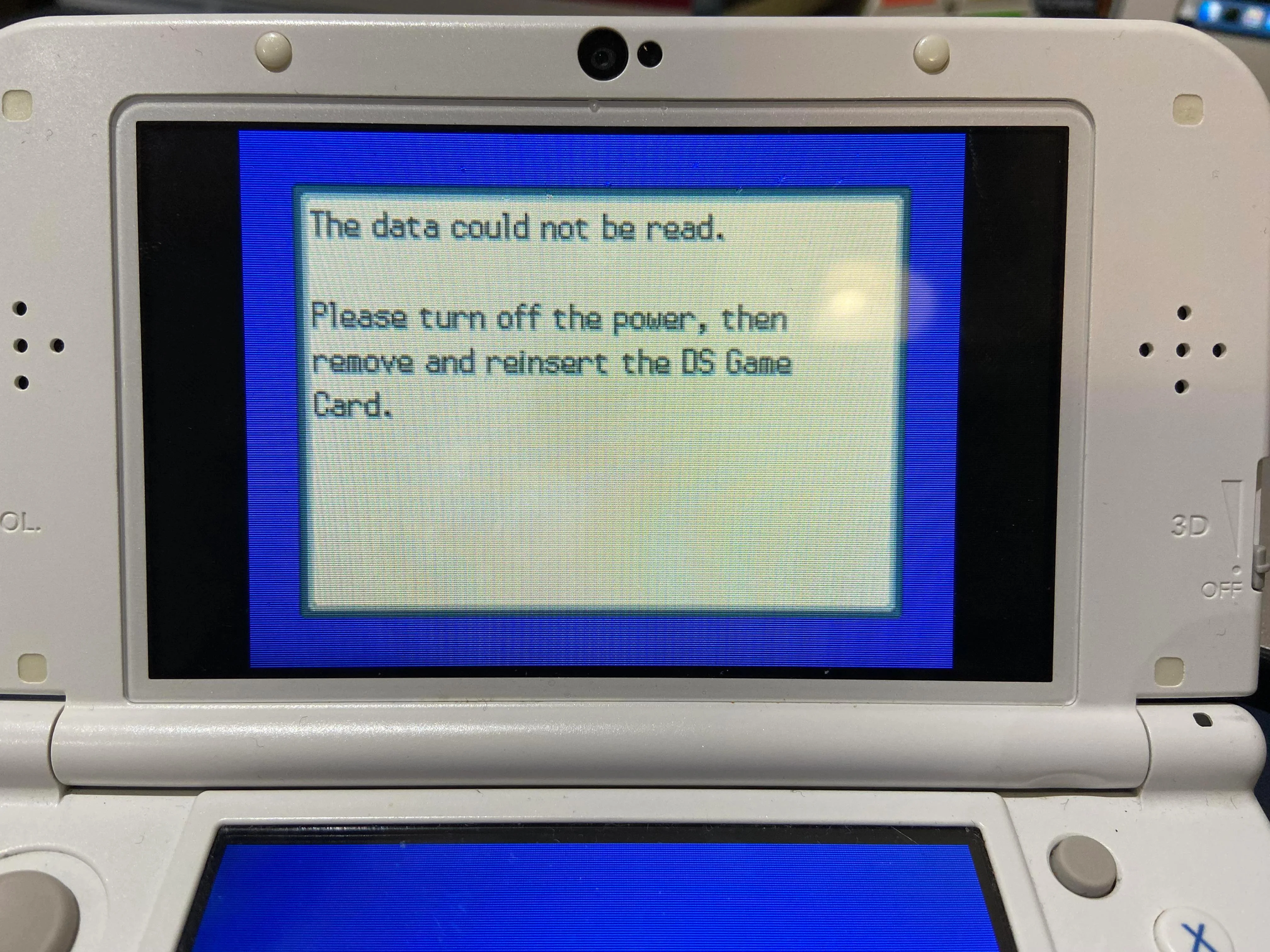

x86pg3ljuu7a1_50.png


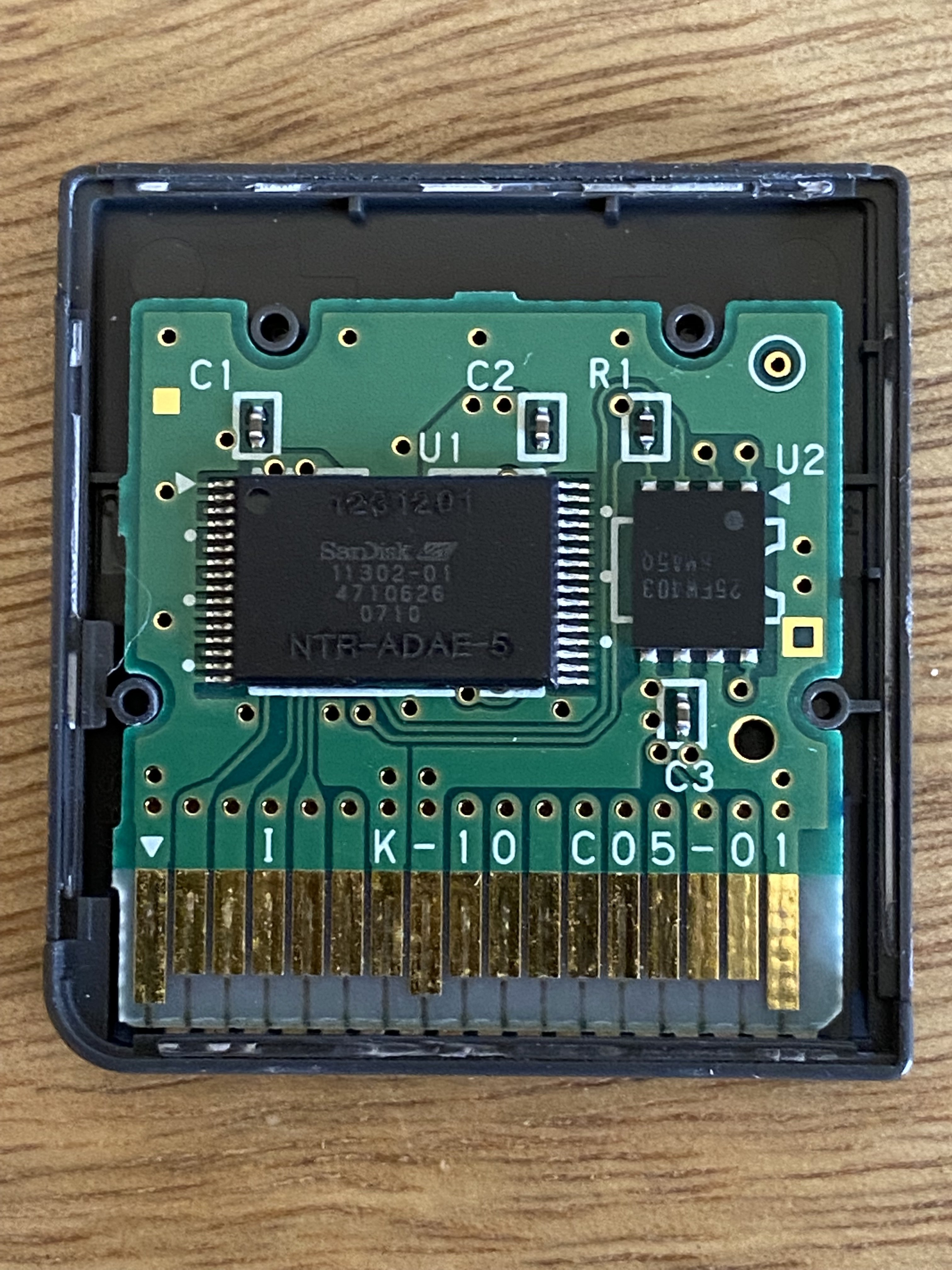
After some asking around on reddit, I've narrowed down to a hardware issue with the save flash chip. I'm not really sure about a few things though. For starters, which part of the motherboard is meant to be the save flash chip? I've chosen to take my cartridge apart to examine it, but I haven't been able to find any schematics of this game cartridge's motherboard anywhere online. Here's what mine looks like for reference:
IMG-1210.jpg


Assuming the motherboard is legit, does anybody know where I can purchase a replacement chip?
 
Component U2 should be the flash chip. U1 looks like the ROM.
@IS1982 worked with those chips lately and may happen to know more.

Did you already try the obvious like forcefully wiping the save data?
Yeah, I've tried just about every save manager I could on my softmodded 3ds, none of them worked. I'll try messaging @IS1982 about the chip, thanks.
 
Hey all. I'm reposting this out of PMs as I think it's good for everyone to see.

The 25FW403 save chip (the one on that board) is privately produced by nintendo and another company. Instead you'll want to try looking into the ST M25PE40-VG. I'm not 100% sure if it works, but it's the right kind of chip (same capacity, pinout, etc) and it was used in iQue WiFi boards, which are compatible with cartridge save chips.

If that doesn't work, I've also got a list of DS cartridges you could use as donors (see attachment). It should be accurate, but you might want to check what save sizes that the games use first. If it's 512kb then you're good.
 

Attachments

If the game doesn't check the flash ID, it's pin compatible and uses the same addressing scheme pretty much any flash that meets the criteria should work.

With addressing scheme i mean the format of the address you send to the flash following the read/write command.
 
I got a Pokemon Soul Silver Cartridge that got a corrupt Save Flash Chip.
But i cant find any of the 512kb chips in my region.
Can someone maybe give me a list with a few (with the risk they couldnt work)

Thank you :)
 
  • Like
Reactions: rvtr
Afaik only the chips I posted above will work. If you're comfortable saying what region you're shipping to then I could try to search for a listing.

Otherwise you might want to try aliexpress or ebay. Go with the ST ones if possible. I found that specific brand of chip in some of my carts, so they're likely the best for replacements. (unless nintendo hired them for cheap parts instead... haha looking at you wii u and dsi nands)
 
  • Like
Reactions: KleinesSinchen
Im from Germany and it says: The save data could not be accessed. Please turn the power off and reinsert the DS Game Card.

2112.jpg

Ive bought a copy of Simcity Creator as a Donor because it was only 4 Euro. I think this might be working
Post automatically merged:

Should the game work (boot but not saving) if i desolder the Flash EEprom?
 

Attachments

  • 2112.jpg
    2112.jpg
    58.7 KB · Views: 155
Last edited by Marax,
  • Like
Reactions: rvtr
Im from Germany and it says: The save data could not be accessed. Please turn the power off and reinsert the DS Game Card.

View attachment 357913

Ive bought a copy of Simcity Creator as a Donor because it was only 4 Euro. I think this might be working
Post automatically merged:

Should the game work (boot but not saving) if i desolder the Flash EEprom?
Possibly, although it's also possible that the game might have a check in place if no save chip is detected at all. Worth a shot though.
 
  • Like
Reactions: rvtr
Before you desolder it (as above if this check is failing now then no chip is probably not going to change that) have you tried reflowing it? A flash chip in a game like this failing after all this time (first 100 hours is one thing, decades later or with intense use* being where I expect to see the next) is super rare but dry joint becoming apparent rather less of one.

*unlikely to be a thing for a game. See USB flash drive torture tests, total bytes written is usually in the "all day, every day for many months" at worst, usually years or could not get it to happen in time allowed for the test.
 
  • Like
Reactions: Marax and rvtr
Im trying to reflow it and check of it works. I will Tell lauter if anything changed

EDIT:

I reflowed the Chip and the same happened. I desoldered it now completely and its the exact same error now. Now i need to wait until my Donor Chips arrives.
 
Last edited by Marax,
  • Like
Reactions: rvtr
The new chip just arrived, will be making the replacement and posting the results shortly.
Once you're done, let us know the exact chip you used and if it worked. I'd like to be able to confirm the different replacements working.
 
  • Like
Reactions: Marax and Ralph367
Ok, so I'm having some trouble with the soldering. I've flattened out the connectors but I think the bottom of the chip might be glued to the surface of the board, because it's not budging an inch.
 
  • Like
Reactions: rvtr
Try inserting a small tool underneath the chip and use it to pry up one side of the chip while the solder is molten. It should pop up, then you can desolder the other side. Afaik no glue is used.
1678518831372.png
1678518918006.png

(I realize this is a different board, but the idea is the same)
 
  • Like
Reactions: KleinesSinchen
Try inserting a small tool underneath the chip and use it to pry up one side of the chip while the solder is molten. It should pop up, then you can desolder the other side. Afaik no glue is used.
View attachment 358434View attachment 358435
(I realize this is a different board, but the idea is the same)
Bingo! Burned two of my fingers, but the chip's off :)
 
Bingo! Burned two of my fingers, but the chip's off :)
I'd really like to click on the 👍 Like/reaction button here. The problem with these reactions on such a message is the possibility of misinterpretation.
So… "👍" for the successful removal and ":ohnoes:" for the burned fingers.
======

Always be careful trying to remove chips. It is very easy to lift solder pads. Desoldering can be tedious. Better be patient. Use more time to catch all liquid metal with desoldering wick than impatiently pulling "because it must be loose now". Hot air is also nice for heating multiple pins at the same time.
 
  • Like
Reactions: rvtr
My donor game arrives in the next few hours. Then I will start immediately to desolder the new chip and transplant it to my Pokémon Card. I will post some Pictures later

EDIT: The Game arrived. I opened it up and it has the 45PE40VG on it (so it should work)

Now im going to desolder the chip and we´ll see if it works


1.jpg2.jpg3.jpg

4.jpg

I think i fucked it up... I broke off a leg of the new Chip ...

I think this should be the SI Point... so its necessery. Maybe i can get the trace and solder Something on but its not easy

55.png
 
Last edited by Marax,
I've created the ultimate weapon. My copy of Pokémon diamond instantly powers off any DS console it's inserted into.

Turns out the chip I bought was a few mms taller than the original, so the cartridge casing doesn't slide in cleanly anymore, so the console short-circuits when trying to make a connection. Anyone know a good way to keep the board in place? I don't feel like waiting another month for a new chip.

EDIT: sources below.

https://www.ifixit.com/Answers/View/383098/3DS+Shuts+Down+Completely+when+Inserting+Game+Cartridge
 
  • Haha
Reactions: ber71

Site & Scene News

Popular threads in this forum