REMOVED Sigpatches, Installed Sys-Patch. Some newer titles wont load?

  • Thread starter Thread starter Wayno1337
  • Start date Start date
  • Views Views 7,586
  • Replies Replies 19
  • Likes Likes 1

Wayno1337

Member
Newcomer
Joined
Jul 19, 2025
Messages
9
Reaction score
3
Trophies
0
Age
36
XP
33
Country
Australia
Hello!

My current setup:

OFW: 18.1.0
Atmosphere: 1.9.2
Hekate 6.3.1
Nyx 1.7.0
Sys-Patch 1.5.6
I am using SysMMC.

I have recently completely removed the Sigpatches and switched to Sys-Patch 1.5.6.
Sys-Patch looks healthy and working as intended:
20250720_192346(1).jpg
20250720_192353(1).jpg


However, via Tinfoil using the Gandalf Sax! eShop, when I update to the latest update of the following titles, I am receiving an error message that the software was closed because of an error:
Disney Illusion Island
The Legend of Zelda: Tears of the Kingdom
Clubhouse Games: 51 Worldwide Classics
The Legend of Zelda: Echoes of Wisdom
Nintendo Switch Online - Nintendo 64

Also, with the game LEGO Horizon Adventures, it will install and run absolutely fine until a reboot has happened and then when attempting to launch I get a different error message “Checking whether this software can be played…”

I have the following questions:

1. Can anyone point me in the right direction as to why this is happening and how it can be fixed?
2. Is it due to using the older OFW 18.1.0 that certain titles wont load?
(As my research suggested there are currently no titles that require a firmware later than 18.1.0)
3. My research also suggested that 18.1.0 is likely the most stable version to use with Atmosphere, with the most support for homebrew etc.
That there is no real reason to upgrade any further. Should I consider upgrading to 19.x.x? If so, specifically what exact version and why?

Thanks in advance to anyone that can help with any of the above, I would greatly appreciate it <3
 
  • Like
Reactions: Willsito_GG
Hello!

My current setup:

OFW: 18.1.0
Atmosphere: 1.9.2
Hekate 6.3.1
Nyx 1.7.0
Sys-Patch 1.5.6
I am using SysMMC.

I have recently completely removed the Sigpatches and switched to Sys-Patch 1.5.6.
Sys-Patch looks healthy and working as intended:
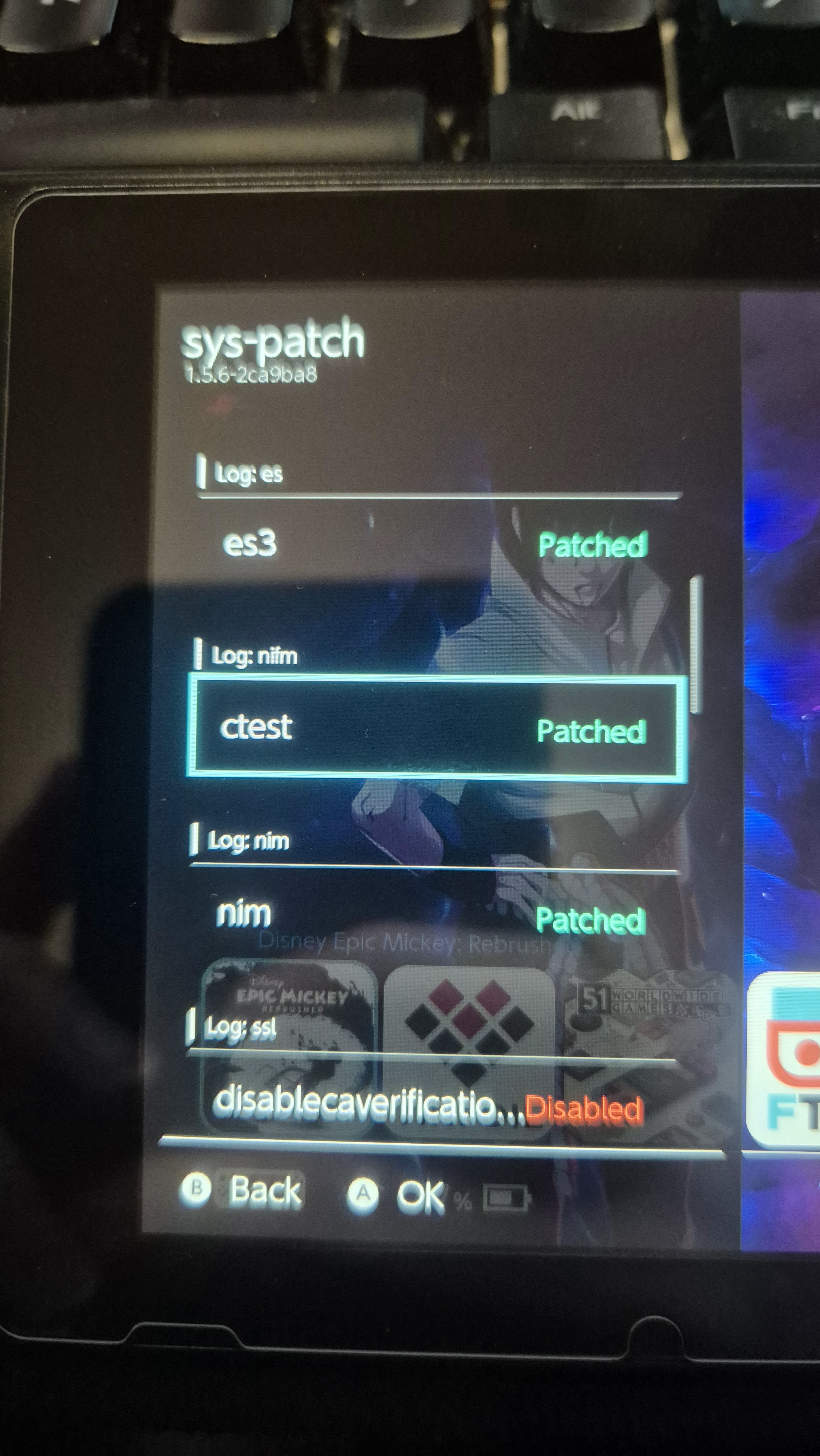
View attachment 517583View attachment 517584

However, via Tinfoil using the Gandalf Sax! eShop, when I update to the latest update of the following titles, I am receiving an error message that the software was closed because of an error:
Disney Illusion Island
The Legend of Zelda: Tears of the Kingdom
Clubhouse Games: 51 Worldwide Classics
The Legend of Zelda: Echoes of Wisdom
Nintendo Switch Online - Nintendo 64

Also, with the game LEGO Horizon Adventures, it will install and run absolutely fine until a reboot has happened and then when attempting to launch I get a different error message “Checking whether this software can be played…”

I have the following questions:

1. Can anyone point me in the right direction as to why this is happening and how it can be fixed?
2. Is it due to using the older OFW 18.1.0 that certain titles wont load?
(As my research suggested there are currently no titles that require a firmware later than 18.1.0)
3. My research also suggested that 18.1.0 is likely the most stable version to use with Atmosphere, with the most support for homebrew etc.
That there is no real reason to upgrade any further. Should I consider upgrading to 19.x.x? If so, specifically what exact version and why?

Thanks in advance to anyone that can help with any of the above, I would greatly appreciate it <3


I actually had to upgrade to the latest 20.2.0 to make BOTW, TOTK and EOW work...

But so far, so good in the testing!
 
I actually had to upgrade to the latest 20.2.0 to make BOTW, TOTK and EOW work...

But so far, so good in the testing!
Thanks for that info, I might consider upgrading down the track but not yet.
Post automatically merged:

Are you loading atmosphere through hekate or through fusee.bin if hekate you might need sigpatches from here https://gbatemp.net/threads/sigpatches-for-atmosphere-hekate-fss0-fusee-package3.571543/
Yes I am. My hekate_ipl.ini reads as follows:

[config]
autoboot=2
autoboot_list=0
bootwait=2
verification=1
backlight=100
noticker=0
autohosoff=2
autonogc=1
updater2p=1
bootprotect=0

[Stock SysNAND]
pkg3=atmosphere/package3
stock=1
emummc_force_disable=1
icon=bootloader/res/stock.bmp
usb3force=1


[CFW (SYSMMC)]
pkg3=atmosphere/package3
emummc_force_disable=1
icon=bootloader/res/sysnand.bmp
usb3force=1


My switch autoboots into Hekate then loads pkg3=atmosphere/package3


It is potentially worth noting that before this last OFW + Atmosphere upgrade, I used to boot like this:
[Atmosphere CFW]
icon=bootloader/res/icon_payload.bmp
payload=bootloader/payloads/fusee.bin
kip1patch=nosigchk

In my earlier attempts at fixing my issues, I attempted using the file "Hekate+AMS-package3-sigpatches-1.9.2P-cfw-20.2.0_V0.zip" but either had the same result.

Perhaps I should try putting the latest correct fusee.bin back alongside these sigpatches and attempt to boot the way I used to?

Update: I attempted to load in this manner:
icon=bootloader/res/icon_payload.bmp
payload=bootloader/payloads/fusee.bin
emummc_force_disable=1
kip1patch=nosigchk
usb3force=1

after placing the sigpatches and fusee.bin to the correct locations. System loads fine but still the same result with launching the mentioned titles :(
 
Last edited by Wayno1337,
> Also, with the game LEGO Horizon Adventures, it will install and run absolutely fine until a reboot has happened and then when attempting to launch I get a different error message “Checking whether this software can be played…”

Sounds like it's a temporary ticket. I would've assumed that tinfoil patches the ticket @blawar? Some scene groups incorrectly create fake tickets. I'm not sure what tool they use, but basically they put the key gen version inside the bitfield flags. This worked by accident up until (iirc) key gen 16 (0x10) which is the flag for a temporary tickect.
 
So without breaking any forum rules, should I consider a different or more reliable eShop?

Edit: It seems like its either Tinfoil or a bad dump causing the issues with certain games. At some point I will attempt an alternative method and if I remember to, I will update this post again.
 
Last edited by Wayno1337,
I haven't touched my switch in about a year and I did update my Atmosphere. I noticed that after installing the new sigpatches and new sys-module, my switch games take forever to load...

I followed the instructions from this thread:
 
  • Like
Reactions: Willsito_GG
I haven't touched my switch in about a year and I did update my Atmosphere. I noticed that after installing the new sigpatches and new sys-module, my switch games take forever to load...

I followed the instructions from this thread:
Oh i have the same problem after updating atmosphere and sigpatches games take forever to load.
 
  • Like
Reactions: Willsito_GG
Oh i have the same problem after updating atmosphere and sigpatches games take forever to load.

@impeeza gave some suggestions check out our conversation on this thread:


I still haven't figured out why its so slow on my end as well. I'm considering doing a fresh install of everything.
 
  • Sad
Reactions: impeeza
@impeeza gave some suggestions check out our conversation on this thread:


I still haven't figured out why its so slow on my end as well. I'm considering doing a fresh install of everything.

Could you check wheteher this folder \atmosphere\erpt_reports fills up with log files after simply navigating through the Homebrew menu and other sections? This is my case... (URL: https://gbatemp.net/threads/nintendo-switch-firmware-20-2-0-released.673295/post-10698974)
 
Thanks for that info, I might consider upgrading down the track but not yet.
Post automatically merged:


Yes I am. My hekate_ipl.ini reads as follows:

[config]
autoboot=2
autoboot_list=0
bootwait=2
verification=1
backlight=100
noticker=0
autohosoff=2
autonogc=1
updater2p=1
bootprotect=0

[Stock SysNAND]
pkg3=atmosphere/package3
stock=1
emummc_force_disable=1
icon=bootloader/res/stock.bmp
usb3force=1


[CFW (SYSMMC)]
pkg3=atmosphere/package3
emummc_force_disable=1
icon=bootloader/res/sysnand.bmp
usb3force=1


My switch autoboots into Hekate then loads pkg3=atmosphere/package3


It is potentially worth noting that before this last OFW + Atmosphere upgrade, I used to boot like this:
[Atmosphere CFW]
icon=bootloader/res/icon_payload.bmp
payload=bootloader/payloads/fusee.bin
kip1patch=nosigchk

In my earlier attempts at fixing my issues, I attempted using the file "Hekate+AMS-package3-sigpatches-1.9.2P-cfw-20.2.0_V0.zip" but either had the same result.

Perhaps I should try putting the latest correct fusee.bin back alongside these sigpatches and attempt to boot the way I used to?

Update: I attempted to load in this manner:
icon=bootloader/res/icon_payload.bmp
payload=bootloader/payloads/fusee.bin
emummc_force_disable=1
kip1patch=nosigchk
usb3force=1

after placing the sigpatches and fusee.bin to the correct locations. System loads fine but still the same result with launching the mentioned titles :(
A number of games and updates/DLC require 19.x so that's probably it. If you don't want to update to the latest consider 19.x, it should be compatible with just about everything.
 
Last edited by Borsalino,
  • Like
Reactions: Willsito_GG
Got it fixed by just starting from scratch. Backed up my saves and did reformatted my SD card. Did a factory reset on the switch as well. I did a file based EmuNAND this time around and everything is working perfectly.

Ufff, to be honest, I really want to avoid starting from scratch, as it takes a long time to "manually" reinstall every game... But if there is no way to fix this problem apart the starting from scratch solution, I will have to go to that path...

Thank you very mun anyway, Borsalino!

PS: I believe that the FW update from 19.x.x to 20.x.x makes some changes in the file system of the emuNand that causes this problem. But if the emuNand is setup directly with 20.x.x I believe that the file system, in this case created from scratch with 20.x.x, is not triggering the mentioned Atmosphere incompatibility referred in this case: https://github.com/Atmosphere-NX/Atmosphere/issues/2594#issuecomment-3130340710
 
  • Like
Reactions: Borsalino
Ufff, to be honest, I really want to avoid starting from scratch, as it takes a long time to "manually" reinstall every game... But if there is no way to fix this problem apart the starting from scratch solution, I will have to go to that path...

Thank you very mun anyway, Borsalino!

PS: I believe that the FW update from 19.x.x to 20.x.x makes some changes in the file system of the emuNand that causes this problem. But if the emuNand is setup directly with 20.x.x I believe that the file system, in this case created from scratch with 20.x.x, is not triggering the mentioned Atmosphere incompatibility referred in this case: https://github.com/Atmosphere-NX/Atmosphere/issues/2594#issuecomment-3130340710

That's why I don't ever just fill my SD card or hard drive with tons of games just to look cool. I only ever have a few games installed at a time. Learned that a couple times long ago. Once with a PS2 HDD crash and again with a drive I was using for the Wii. I won't ever make the same mistake again. Most people don't play 20, 30, 50, 100+ games at a time anyway and just want to have a large library to stare at cuz it looks neato. I agree, it looks cool to see a large list of games to pick from, but it's much more practical to Just play what you want, delete, then add a few new games. Wash, rinse, repeat. That way if you ever have problems like this, you don't need to reinstall a crap ton of games. It also saves money not having to buy a large capacity SD card. :)
 
  • Like
Reactions: Borsalino
I'll definitely keep watching the performance of my EmuNAND.
main thing is the core3 (os) usage. installing a game will pin it to 100% usage. in sphaira i had to add sleep() during the install / file copy loop as core3 gets pinned so the other threads wouldn't wake up, making it look like the app / switch has frozen (it hasn't). emuMMC doesn't have this problem.
 
So without breaking any forum rules, should I consider a different or more reliable eShop?

Edit: It seems like its either Tinfoil or a bad dump causing the issues with certain games. At some point I will attempt an alternative method and if I remember to, I will update this post again.
Yes, this one works
 

Site & Scene News

Popular threads in this forum