Hacking [RELEASE] 3DS Multi EmuNAND Creator

  • Thread starter Thread starter DarkMatterCore
  • Start date Start date
  • Views Views 172,469
  • Replies Replies 365
  • Likes Likes 44
Not at all. Read the first post; this a PC application. You can use the Gateway Launcher + Spider Exploit, though.

Alright. I saw "Extract NAND", so I just wasn't sure, so that's why I asked. Still learning about all this 3DS scene stuff.
 
  • Like
Reactions: DarkMatterCore
A really good approach would be to let the user select the start sector of the EmuNAND, just like TRICK does. That way, it wouldn't be limited to a specific number of EmuNANDs.

Personally, I have been waiting for multiple EmuNAND support for months (this program is an example of that), and it would really be the icing on the cake.
 
I think his idea was to launch directly from a nand file, without any partitioning of the sd card.
 
is it possible to run to different gateway emunands from the same card? I want to be able to have to different regions running off of my new 3ds xl so i can play in japanese pokemon tournis
 
I have a sd - cfw Palatine 4.4 (rednand).

My SD is 30GB - 10 Kingstone - Fat32.
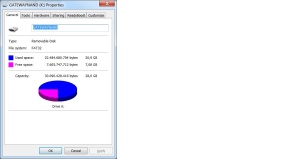


Want to take the rednand and transform in emunand to inyect in emunand GW (4.4).
For then uptade that emunand GW (4.4) to GW (9.8) and can use devmenu to install cias.

But allprograms giveme errors, starting with 3ds multinand creator:

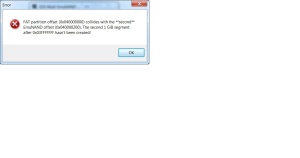
Choose "nandnumber" - 2 , "nintendo3ds model" - old 3ds ,extract nand.
Gives me this error and dont extract nothing.


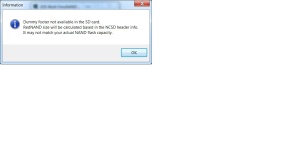
Choose "nandnumber" - 1 , "nintendo3ds model" - old 3ds ,extract nand.
Gives me this error: Dummy footer not available in the sd card, Rednand size will be calculated
based in the NCSD header info , It may not match your actual NAND flash capacity .


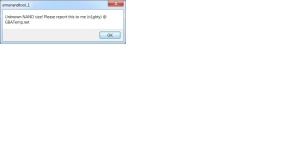
When use emunandtools, choose extract emunand.
Gives me this error: Unknown nand size.


Any help with this errors, i am doing something wrong or is a problem with my sd?.
(i install again the cfw palatine 4.4 but when trying to extract the rednand gives me the same errors). [smile]

 
I have a sd - cfw Palatine 4.4 (rednand).

My SD is 30GB - 10 Kingstone - Fat32.


Want to take the rednand and transform in emunand to inyect in emunand GW (4.4).
For then uptade that emunand GW (4.4) to GW (9.8) and can use devmenu to install cias.

But allprograms giveme errors, starting with 3ds multinand creator:

Choose "nandnumber" - 2 , "nintendo3ds model" - old 3ds ,extract nand.
Gives me this error and dont extract nothing.


Choose "nandnumber" - 1 , "nintendo3ds model" - old 3ds ,extract nand.
Gives me this error: Dummy footer not available in the sd card, Rednand size will be calculated
based in the NCSD header info , It may not match your actual NAND flash capacity .


When use emunandtools, choose extract emunand.
Gives me this error: Unknown nand size.


Any help with this errors, i am doing something wrong or is a problem with my sd?.
(i install again the cfw palatine 4.4 but when trying to extract the rednand gives me the same errors). [smile]

First of all, don't play blind with the options available in the program. If you're only using one RedNAND, there's no need to set the NAND number to a greater value. The first error you mentioned is displayed for this very reason.

The second dialog box you're showing us isn't actually an error; it's more like a warning. If there's no dummy footer available in the SD card, the program can't possibly know the real NAND capacity of your Nintendo 3DS console, but that shouldn't (and won't) keep it from dumping the RedNAND to the output file you chose. Just try it.
 
First of all, don't play blind with the options available in the program. If you're only using one RedNAND, there's no need to set the NAND number to a greater value. The first error you mentioned is displayed for this very reason.

The second dialog box you're showing us isn't actually an error; it's more like a warning. If there's no dummy footer available in the SD card, the program can't possibly know the real NAND capacity of your Nintendo 3DS console, but that shouldn't (and won't) keep it from dumping the RedNAND to the output file you chose. Just try it.

Yes, thanks for your answer but i am trying this for 3 days... i think the problem is the microsd 30gb - Kingstone , i try with other microsd 8gb kingstone and the emunandtools give me the same error (thats must be because is a rednand lol), but with 3ds multinand creator choosing "Choose "nandnumber" - 1 , "nintendo3ds model" - old 3ds ,extract nand." ;
works fine dont give more the "Dummy footer" error. Well now my problem is when a inyect the rednand transform in to emunand in the emunand gw,
i boot it , but the devmenu say need too download again from eshop.

What may be the problem here... "download again from eshop". My guess is that my "rednand" is mix with my sysnand because i dont have them separated.
Because something rare happend, the devmenu appear on the sysnand and i can click it and say the same thing that says in emunand "download again from eshop".

(On my other cfw emunand, the devmenu appears on boths sides but only can click it and used on emunand, but now is mixed).
 
Trying to get a spare 3ds that is using the palatine cfw to the rxtools version. So would this be the steps I need to do:

1) Put the rednand sd in laptop
2) Run multinand tool and choose "extract nand" (I assume it can extract rednand?)
3) Then choose "Inject emunand" (Again I assume this auto converts the rednand I extracted from #2 to a emunand)

Or am I totally confused and that is not how it works. Bascially I just want to use rxtools so I need to convert the rednand so I don't have to reinstall all the games.
 
Trying to get a spare 3ds that is using the palatine cfw to the rxtools version. So would this be the steps I need to do:

1) Put the rednand sd in laptop
2) Run multinand tool and choose "extract nand" (I assume it can extract rednand?)
3) Then choose "Inject emunand" (Again I assume this auto converts the rednand I extracted from #2 to a emunand)

Or am I totally confused and that is not how it works. Bascially I just want to use rxtools so I need to convert the rednand so I don't have to reinstall all the games.

I did this way on a o3DSxl to go from palantine to RX, but after extracting the rednand, the resulting emuNAND.bin was smaller than the phisical NAND size (you can check the size of a NAND dump made with GW).

I assumed the rednand dump was missing only the final set of zero values so I manually added them with HxD to reach the exact size in bytes of the NAND dump and reinjected the modified emunad image with the Inject Emunand option.

Everything went fine.

PS: You have to add severa MB of zeros, so start adding a sector of 0 (0x200 bytes in lenght) then copy the whole sector and paste it several times (about 20) than copy again this bunch of sector and paste them since you reach the desidered size. Youll have to make a little final trim since it's very difficoult you'll reach the exact desidered size copying suach a big cluster of 0 valuies.

Good luck
 
That's because 3DS Multi EmuNAND Creator writes some dummy data to the sector next to the RedNAND final sector, and uses that as an indicator of the true RedNAND size when extracting (you can't calculate the NAND size using the NCSD header info). This isn't necessary with common EmuNANDs because the NCSD header position serves to tell the right EmuNAND size.

If you use the emuNAND Tool + drag_emunand_here.bat combo to inject the RedNAND the first time around, this dummy data won't get written, so my program defaults to a Toshiba RedNAND (the smaller one) in such case. If this happens during the extraction process, the program will also inform the user about it.

The steps are correct, though. The "Extract NAND" option is valid for both NAND types.
 
This tool made it so simple. I did extract by rednand at first and it put out a 1kb file smaller of 942kb compared to my nand.bin backup of 943kb. It did give me a warning before extracting. And after choosing to inject emunand I loaded it in the 3ds and it booted both gateway and rxtools. Such a useful simple tool.
 
  • Like
Reactions: DarkMatterCore
Hi, the download link is been removed. Can restore?

Edit : Scratch that, found the alternate download links. Phew..
 
Last edited by KennyWYL,

Site & Scene News

Popular threads in this forum