Hacking Problem with plugin folder.

  • Thread starter Thread starter tt87
  • Start date Start date
  • Views Views 1,824
  • Replies Replies 5

tt87

Active Member
Newcomer
Joined
Apr 14, 2010
Messages
30
Reaction score
0
Trophies
0
XP
62
Country
United States
Hello, GBAtemp.

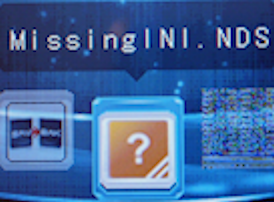
I seem to have a problem with my plugin folder. Namely the NES-DS and LameBoy plugin icons. They're not working correctly, and just display the default orange "?" icon.
ds2.png

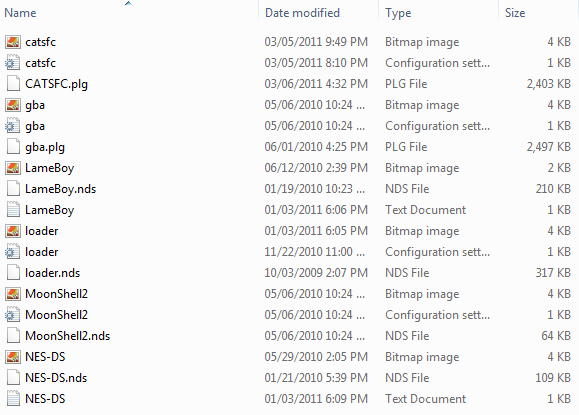
Here is a pic of the directory.

NES-DS.jpg
LameBoy.jpg

Here are the icons (note PB automatically converted them into JPG file instead of the 24-bit BMP I had them in.

If anyone can help me, please do.
 
Looking at your directory pic, it looks like the problem is with your nesds and lameboy .ini files. They don't appear to be recognized the same as the others. Make sure they don't have a hidden ".txt" extention.
 
Check your INI files and make sure the 'icon' value redirects to the correct file.
You've renamed your files, but you will need the .ini to redirect to the new renamed bitmap image.
This is very unlogically made by the Supercard team, as most people rename all files (including the icon) the same.
 
sir_voe is right, the files that are supposed to have a .ini file extension have a .txt extension (you can tell because the little looseleaf paper icon doesn't have a cog)

to change it click on organize on the top left, then folder and search options, then click on the View tab and uncheck the option for "Hide extensions for known filetypes"

after you apply and press OK you should now see that those two are .txt, just change them to .ini and they should be fine (and the icon should switch to the same type of icons for all of the other .ini files)
 
Oh, now I see it...
It was so obvious!
I only looked at the top files, because they all say the same (Configuration settings file)
But now I notice, the files you have problems with are TXT files.
So yeah, sir_voe was indeed right at this.
 

Site & Scene News

Popular threads in this forum