Hi....i installed picifly on a lite switch....everything ok but when i was turning on got a fuckin bsod...i dont even put a sd card... the first time got no sd...after that just blue screen? Am i bricked it? Is there any solution...the console is brand new
Oh, so it WAS the ribbon that was causing 'no backlight' (I see your pic now, the only thing it COULD have been is the backlight pins, guess I needed to specify the "connectors" of the 'main ribbon' as well?), you didn't actually touch the daughter board. The discoloration of the ribbon was due to the pins being out of whack, more than likely.
@lightninjay's link goes str8 to a pic of the daughter's backlight connector and I thought that was your issue since you gave credit to Jay for helping you Hence, the confusion as to why the daughter board was touched at all.
Post automatically merged:
Double check everything related to the APU. All caps, look for solder balls, bridging, etc.
I currently have a bsod that I think is just because I was careless and swiped a cap off the APU. Will let you know how the fix goes.
I've fixed bsod before by bending the Switch back into shape and reflowing the APU. I think I've read that it could be the ram too, another reflow\reball. Otherwise, dead Switch.
I think this was the cleanest install i ever made...everything went perfect...really don't know what could even happen...the switch is brand new so i guess its not relatrd to the apu reflow... my guess is the emmc chip...but dont know what to do to test it
I think this was the cleanest install i ever made...everything went perfect...really don't know what could even happen...the switch is brand new so i guess its not relatrd to the apu reflow... my guess is the emmc chip...but dont know what to do to test it
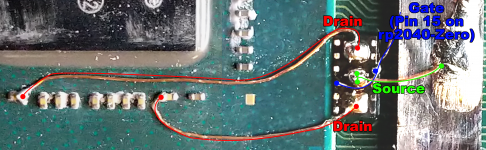
hello, does anyone know how to solder this part of the mosfet source to the SOC, been trying to figure out how to solder this all night, the solder keeps falling off, it sticks first times but then it removes itself multiple times , that damn wires
any tips or any possiblities to solder alternate part for the source?
Yes, it's just a ground point. I'm not sure why the guide doesn't just recommend soldering to the shield frame right there, it's also a ground point and would be a bit easier to solder to in my opinion. I found that solder isn't a huge fan of that square piece - I got it to stick fine by scraping it a bit, but I can see people having issues with it.
If you can't though - Find a stencil and get some leaded solder paste, should have a melting temp of ~183c. Clean all of the solder off of the pcb and the component. Place the stencil on the component, add some solder paste and spread it around. Use a tiny squeegee/metal scraper/xacto knife to scrape off all of the extra. Then use hot air on a low air speed like 10, and a temperature of 250-300c. Heat the whole chip, moving the hot air around in a circle, for about 5 seconds, then hold the hot air in one corner. Once the balls start to melt, slowly move over the whole chip. Once melted, remove the hot air and keep holding the stencil there for another 20-30 seconds. From there you should be able to remove the component from the stencil, and then install it on the pcb
I haven't done that exact component, but I've done a lot of bga work on graphics cards, and that's almost exactly what I do.
Yes, it's just a ground point. I'm not sure why the guide doesn't just recommend soldering to the shield frame right there, it's also a ground point and would be a bit easier to solder to in my opinion. I found that solder isn't a huge fan of that square piece - I got it to stick fine by scraping it a bit, but I can see people having issues with it.
Personally I don't "trust" the GND from the shield, since when cutting the shield for the CLK point soldering, some of the anchors popped out right away, and thus I question about how good the connection could be there.
For the SoC "GND square", I scrape it slightly with tweezers as you do, add flux, T12-BC1 tip and bump the temp up to 370°C on the T12 station. I use Sn63/Pb37 solder and never had issues for soldering that point.
Otherwise, one can use the other side of the capacitor on the SoC, since there're a lot of GND points around.
It’s about that time of year again where I check in with the community to see if we can get the front page aligned with what people are interested in knowing and what...
WiiCompiled is a new project that lets PC gamers play Mario Kart Wii natively on PC without emulation. Using static recompliation to convert the code into native PC...
After being announced last year, the fan-made remake Gamma Emerald has finally gotten its first early access release. A complete rebuild of fan-favourite Pokemon...
The long awaited Grand Theft Auto VI Extended Look gameplay trailer has finally dropped on YouTube. As you all know, it had dropped 6 hours earlier on Netflix, and...
Though we knew all the way back in May that this was coming, the exact numbers remained a mystery for prospective Nintendo gamers in the UK. If you happen to have...
Thanks to the recent decomplication efforts; The Minish Cap 3DS brings the Game Boy Advance classic Zelda title to your 3DS.
The port takes full advantage of the 3DS...
In the wake of Sony's shift to a digital-only ecosystem within the next year, Xbox have today announced a surprising scheme. Aiming to offer physical buyers the same...
After being announced last week, the first of two broadcasts is set to go live later today with a stark focus on The Legend of Zelda and its 40th anniversary...
It is with a heavy heart that I announce the departure of our beloved Chary from the position of Chief Editor. Chary took over early 2021 and has done a wonderful job...
To celebrate its 25th anniversary, XBOX has launched pre-orders for the XBOX 25th Anniversary Collection. For the occasion, the trailer below was aired.
This...
It’s about that time of year again where I check in with the community to see if we can get the front page aligned with what people are interested in knowing and what...
After being announced last week, the first of two broadcasts is set to go live later today with a stark focus on The Legend of Zelda and its 40th anniversary...
It's been something of a quiet week in the gaming space, with the deluge of big hitters trying to find their place before GTA 6 launches really kicking off next week...
In the wake of Sony's shift to a digital-only ecosystem within the next year, Xbox have today announced a surprising scheme. Aiming to offer physical buyers the same...
Though we knew all the way back in May that this was coming, the exact numbers remained a mystery for prospective Nintendo gamers in the UK. If you happen to have...
The long awaited Grand Theft Auto VI Extended Look gameplay trailer has finally dropped on YouTube. As you all know, it had dropped 6 hours earlier on Netflix, and...
It is with a heavy heart that I announce the departure of our beloved Chary from the position of Chief Editor. Chary took over early 2021 and has done a wonderful job...
The second of a two-part special, a more traditional Nintendo Direct is set to air today. Unlike the Zelda Direct the contents of this one is still relatively up in...
After being announced last year, the fan-made remake Gamma Emerald has finally gotten its first early access release. A complete rebuild of fan-favourite Pokemon...
A few days ago Chary stepped down as Chief Editor after 5 wonderful years, and everyone guessed the seat wouldn't stay empty for very long. Back in 2021 I proudly...








 Hence, the confusion as to why the daughter board was touched at all.

 .
.