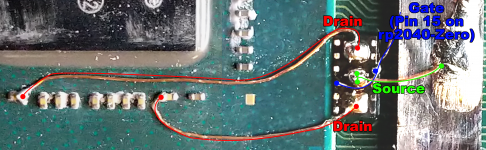
After doing a flex install, admittedly the mosfets can be easier if you are good at manipulating things with tweezers.
The flex can be easier, but you have to install it a very particular way with pre-tinning the solder pads on it,
oh, i was thinking of using the screw hole circles or the arrow next to the dat 0 pinout, but doesnt distance matter here? wouldnt the usb c connection port be too far and cause issues?
Post automatically merged:
also is there a way to test if my switch is stable after the instalation? is there a way to check out that i did everything successfully?
oh, i was thinking of using the screw hole circles or the arrow next to the dat 0 pinout, but doesnt distance matter here? wouldnt the usb c connection port be too far and cause issues?
Post automatically merged:
also is there a way to test if my switch is stable after the instalation? is there a way to check out that i did everything successfully?
Which point are you soldering to ground? If you are soldering the RP2040 board to ground (for power) then any ground will do, just try to use thicker wire (around 32awg or 30awg) for the 3.3v and the GND.
If you are doing the ground for the mosfets coming from the Source pin of the mosfet, then yes, ideally you should have a short path to ground.
Here is how I did my switch lite earlier today. I posted this in the main Picofly thread.
oh, i was thinking of using the screw hole circles or the arrow next to the dat 0 pinout, but doesnt distance matter here? wouldnt the usb c connection port be too far and cause issues?
Post automatically merged:
also is there a way to test if my switch is stable after the instalation? is there a way to check out that i did everything successfully?
Which point are you soldering to ground? If you are soldering the RP2040 board to ground (for power) then any ground will do, just try to use thicker wire (around 32awg or 30awg) for the 3.3v and the GND.
If you are doing the ground for the mosfets coming from the Source pin of the mosfet, then yes, ideally you should have a short path to ground.
Here is how I did my switch lite earlier today. I posted this in the main Picofly thread.
this is where i was trying to get ground from, the screw hole coper circle and the arrow beside it. But if the usb c connector works fine ima use that from now on lol. thanks!
View attachment 369501this is where i was trying to get ground from, the screw hole coper circle and the arrow beside it. But if the usb c connector works fine ima use that from now on lol. thanks!
Can somebody help me, i‘ve broken the pads for clk and somehow even lost the resistor? next to it. Is there an alternative point so i can fix my switch and what is the value of this resistor/diode?
Anyone know the value of this caps in red? its a V2 board. I broke it when try to lift the header, leason learned. Also Is there any replacement in the rp board?
Anyone know the value of this caps in red? its a V2 board. I broke it when try to lift the header, leason learned. Also Is there any replacement in the rp board?
Those are capacitors that are the same as the ones being soldered to on the APU, that can be robbed off the RP2040-Zero (see the definitive guide). They are 100nF 0201 capacitors.
Fun fact, those two capacitors affect whether or not your console has bluetooth and wifi capability (ask me how I know)
ive just finished soldering all the point and final test before connecting to pico i tried to turn on the console to ofw, but everytime i put on the soc cover the switch wont boot only blank screen i can feel the soc heating up
when i lift the soc cover the switch turned on normally to ofw, does anyone have an idea what happened? where to find the short?
tried to isolate everything using kapton tape does nothing
ive just finished soldering all the point and final test before connecting to pico i tried to turn on the console to ofw, but everytime i put on the soc cover the switch wont boot only blank screen i can feel the soc heating up
when i lift the soc cover the switch turned on normally to ofw, does anyone have an idea what happened? where to find the short?
tried to isolate everything using kapton tape does nothing
Check below the flex (1)
Remove some solder from the caps (2) if possible.
Check the soldering on this capacitor (maybe just bad photo)
Clean everything around APU with IPA just to be sure
It looks like one string of multicore wire is loose and might be touching the ground on cap (3)
Again, it's difficult to troubleshoot using a photo...
If you are careful, you will not damage anything.
It is ok to solder to nand board.
Or you can combine both, solder some on Nand and some on alternative, whatever works best for you
After being announced last week, the first of two broadcasts is set to go live later today with a stark focus on The Legend of Zelda and its 40th anniversary...
It's that time again folks, an update for the Switch and Switch 2, and a surprisingly big one at that! At lease for folks on the Switch 2. The most notable feature...
It is with a heavy heart that I announce the departure of our beloved Chary from the position of Chief Editor. Chary took over early 2021 and has done a wonderful job...
The second of a two-part special, a more traditional Nintendo Direct is set to air today. Unlike the Zelda Direct the contents of this one is still relatively up in...
After an accidental leaking of their review video from Linus Tech Tips last week, we somewhat knew that news on Steam's latest VR venture was imminent. Today the...
Over the weekend a number of Switch and Switch 2 related subreddits came alive with people reporting bans on their Switch 2 consoles out of nowhere. The error code...
The PlayStation 5 scene has received a massive breakthrough with the public release of Relapse, a new exploit chain developed by Nathan Fargo in collaboration with...
After more than a year, Mario Kart 8 Deluxe has gotten a fresh update with a focus on the Switch 2, and it's surprisingly meaty. For those Switch 2 players, they'll...
Announced a few days ago, Nintendo of America have today launched their Customer Appreciation Sale. Featuring 30% discounts across a wide range of popular first-party...
It's been something of a quiet week in the gaming space, with the deluge of big hitters trying to find their place before GTA 6 launches really kicking off next week...
After being announced last week, the first of two broadcasts is set to go live later today with a stark focus on The Legend of Zelda and its 40th anniversary...
It's been something of a quiet week in the gaming space, with the deluge of big hitters trying to find their place before GTA 6 launches really kicking off next week...
It is with a heavy heart that I announce the departure of our beloved Chary from the position of Chief Editor. Chary took over early 2021 and has done a wonderful job...
The in-progress Switch port of the 2013 Rockstar Games Grand Theft Auto V has been forced to end progress after Take-Two Interactive has threatened legal action...
After an accidental leaking of their review video from Linus Tech Tips last week, we somewhat knew that news on Steam's latest VR venture was imminent. Today the...
The second of a two-part special, a more traditional Nintendo Direct is set to air today. Unlike the Zelda Direct the contents of this one is still relatively up in...
Announced a few days ago, Nintendo of America have today launched their Customer Appreciation Sale. Featuring 30% discounts across a wide range of popular first-party...
From my post earlier this week you probably already know which game I'm talking about. Fire Emblem released yesterday to some pretty rave reviews. Looking at...
A few days ago Chary stepped down as Chief Editor after 5 wonderful years, and everyone guessed the seat wouldn't stay empty for very long. Back in 2021 I proudly...
A court has ordered Reddit r/SwitchPirates moderator James Williams (of ArchBox fame) must pay Nintendo $4.5 million in a default judgment for copyright infringement...