Homebrew RELEASE pFBA: final burn alpha

  • Thread starter Thread starter cpasjuste
  • Start date Start date
  • Views Views 542,751
  • Replies Replies 1,553
  • Likes Likes 61
Single joycon is disabled for now, but if I want to play with another person, should I use a pair of joycons together with a pro controller?
 
Hey everyone, I was really surprised at how well pFBA was running when I got it all installed. Also like the fact that it can show just the installed roms rather than that huge list.. lol. One issue i'm having tho is that Save States don't seem to be working on "Jojo's Venture (USA)" Anyone else have the same issue or know a fix? Thanks
 
how can i change the region in UNIBIOS? pressed some buttons accidentally and could change it to japan to enable red blood in metal slug...but can't figure it out
EDIT: GOT IT! Its X + A + B
all pressed in the same time after booting game and the unibios logo appears
 
Last edited by focusonme,
It seems that my “-“ button is not be responding in pFBA after sleep Mode (latest hekate cfw). I can add coins but not start a game. Or maybe there is some other reason. In any case I thought I’d mention it.
 
what does this mean:

  • switch: disable single joycon support for now

does this mean we can use the joycons as one player because if i have them undocked they act as 2 controllers
im on an older version and havent updated
 
what does this mean:

  • switch: disable single joycon support for now

does this mean we can use the joycons as one player because if i have them undocked they act as 2 controllers
im on an older version and havent updated
it means you cant use 1 single joycon as 1 player, it need to be the full pait for 1 player, or the pro controller for another one.
 
it means you cant use 1 single joycon as 1 player, it need to be the full pait for 1 player, or the pro controller for another one.
ok that is good
i had an older build and while undocked it would force the joycons to work as 2 controllers which i did not want
 
Hi,

pFBA is a fork of FBA, an arcade and consoles emulator which run neogeo, cps1, cps2, cps3... arcade roms and megadrive, master system, game gear, pc engine.... consoles roms.

Tips:

You can also run console games (megadrive, pc engine...).
You can find some information in the ps vita thread : https://gbatemp.net/threads/release-pfba-portable-final-burn-alpha-official-thread.458445/
You can also find some information and source code here : https://github.com/Cpasjuste/pfba/tree/new

Download pfba releases on github : https://github.com/Cpasjuste/pfba/releases

Thanks:
  • devkitPro and libnx people: yellows8, plutoo, profi200, WntrMute ....
  • fba main author: barry... https://www.fbalpha.com
  • ScHlAuChi for providing a 3.0 Switch! (you rock mate)

pFBA 1.55:

  • update to FBA 0.2.97.43
  • update/fix save states and nvram support (you NEED to delete old folders : "config" and "saves" to prevent crashes)
  • remove m68k cyclone asm core support
  • switch: disable single joycon support for now
  • fix console roms, no prefix needed anymore, roms need to be in their respective directories :
    • pfba/megadriv
    • pfba/gamegear
    • pfba/sms
    • pfba/coleco
    • pfba/msx
    • pfba/sg1000
    • pfba/pce
    • pfba/tg16
    • pfba/sgx

pFBA 1.54:
  • switch: fix audio :)
  • switch: add 4 player support. When joycons are not docked (multiplayer), use "L STICK" button press for start or coin instead (+) or (-)). All players share the same button configuration for now.
  • switch: fix a random crash on exit (hopefully)
  • switch: lower font size
  • switch: use linear filtering as default option (faster)
  • pfba: fix button textures not deleted when changing menu
  • pfba: fix version not correctly handled on some platforms
  • pfba: fix missing rom path slash on new config

pFBA 1.52:
  • SWITCH; new ui renderer (libcross2d/sdl2), improved texture and font rendering (no more scaling)
  • SWITCH: use bigger font size
  • SWITCH: add proper joystick implementation (joystick was previously interpreted as buttons).
  • SWITCH: add "point filtering", limited to 1x, 2x and 3x scaling. This is slower but may give a better image.
  • SWITCH: add basic/crappy scanline effect
  • SWITCH: fix input rotation (OFF=landscape, ON=landscape, FLIP=portrait)
  • SWITCH: fix random crash on exit? (libnx fix?)
  • VITA: fix wrong input rotation (hopefully)
  • VITA: add sharp-bilinear-simple shader back in
  • PFBA: don't play an audio frame when entering menu/savestates
  • PFBA: reset configuration when updating to a new version (sorry).


Changelog 1.51:

  • PFBA: some ui adjustment
  • PFBA: fix 4/3 aspect ratio
  • NX: add audio (not perfect, but mostly ok)
  • NX: many fixes and improvements
  • PSP2: lot of ui changes
  • PSP2: fixed shaders (was not properly scaling, linear filter and sharp+scan shader is now perfect)
  • PSP2: many, many changes...


Changelog 1.50 :

  • THERE IS MAJOR CHANGES IN THE CONFIGURATION, YOU NEED TO DELETE THE CONFIG FILES BEFORE PLAYING BACK YOUR FAVORITE GAME :
    • DELETE FILE "/switch/pfba/pfba.cfg
    • DELETE FOLDER "/switch/pfba/configs"

  • add hardware scaling and rotation, big improvement in frame-rate.
  • fix scaling and rotation in any mode (horizontal, vertical, flipped)
  • add save state support
  • fix some random crashes
  • fix input change/mapping in configuration menu
  • add input names in configuration menu (textures to come)
  • add joystick support (basic, handled as buttons for now)
  • add rotation information in rom info box
  • add crappy audio support (disabled for now)
  • add fba version in loading screen
  • disabled unused filtering option for now (only linear filtering is available)

What frimware does this work on
 
  • pfba/megadriv
  • pfba/gamegear
  • pfba/sms
  • pfba/coleco
  • pfba/msx
  • pfba/sg1000
  • pfba/pce
  • pfba/tg16
  • pfba/sgx
What do i rename the bios to, for each of these systems? Im getting "driver INT failed"
 
Last edited by BakerxXxFiona,
Any of you got a rom set that's split into the folders that pFBA uses? I don't want to go through my 10k + ROMS and put them into the respective console folder :/
  • pfba/megadriv
  • pfba/gamegear
  • pfba/sms
  • pfba/coleco
  • pfba/msx
  • pfba/sg1000
  • pfba/pce
  • pfba/tg16
  • pfba/sgx
 
Any of you got a rom set that's split into the folders that pFBA uses? I don't want to go through my 10k + ROMS and put them into the respective console folder :/
  • pfba/megadriv
  • pfba/gamegear
  • pfba/sms
  • pfba/coleco
  • pfba/msx
  • pfba/sg1000
  • pfba/pce
  • pfba/tg16
  • pfba/sgx
Its against the rules to distribute/share/link to roms/warez.

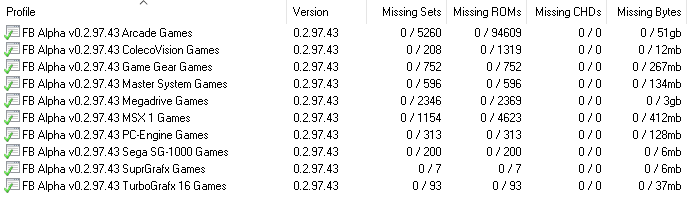
For anyone wondering how many roms are on the FBA Set, this is the info:
Final_Burn.png
 
  • Like
Reactions: lordelan
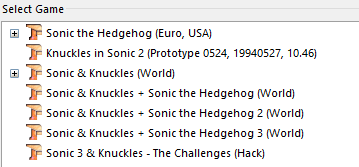
1,2 or 3?
Screenshot_1.png
Sonic and Knuckles (World) which would be the first one buttt i can run sonic 2 so i have that going.

I cant seem to get any roms to run on FBA for Windows over all Im having a hard time with that too (obviously a different topic of discussion). :/ Shouldn't it be easier to run roms for PFBA then FBA?
 

Site & Scene News

Popular threads in this forum