Hacking O3DS Stuck on 2.1

NewWorldHodor

Active Member
Newcomer
Joined
Jan 22, 2017
Messages
25
Reaction score
4
Trophies
0
Age
32
XP
95
Country
United States
Hey everyone, I was trying to softmod my 3rd 3ds and after downgrading to 2.1 my sd card became corrupted so i lost everything that was on it including my backup. Unfortunately I didn't have a backup of my backup and now im stuck in 2.1 with no way back.

I do understand there is a way to update the console with cartridges, my only one being pokemon x which comes with the version 6.1. But i don't know where to start. Please help anyone.

 
Are you trying to install a9lh when 11.2 is totally exploitable now??
3ds.guide
...

Sent from my SM-G903W using Tapatalk
 
Update to 6.1 with the cartridge, then redo the steps with another SD.
 
Yea i was installing a9lh. I wasn't aware it was totally exploitable, i've done this to a few other 3ds's without issue just never had the sd card corrupt on me.

Update to 6.1 with the cartridge, then redo the steps with another SD.
Do i need to be in safemode to update to 6.1 with the cartridge? Also redo what steps? Installing a9lh?
 
Did you make a backup of your SD card and/or did you copy your backup to your PC? Can you still use the SD?
As i said i did not have a back up of my back up unfortunately, i had to reformat the sd card to get it to do anything.
Im pretty sure i do have a9lh installed im not too sure about decrypt 9 or hour glass9, is that something that i will have to add to the sd card?

How do i know for sure if A9lh is installed so i know if it will be safe or not to update via system settings?
 
As i said i did not have a back up of my back up unfortunately, i had to reformat the sd card to get it to do anything.
Im pretty sure i do have a9lh installed im not too sure about decrypt 9 or hour glass9, is that something that i will have to add to the sd card?

How do i know for sure if A9lh is installed so i know if it will be safe or not to update via system settings?
Hold select when pressing power on and see if you get the settings screen.

If it just starts normally it's not installed and it's ok to system update either way once it's on old 3ds.

If it's the newer 3ds you can't update from 2.1.0 unless it's a ctrtransfer or you'll brick it.
 
Last edited by OldSchoolTech,
When i hold select and power on it brings me to luma3ds? Guess that confirms that a9lh was successfully installed?

So updating with system settings should work?

EDIT: Im just really hesitate to do so because i read so many things saying not too, but i guess that's only for N3ds.
 
Last edited by NewWorldHodor,
When i hold select and power on it brings me to luma3ds? Guess that confirms that a9lh was successfully installed?

So updating with system settings should work?

EDIT: Im just really hesitate to do so because i read so many things saying not too, but i guess that's only for N3ds.
Yep you can update, as long as it is an O3DS or O3DS XL
 
  • Like
Reactions: wormdood
You're alright then yeah it's the newer one you've to worry about. I was afraid myself in case I had a €200 brick in the end :)
 
Okay, I am attempting to update via system settings. Will post back with results. Thanks for all the help so far everyone! Never had replys this fast on a forum, i must say, Im impressed!

EDIT #2: After updating manually, will my soft mod still be functional?
 
Last edited by NewWorldHodor,
Okay, I am attempting to update via system settings. Will post back with results. Thanks for all the help so far everyone! Never had replys this fast on a forum, i must say, Im impressed!

EDIT #2: After updating manually, will my soft mod still be functional?
It will once a9lh was installed successfully prior to the update. If not you'll have to do it all over unfortunately.
 
Last edited by OldSchoolTech,
I got an error while updating with system settings about half way through. So im guessing the easy option is no longer a choice..

Would updating to 6.1 via cartridge then manually updating be the next option?
 
I got an error while updating with system settings about half way through. So im guessing the easy option is no longer a choice..

Would updating to 6.1 via cartridge then manually updating be the next option?
OK so if you have a functioning sd card go to https://3ds.guide/9.2.0-ctrtransfer and get decrypt9 then put it in sd\luma\payloads and rename it to start_decrypt9.bin then power the ds on holding start and just check if decrypt9 loads up for you before we go further.
 
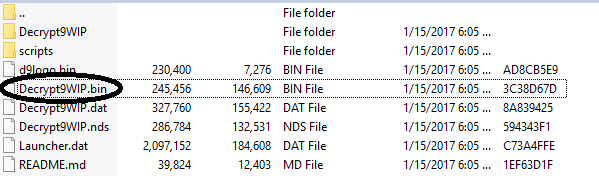
Is this the file that you are talking about?
d19f7903868216e4c3cf2120cfa15301.png


EDIT

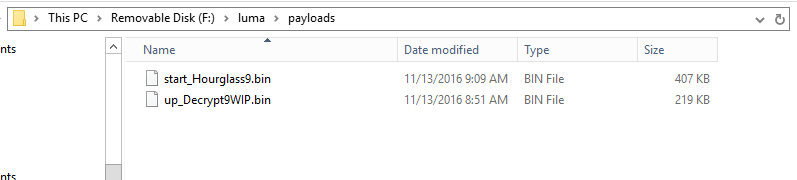
Its appears as if i have hourglass9 and decrypt9 already.
9fc5128d5757529acdfc34f9c96f6f3f.png
 
Last edited by NewWorldHodor,
Yeah just put start_ at the start of the name and put it in that payloads folder then see if booting the ds holding start gets you into decrypt 9 and if it does then follow the 9.2.0 ctrtransfer on the page to get to 9.2 again then you can system update from there.

so sd\luma\payloads\start_Decrypt9WIP.bin
 
I just renamed it and it did load up into decrypt9wip.
Im going to start following instructions on that link you posted and will post back with results.
 
Last edited by NewWorldHodor,

Site & Scene News

Popular threads in this forum