Hacking NOOB PARADISE - ask away

  • Thread starter Thread starter richglix
  • Start date Start date
  • Views Views 1,691,305
  • Replies Replies 15,247
  • Likes Likes 14
Sorry for this noob question, but I haven't found an answer elsewhere so here it goes.
Does Dios Mios support physical memory cards? I play lots of MKDD and I want to continue the file I have (for time trial records, etc.).
However, I plan on using the 20XX Hack Pack for Melee so I will need to use Dios Mios. I already have MKDD installed on a flash drive in preparation for this.

If it helps at all, I am using USB Loader GX 3.0. If there is any other way this works as well, I would be happy to hear it (ie move files from memory card to virtual memory card). Thanks for any help!
 
Sorry for this noob question, but I haven't found an answer elsewhere so here it goes.
Does Dios Mios support physical memory cards? I play lots of MKDD and I want to continue the file I have (for time trial records, etc.).
However, I plan on using the 20XX Hack Pack for Melee so I will need to use Dios Mios. I already have MKDD installed on a flash drive in preparation for this.

If it helps at all, I am using USB Loader GX 3.0. If there is any other way this works as well, I would be happy to hear it (ie move files from memory card to virtual memory card). Thanks for any help!

DIOS MIOS does support physical memory cards. Although from what I have heard, Nintendont is the way to go.
 
DIOS MIOS does support physical memory cards. Although from what I have heard, Nintendont is the way to go.

Thanks! Now that I look at it Nintendont sounds a lot better. I think I will be using Nintendont and Devolution to cover all my needs while still being able to boot GC disks.

One more question. I have been using USB Loader GX, installed it as a forwarder. I installed the .dol file in Priiloader so that I could boot directly to USB Loader GX, and that works wonderfully. However, if I try to boot a GC game on the harddrive with either Nintendont or Devolution, it tells my I dont have AHB access. I know this is because I am booting to it directly, and if I boot it from HBC or the system menu it works fine. Is there any way to autoboot to USB Loader GX still and be able to use Nintendont and Devolution?
 
Totally new on the scene. I've got a camper that we use about a dozen times a year. I've been taking the wii with me so the kids can play if it's rainy outside. I'm thinking of buying a used wii and moving my games to a hard drive so I don't have to keep carrying boxes of games with us when we go. If I haven't purchased a used wii yet, which is the best kind to get? I've heard certain ones (black cases) can't be modded, or certain firmware versions are better than others. I'm confident I can make it work once I get me, I just don't want to screw it up before I even get started. Thanks.
 
Right, so...

I finally got myself a "new" Wii to replace my old, hacked broken one....and it had firmware version 4.3. So I dregged up my old resources, re-found this topic:

http://gbatemp.net/threads/modify-any-wii-4-3-below.171901/

---and began to follow the instructions after a good 4 years of forgetting them. And I followed them successfully! Until the Wii in question stopped receiving the signals from all my Wii Remotes. Even after I attempted to re-sync them. Several times. This occurred after I successfully installed the Homebrew Channel via Letterbomb and then decided not to immediately install BootMii (I planned on doing it later, don't worry) because it said I couldn't install it as a boot 2. Which I understand relies on the SD Card being inserted every time you want to use boot mii. Which I planned on making better by purchasing a 32 gig sd card instead of the 2 gig one I was using for So yeah, I now can't even use any of the channels on the Wii, not because the Wii is bricked, but because for some reason it won't let the Wii Remotes connect to the Wii so I can click on stuff.

I'm not getting any black screens or nothing. They just wont connect. Has anyone had this problem? I'm sure I'm not the first one....

PS: My Wii is white USA, as as far as I can tell or was told, only upgraded to v4.3 through natural means. I also made sure to format the 2 gig sd card to FAT32. Had no problems with that either.
 
I'm new to the whole wii hacking thing. I bought a wii last night. Its a preowned one. It has 4.3u. I used letterbomb and installed the homebrew channel okay. I instcalled bootmii as boot2 and made a backup. So far everything successful. My noob question is about cIOS installation.. do I need it? I'm on this page. https://sites.google.com/site/completesg/backup-launchers/installation
The dx2-cIOS installer is at 3.1. Do I need a newer version or is that the newest version? Also I don't have wii online. So I downloaded the NUS downloader. I checked the database and there are newer versions for ISO56 and ISO57. Do I get those instead or do I get the ones mentioned in the tutorial?
 
Purchased a used Wii today, and was looking through to see what it had on it. I've noticed in the save data there is a 1 block space for Homebrew, however I am not seeing the Homebrew channel on the actual Wii.
I want to hack this Wii, but from scratch, so I know exactly how to do things in case I need to undo them later.

I don't know which version the Wii menu is. It will be 4.3 before I start doing anything to rehack it.
I want to do a factory reset to clear the data from the previous owner, but don't want to brick the system.

EDIT: I do indeed have version 4.3u. I still do want to preform a factory reset to clear the data from the Wii before I rehack it, however.

As I'm unfamiliar with stepping into systems that already have things such as this on them, I was wondering what, if anything, I would need to do before reformatting the data (doing a factory reset) and updating to 4.3?
 
Okay well I think I might of messed up. I installed the cIOS like the tutorial I posted above said. Then I used a wad manager, YAWMM, to install usb loader gx. I brought up the usb loader gx and pressed a homebrew and then shortly after I got a black screen. After that I had to unplug my wii. The wii seems okay. So than I decided to see if a wii game would work okay. So I put a game in it and I ended up updating the wii. Do I need to do a nand backup and start over? or does updating through the disk after its been softmodded do permanent damage to the wii? I tried using usb loader gx again this time with a flash drive. But it says USB Loader requires atleast cIOS 222 or 245-250. So did I do something wrong or is it the update through the disk that messed it up?
 
Welcome to the Noob Paradise!

Please keep all noob questions in this topic. Thanks!

Some useful links:
* http://gbatemp.net/t171901-modify-any-wii-4-3-below
* http://gbatemp.net/t207126-modmii-for-windows
* http://sites.google.com/site/completesg/
* http://wiibrew.org

Read those before modding!

I just installed Homebrew and cIOS on my Wii last night to try and back up my discs. I used a 4GB SDHC card and now when I pop the card in my computer I can no longer view files. I know drives used for Wii backup Manager can't be viewed so I am guessing that is the problem. I plan on getting a new external hard drive and a bigger SDHC later in the week, using the external for backup files with a partition for PSX and GameCube back ups and the SDHC for my Virtual Console and older-emulator content. My question is, since I used and have all the data on my SDHC would re-formatting it be dangerous to my Wii (the SDHC, not the Wii itself)? I would assume that BootMii, Homebrew, and cIOS would have been installed direct onto the system itself and the SD is essentially just storage but I want to make sure before I turn my Nintendo into a big paperweight. Thanks in advance for anybody's time.
 
This is a extremely nooby question but can i transfer the softmods on my 2gb sd card to a bigger sd card and still have it work when i put it in the wii.
 
Works fine. I've switched to bigger memory cards loads of times by just copying everything across.
 
I have a bunch of GC ISO's on my PC, and iirc you need to use some tool that puts them all in folders so that they can go onto an SD card and have you Wii load them with a loader. However, I don't remember what that program was. I looked around and found DiscEX/GCIT, but that didn't seem to help much, it spat out a random error. The program looked so familiar though.

What do I need to put GC ISO's into the correct folders to go onto an SD card?
 
So I have bought a used wii and it turned out that homebrew was already installed. But the previous user did not install bootmii. Is there a way to reinstall homebrew/ run bootmii from the first initial steps? I do not have the original NAND so I do not want to proceed unless i get some more info on this matter.

So I guess my question is, should i just install bootmii as boot2 via hackmii and continue on from there using the softmod guide on here?

Or how should I go about getting this done?

update:
LOL well this seems bad. couldnt open wiibrand and hackmii is down. gg.
 
So I have bought a used wii and it turned out that homebrew was already installed. But the previous user did not install bootmii. Is there a way to reinstall homebrew/ run bootmii from the first initial steps? I do not have the original NAND so I do not want to proceed unless i get some more info on this matter.

So I guess my question is, should i just install bootmii as boot2 via hackmii and continue on from there using the softmod guide on here?

Or how should I go about getting this done?

update:
LOL well this seems bad. couldnt open wiibrand and hackmii is down. gg.

If you already have homebrew channel on the wii just load the hackmii installer using the homebrew channel.
 
1. are there hacks/homebrew that allow for button remapping on wii games
2. is there support for a ps3 controller on wii?
 
Nevermind, i just used modmii for ios 236 and installed diosmioslite that way. Melee works great now no more black screens because i didn't realize the latest version was 2.10 of diosmios.
 
Right, so...

I finally got myself a "new" Wii to replace my old, hacked broken one....and it had firmware version 4.3. So I dregged up my old resources, re-found this topic:

http://gbatemp.net/threads/modify-any-wii-4-3-below.171901/

---and began to follow the instructions after a good 4 years of forgetting them. And I followed them successfully! Until the Wii in question stopped receiving the signals from all my Wii Remotes. Even after I attempted to re-sync them. Several times. This occurred after I successfully installed the Homebrew Channel via Letterbomb and then decided not to immediately install BootMii (I planned on doing it later, don't worry) because it said I couldn't install it as a boot 2. Which I understand relies on the SD Card being inserted every time you want to use boot mii. Which I planned on making better by purchasing a 32 gig sd card instead of the 2 gig one I was using for So yeah, I now can't even use any of the channels on the Wii, not because the Wii is bricked, but because for some reason it won't let the Wii Remotes connect to the Wii so I can click on stuff.

I'm not getting any black screens or nothing. They just wont connect. Has anyone had this problem? I'm sure I'm not the first one....

PS: My Wii is white USA, as as far as I can tell or was told, only upgraded to v4.3 through natural means. I also made sure to format the 2 gig sd card to FAT32. Had no problems with that either.


The issue has seemed to have fixed itself. I have no idea how, but it has. Goody for me.

Ignore what I said earlier....I'll get started on hacking Brawl now.....AGAIN....
 
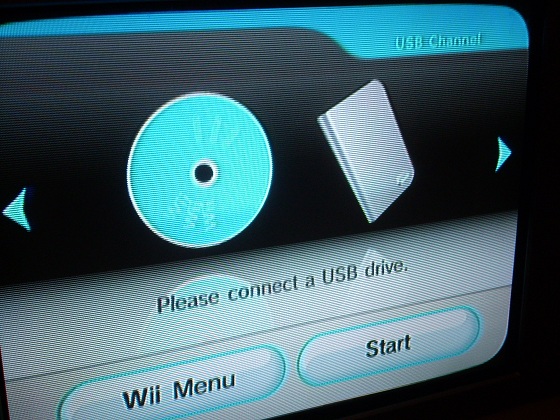
Sorry if this is a noob question, but I'm looking for this particular looking forwarder and am interested in getting it to load USB Loader GX:

2.JPG


I'm having difficulty even finding this forwarder (I googled for this image).
 

Site & Scene News

Popular threads in this forum