Hacking Nintendont

  • Thread starter Thread starter sabykos
  • Start date Start date
  • Views Views 10,170,058
  • Replies Replies 42,894
  • Likes Likes 194
How true is that Nintendont on Wii run games at better frame rates than GameCube?

This video claims that I don't believe it. @FIX94


Since Nintendont is running in Wii mode is has slightly more resources to work with so some games do get slightly better frame rates but it doesn’t help poorly coded games.
 
Since Nintendont is running in Wii mode is has slightly more resources to work with so some games do get slightly better frame rates but it doesn’t help poorly coded games.

But i thought when you put a GC game this basically runs the game like if it was a GC, i personally have never seen any performance increase on anything and i have no way of testing this. I'd like to hear FIX94 perspective on the matter..

EDIT:
My skepticism comes because if this was true it would be advertised as a feature for Nintendont and that is not the case.
 
Last edited by huma_dawii,
  • Like
Reactions: Alexander1970
But i thought when you put a GC game this basically runs the game like if it was a GC, i personally have never seen any performance increase on anything and i have no way of testing this. I'd like to hear FIX94 perspective on the matter..
Unfortunately @FIX94 seems to have dropped off the face of the Earth. We last heard from him back in 2019. There are loads of patches needed so the games can properly run in Wii mode. Any performance increase is unlikely to be noticeable anyway. There are a few games that do actually run better thank's to having more resources to work with and with some fancy coding.
 
If a game reinstates the deflicker filter despite forcing it off in Nintendont, try selecting "no" in response to the game's "enable progressive?" prompt. Seems to prevent the game from initialising the progressive display mode, part of which I'm guessing initialises the deflicker filter too. Works for Smugglers Run and Burnout 2, but not Starfox Adventures.
 
Last edited by NoobletCheese,
EDIT:
My skepticism comes because if this was true it would be advertised as a feature for Nintendont and that is not the case.
It's not advertised as a feature as it was never intended to be one. Some games run better but others do not. It's not consistent. It's game dependent. In fact I believe there was a game that actually ran at 1.5x speed on Nintendont. Along with another game that crashed if force progressive was selected as the game developers never coded that possibility despite it being released toward the end of the GameCube's life. Any games that run better are just a side-effect of it running in Wii mode and nothing more and are not always noticeable.
 
But i thought when you put a GC game this basically runs the game like if it was a GC, i personally have never seen any performance increase on anything and i have no way of testing this. I'd like to hear FIX94 perspective on the matter..

EDIT:
My skepticism comes because if this was true it would be advertised as a feature for Nintendont and that is not the case.
Games will only run faster if the CPU is bottlenecking them, and if the frameskip is dynamic rather than hardcoded.

This is a bit of an oversimplification, but you can notice that (for example) framedrops in the miasma streams in Crystal Chronicles are far rarer on Nintendont than on Gamecube (original hardware or MIOS)
 
Games will only run faster if the CPU is bottlenecking them, and if the frameskip is dynamic rather than hardcoded.

This is a bit of an oversimplification, but you can notice that (for example) framedrops in the miasma streams in Crystal Chronicles are far rarer on Nintendont than on Gamecube (original hardware or MIOS)
Why are you bringing up a GPU bottleneck as an example of a CPU bottleneck?
 
No idea, maybe i just have big hands? And the game i'm playing requires select and start buttons a lot.

--------------------- MERGED ---------------------------


Happened two times, and i've been using nintendont for 2 days
who clicks on home buttons by mistake? lol they are totally different from start and select, both start and select are buttons that are on the outside and home is really deep compared to them, its not a button one would accidentally click, so your saying if your playing regular wii games you constantly pressing home and bringing up the home screen overlay by accident? just seems to me you need to get used to the controller more...

Also nintendont has no graphic interface once the games are running and we cant stop the games either so we cant add prompts or stop the games so you can decided if you want to exit or not, nintendont is not an emulator where one could easily do that.

BTW the gamecube didnt have a select button so the select button only swaps face buttons on nintendont, so i have no idea what game you are playing where you need to press select on nintendont alot, since no gamecube game requires pressing select since gamecube controller had no such button.
 
Last edited by pedro702,
ADD. A. CONFIRMATION. TO. HOME. BUTTON.
THIS IS CRUCIAL.
Playing with a CC or CCP is EXTREMELY risky, because the START HOME and SELECT button are SO CLOSE. And guess what happens when you click the home button? YOUR GAME RESETS, COMPLETELY, WITHOUT ANY CONFIRMATIOM. And yes, that means that if you haven't saved in a while and accidentally press that button, yeah, you're f****d. Just because those buttons are so close.

SOLUTION?: Add a "Are you sure?" when you click the HOME button, that would help a lot.
Thanks.
this isn't the first time i see people mentioning this, i never had a problem with it myself but i can see why some people could find it annoying
i don't think it's possible to add overlays while in game, can the home button can be disabled in the controller config? or maybe a better idea could be changing the amount of time it has to be pressed for quitting the games, so if you press it accidentally nothing would happen
 
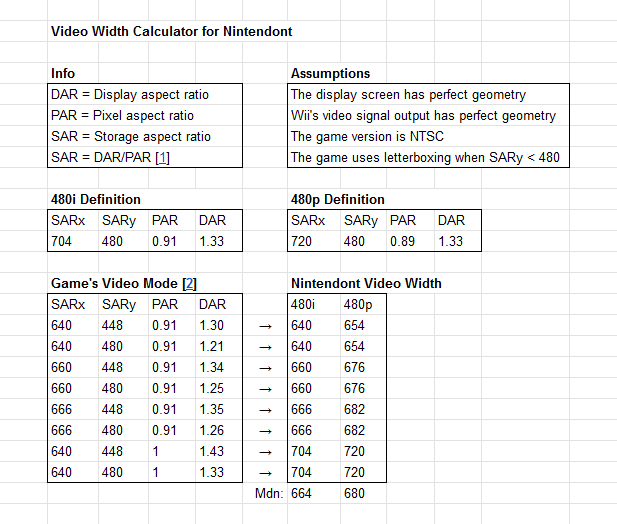
Regarding video width, it seems that a useful global default value may be 680 when Wii is outputting 480p.

Then if the game looks too skinny, try 720, or if it looks too fat, try 654.

This should get you to the correct setting by eye in only one reboot, for most games.

In USB Loader GX per-game settings, those width values are 80, 120 and 54 respectively.

Following is my justification for this value:

ImZfIm.png


Link to Google sheet
Link to big post
 
Last edited by NoobletCheese,
ADD. A. CONFIRMATION. TO. HOME. BUTTON.
THIS IS CRUCIAL.
Playing with a CC or CCP is EXTREMELY risky, because the START HOME and SELECT button are SO CLOSE. And guess what happens when you click the home button? YOUR GAME RESETS, COMPLETELY, WITHOUT ANY CONFIRMATIOM. And yes, that means that if you haven't saved in a while and accidentally press that button, yeah, you're f****d. Just because those buttons are so close.

SOLUTION?: Add a "Are you sure?" when you click the HOME button, that would help a lot.
Thanks.

I suspect inserting graphics into games is probably incredibly complex, a good compromise would be to simply press and hold home instead?
 
  • Like
Reactions: Phenj
Hello everyone. I'm trying to change the input mapping for the wiiU gamepad. How do I go about doing that?

The documentation mentions using a custom controller.ini file for hid controllers but also says the wiiU gamepad isn't recognized as an hid controller? Also I don't see a controller.ini file anywhere on my sd card or usb drive.
 
Hello everyone. I'm trying to change the input mapping for the wiiU gamepad. How do I go about doing that?

The documentation mentions using a custom controller.ini file for hid controllers but also says the wiiU gamepad isn't recognized as an hid controller? Also I don't see a controller.ini file anywhere on my sd card or usb drive.
bt controllers and wiiu gamepad are not hid therefore you cant change the layout of the buttons unless you recompile nintendont yourself and change it directly in the codding.

also pressing - button on wiiu gamepad does rotate the abxy buttons once and pressing it again rotates it back.
 
Could use some help getting my OEM GC controller working properly with Nintendont on my Wii U. Whenever I push the analog stick to the maximum position the character will move in the OPPOSITE direction of my analog stick. This problem only occurs when I push the stick all the way in a particular direction. So if I slightly push it in any direction the character will walk normally.

I have my controller connected to a Mayflash 4-port adapter. I have HIDTest loaded and I cannot figure out what exactly is wrong and how to fix it. Do I need to make a custom controller configuration? I have my HID Test screen uploaded.

I should note that I tested the controller using the same adapter on my PC and it works flawlessly.
 

Attachments

  • IMG-0071.jpg
    IMG-0071.jpg
    548.7 KB · Views: 110
Last edited by Talamatross,
I
Could use some help getting my OEM GC controller working properly with Nintendont on my Wii U. Whenever I push the analog stick to the maximum position the character will move in the OPPOSITE direction of my analog stick. This problem only occurs when I push the stick all the way in a particular direction. So if I slightly push it in any direction the character will walk normally.

I have my controller connected to a Mayflash 4-port adapter. I have HIDTest loaded and I cannot figure out what exactly is wrong and how to fix it. Do I need to make a custom controller configuration? I have my HID Test screen uploaded.

I should note that I tested the controller using the same adapter on my PC and it works flawlessly.
If I recall correctly I think other people had the exact same issue but I don't remember if they were using a GameCube controller or a different controller with analog sticks but I do remember it happening before.
 

Site & Scene News

Popular threads in this forum