Hacking Nintendont Controller-Configurations

  • Thread starter Thread starter Excelsiior
  • Start date Start date
  • Views Views 571,623
  • Replies Replies 901
  • Likes Likes 4
Hi all, I have an issue where two offsets change instead of one for both my DPAD and LSticks and I don't know what to do. I have attached controller config of my classic controller adapter and a picture of it. I'm making a new config cause the ones that are in the repo don't work and the offsets are much different. If some one could help that would be great :)
 

Attachments

  • Controller_WiiCCMayflash.txt
    Controller_WiiCCMayflash.txt
    729 bytes · Views: 290
  • IMG_20140823_093858.jpg
    IMG_20140823_093858.jpg
    270.6 KB · Views: 305
  • controller.txt
    controller.txt
    355 bytes · Views: 357
it is correct for you lol it was messed up in my side. anyway could you try this?


[MayFlash Wii CC USB Adapter]
VID=1D79
PID=0301
Polltype=1
DPAD=1
DigitalLR=2
Power=6,40
A=5,20
B=5,40
X=5,10
Y=5,80
Z=6,08
L=20,F0
R=21,F0
S=6,20
Left=5,06
Down=5,04
Right=5,02
Up=5,00
RightUp=5,01
DownRight=5,03
DownLeft=5,05
UpLeft=5,07
StickX=2
StickY=3
CStickX=0
CStickY=1
LAnalog=20
RAnalog=21


It is an altered controller I made, maybe it could work, maybe not. please let us know.

Thanks for trying to help. I did try it, but unfortunately, it didn't work, it made the shoulder L and R buttons unresponsive. I tested in Super Mario Sunshine.
 
Hi all, I have an issue where two offsets change instead of one for both my DPAD and LSticks and I don't know what to do. I have attached controller config of my classic controller adapter and a picture of it. I'm making a new config cause the ones that are in the repo don't work and the offsets are much different. If some one could help that would be great :)

Have you tested it with the normal classic controller?
 
Thanks for trying to help. I did try it, but unfortunately, it didn't work, it made the shoulder L and R buttons unresponsive. I tested in Super Mario Sunshine.
Start by doing your testing in HIDTest v.6
Go back to the origonal controller.ini test and report what isnt working.
I got as far as looking at the setting for the "A" button what was in the origonal file is correct for your data.
Remember the offsets start at 0 and for buttons the value you need to enter is only the part that changes.

VinsCool
yours could not work for the Shoulder L & R. You had DgitalLR=2 with LAnalog, RAnanlog, R,and L all pointing past the end of the data
 
Start by doing your testing in HIDTest v.6
Go back to the origonal controller.ini test and report what isnt working.
I got as far as looking at the setting for the "A" button what was in the origonal file is correct for your data.
Remember the offsets start at 0 and for buttons the value you need to enter is only the part that changes.

VinsCool
yours could not work for the Shoulder L & R. You had DgitalLR=2 with LAnalog, RAnanlog, R,and L all pointing past the end of the data


Howard - Thank you for responding. So, to clarify, I should take the original controller.ini file in the repository, test in HIDTest v.6, and report what wasn't working? I can do this again, but I had already did this, and reassigned a few values to correctly map to the buttons on the classic controller buttons, but never touched any R or L analog settings, because they were not detected in HIDTest v.6 this was for my classic controller with may flash classic controller to USB adaptor. All of the buttons were working for my games, except the analog settings on the shoulder buttons- they were not being detected in games.

To confirm, I do have the white classic controller, which I understand has the analog settings, vs the classic controller pro, which does not.
 
Howard - Thank you for responding. So, to clarify, I should take the original controller.ini file in the repository, test in HIDTest v.6, and report what wasn't working? I can do this again, but I had already did this, and reassigned a few values to correctly map to the buttons on the classic controller buttons, but never touched any R or L analog settings, because they were not detected in HIDTest v.6 this was for my classic controller with may flash classic controller to USB adaptor. All of the buttons were working for my games, except the analog settings on the shoulder buttons- they were not being detected in games.

To confirm, I do have the white classic controller, which I understand has the analog settings, vs the classic controller pro, which does not.
I would recomend starting over with the origonal controller.ini. Make sure it is in the root of the same drive as HIDTest. your changes definitly broke several buttons.
Your data didnt include L and not sure why you marked (Z) next to R
None of the 3 controller.ini files could work with L & R.
What is the raw data for L & R when half pressed and fully pressed. If their is no analog values coming from the adapter the they will need to be setup as digital
Which buttons are you having a problem with in the origonal controller.ini?
 
Just read bout this on the Dolphin Emulator website.

"XBOX 360 Controller emulator is a wrapper library that translates the XInput calls to DirectInput calls, for support non-XInput devices in new application (mostly games)".

360 controller support for Nintendont?

Source: https://code.google.com/p/x360ce/
 
  • Like
Reactions: cvskid
Hi,

i've created a controller.ini for the Logitech Cordless Rumblepad 2 :
logitech-cordless-rumblepad-2.jpg

Its based on settings of the F510 controller.
A,B,X,Y buttons are located in the way of the wii u gamepad / pro controller.

I'm having an issue with the this controller. The wireless USB adapter shuts off the instant I start Nintendont, and the controller won't sync after that, causing the .ini to fail to load. How would I go about fixing this?
 
I would recomend starting over with the origonal controller.ini. Make sure it is in the root of the same drive as HIDTest. your changes definitly broke several buttons.
Your data didnt include L and not sure why you marked (Z) next to R
None of the 3 controller.ini files could work with L & R.
What is the raw data for L & R when half pressed and fully pressed. If their is no analog values coming from the adapter the they will need to be setup as digital
Which buttons are you having a problem with in the origonal controller.ini?


I have uploaded and attached my original controller.ini file. It was setup to correctly map to my controller- every button- I had to make some changes from the original file to map the buttons correctly- basically the Z,L,&R buttons but when a game required analog l/r input (super mario sunshine, luigi's mansion, etc, the game would not register any analog button press). When I used HIDTest v6, it did not register any values on half press, only full press. Does that mean my controller isn't analog (only digital)? But I thought that the classic controller had analog shoulder buttons? Basically, the issue in the games I listed is that Mario's FLUDD Device doesn't spray water, and luigi's vacuum cleaner doesn't work.
 

Attachments

Ok, I got my PS3 controller working. I had to switch values for A and B because they were switched for some reason. But now I notice the analog triggers aren't working. They register as fully pressed when I barely touch them. Is there a way to fix this?
 
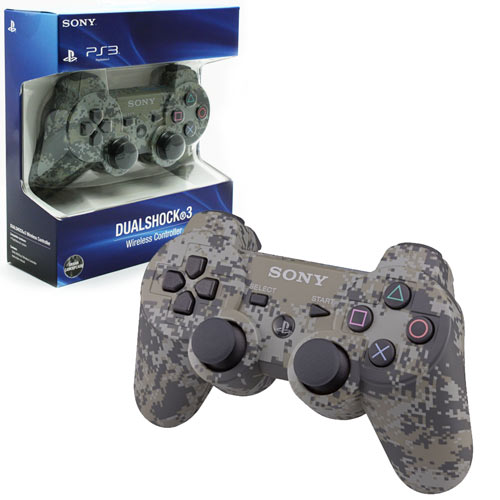
Tried this ps3 ini with my controller but it isn't working.
https://github.com/Nanolx/nintendont-controller/blob/master/controller_ps3.ini
Do only certain ps3 controllers work?
ps3_cont_camo.jpg

I have that exact same model and I can tell you it works just fine. Make sure you download the controller ini from here https://nintendon-t.googlecode.com/svn/trunk/controllerconfigs/controller_ps3.ini and place it at the root of your SD or USB that contains the games. So for ex I use a sd card and my games are in sd:/games/ so I'd place the ini in sd:/ Make sure you rename the ini to controller.ini

ALSO I had to reverse the A and B buttons because they were swapped for me. Just a heads up.
 
I have that exact same model and I can tell you it works just fine. Make sure you download the controller ini from here https://nintendon-t.googlecode.com/svn/trunk/controllerconfigs/controller_ps3.ini and place it at the root of your SD or USB that contains the games. So for ex I use a sd card and my games are in sd:/games/ so I'd place the ini in sd:/ Make sure you rename the ini to controller.ini

ALSO I had to reverse the A and B buttons because they were swapped for me. Just a heads up.
What about the L and R analog?
 

Site & Scene News

Popular threads in this forum