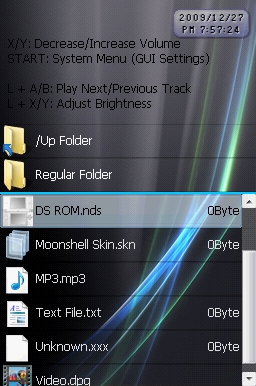
Homebrew Moonshell 2 Skin Previewer

Download link is broken... remove the second 'http//' from the url.
Code:
http://"http//filetrip.net/f9906-MS2-Skin-Previewer-1-3.html

Good link
tongue.gif
 
CannonFoddr said:
I've tried this On XP Pro - doesn't work (I tried Aero.skn).
When I try I get a quick flash of a screen (too quick to see what it says)
Even tried moving it to the root directory of C: drive just in case it something to do with long folder names - still no luck
This program really makes no sense to me. It seems that it is working, and supposedly it should have been able to work on windows xp or windows seven, but all that seems to be happening are contradictions everywhere xD.

twiztidsinz said:
Download link is broken... remove the second 'http//' from the url.
CODEhttp://"http//filetrip.net/f9906-MS2-Skin-Previewer-1-3.html
Good link

tongue.gif
Whoops xD. I was in a slight hurry.
 
jurassicplayer said:
CannonFoddr said:
I've tried this On XP Pro - doesn't work (I tried Aero.skn).
When I try I get a quick flash of a screen (too quick to see what it says)
Even tried moving it to the root directory of C: drive just in case it something to do with long folder names - still no luck
This program really makes no sense to me. It seems that it is working, and supposedly it should have been able to work on windows xp or windows seven, but all that seems to be happening are contradictions everywhere xD.
I'm going to hazard a guess at this - Could it be the version of skinmaker that's been used that MADE the skn that's the problem

You may not be able to 'unpack' a v2.05 skn with the modifed skinmaker that came may've came with v2.09
Perhaps some graphics names were changed between skinmakers which the modified skinmaker doesn't recognise ???

I've looked @ v2.09 skinmaker & that's 515Kb in size yet v2.01, v2.06-2.08 are 209Kb - the 'modified' skinmaker is 540Kb

EDIT: This is weird - I've just realised that the 'source code' is supplied with the skinmaker & had quick look at it (not that I know much about programming) but it LOOKS like it's a Delphi (or PASCAL) based language
The other weird thing is - the file sizes of the source are the same between v2.06-2.09 - so WHY is v2.09 nearly twice the size when it's compiled ???

Any PASCAL experts here who could 'reverse engineer' this - & come up with a unpacker ??
 
CannonFoddr said:
jurassicplayer said:
CannonFoddr said:
I've tried this On XP Pro - doesn't work (I tried Aero.skn).
When I try I get a quick flash of a screen (too quick to see what it says)
Even tried moving it to the root directory of C: drive just in case it something to do with long folder names - still no luck
This program really makes no sense to me. It seems that it is working, and supposedly it should have been able to work on windows xp or windows seven, but all that seems to be happening are contradictions everywhere xD.
I'm going to hazard a guess at this - Could it be the version of skinmaker that's been used that MADE the skn that's the problem

You may not be able to 'unpack' a v2.05 skn with the modifed skinmaker that came may've came with v2.09
Perhaps some graphics names were changed between skinmakers which the modified skinmaker doesn't recognise ???

I've looked @ v2.09 skinmaker & that's 515Kb in size yet v2.01, v2.06-2.08 are 209Kb - the 'modified' skinmaker is 540Kb

EDIT: This is weird - I've just realised that the 'source code' is supplied with the skinmaker & had quick look at it (not that I know much about programming) but it LOOKS like it's a Delphi (or PASCAL) based language
The other weird thing is - the file sizes of the source are the same between v2.06-2.09 - so WHY is v2.09 nearly twice the size when it's compiled ???

Any PASCAL experts here who could 'reverse engineer' this - & come up with a unpacker ??

I will have to take a look at it when(/if) I get Delphi installed but it could be either one of two things... The newest build might have debug information included in it -- which adds quite a bit of bloat -- or it might have 'controls' (encapsulated classes a la VB .ocxs) or graphics embedded into the .exe so there isn't a need for external dependencies.
 
QUOTE said:
CannonFoddr said:
....I'm going to hazard a guess at this - Could it be the version of skinmaker that's been used that MADE the skn that's the problem.....
.....You may not be able to 'unpack' a v2.05 skn with the modifed skinmaker that came may've came with v2.09
Perhaps some graphics names were changed between skinmakers which the modified skinmaker doesn't recognise ???....
.....The other weird thing is - the file sizes of the source are the same between v2.06-2.09 - so WHY is v2.09 nearly twice the size when it's compiled ???
.... it could be either one of two things... The newest build might have debug information included in it...... or it might have 'controls' (encapsulated classes a la VB .ocxs) or graphics embedded into the .exe so there isn't a need for external dependencies.
It might help but I've been doing some comparing between different MS versions & looking @ the changelogs

So far it seems that:
  • '2.00 Beta 1' has many more graphics than 'v2.00 Stable' (seems like *.PSD graphics have been removed)
  • '2.00 Beta 6' had many 'font' graphics removed ('Font32' / '48' and '64' mainly)
  • '2.00 Beta 12' (& Stable) had some Graphics added,some Graphics names have been changed & one graphic had a size change as well (Custom_BG.bmp)
  • Between '2.00 Beta' & 'v2.05' some other graphics have been added that are not shown in the changelogs but what I've actually found out when comparing actual filenames in various MS downloaded (Mainly 'MemoEdit*.png')
What version is the modified skinmake.exe from ??
 
The modified makeskin.exe was made with the source code of one of the more recent ones (before 2.10 stable). I believe it may be any of the ones 2.08+ since the post was made fairly recently.
The good part we can infer is that there aren't really any graphics added to the .exe, unless I've just really never been paying attention.
 
jurassicplayer said:
The modified makeskin.exe was made with the source code of one of the more recent ones (before 2.10 stable). I believe it may be any of the ones 2.08+ since the post was made fairly recently.
The good part we can infer is that there aren't really any graphics added to the .exe, unless I've just really never been paying attention.
Hmm I've tried an experiment - I used MS v2.06 stable for this

- I use original 'makeskin' to create 'default.skn' & tried modified 'makeskin' to unpack - No luck
Then tried modified 'makeskin' to create skn & then tried to UNPACK it straight away afterwards - still no luck

So I'm guessing that it CAN'T be down to the versions of MoonShell Skinmaker being the problem.
If the modified one creates but can't unpack the skin it makes - then IMHO it gotta be the program at fault, but why some1 has had success but others don't don't ???
 
jurassicplayer said:
The modified makeskin.exe was made with the source code of one of the more recent ones (before 2.10 stable). I believe it may be any of the ones 2.08+ since the post was made fairly recently.
Looks like, according to the date in the archive, it was made 2009-09-23, but took a week for linoul to find or upload it on 2009-10-02.

Going by either date, the most recent stable version it could have been is Moonshell 2.05, released on 2009/07/25, since 2.06 wasn't released until 2009/11/05, which is a full month after linoul posted the download.
(Dates taken from here: http://mdxonlinemirror.dyndns.org/index.html)
 
twiztidsinz said:
jurassicplayer said:
The modified makeskin.exe was made with the source code of one of the more recent ones (before 2.10 stable). I believe it may be any of the ones 2.08+ since the post was made fairly recently.
Looks like, according to the date in the archive, it was made 2009-09-23, but took a week for linoul to find or upload it on 2009-10-02.

Going by either date, the most recent stable version it could have been is Moonshell 2.05, released on 2009/07/25, since 2.06 wasn't released until 2009/11/05, which is a full month after linoul posted the download.
(Dates taken from here: http://mdxonlinemirror.dyndns.org/index.html)
Well I tried the same as I mentioned in last post - this time with v2.05 - still no luck
Even tried putting into root directory just in case it was down to long folder path - Nope

Quick question to those who've tried - whether you succeeded or not. What your Operating system setup. Could it be those with 64-bit works & those with 32-bit don't ??

Mine is: XP Professional 32-bit
 
CannonFoddr said:
Quick question to those who've tried - whether you succeeded or not. What your Operating system setup. Could it be those with 64-bit works & those with 32-bit don't ??
Isn't that kinda backwards?

Anyway, Windows 7 Ultimate x86.
 
twiztidsinz said:
CannonFoddr said:
Quick question to those who've tried - whether you succeeded or not. What your Operating system setup. Could it be those with 64-bit works & those with 32-bit don't ??
Isn't that kinda backwards?

Anyway, Windows 7 Ultimate x86.
Dam that's My theory out the windows then - 'cos that's 32bit isn't it ??
 
CannonFoddr said:
twiztidsinz said:
CannonFoddr said:
Quick question to those who've tried - whether you succeeded or not. What your Operating system setup. Could it be those with 64-bit works & those with 32-bit don't ??
Isn't that kinda backwards?

Anyway, Windows 7 Ultimate x86.
Dam that's My theory out the windows then - 'cos that's 32bit isn't it ??
Well, your theory is still possible... and yes x86 = 32bit.


Your theory is:
-- 32bit (x86) = Broken
-- 64bit (x64) = Works
Which is possible... as you and I do NOT have it working and are both on 32bit OS's.
But I say it's backwards since this isn't coded in 32bit and 64bit 'flavors'*, I have to assume it's 32bit only and when running on an x64 system, runs in compatibility mode for 32bit OS's, which to the best of my knowledge would only cause (more) issues, and not 'magically work better than on a 32bit system.

*Sorry... left over terminology from my high school programming teacher... he'd call something made for different setups 'flavors'.
 
twiztidsinz said:
CannonFoddr said:
twiztidsinz said:
CannonFoddr said:
Quick question to those who've tried - whether you succeeded or not. What your Operating system setup. Could it be those with 64-bit works & those with 32-bit don't ??
Isn't that kinda backwards?

Anyway, Windows 7 Ultimate x86.
Dam that's My theory out the windows then - 'cos that's 32bit isn't it ??
Well, your theory is still possible... and yes x86 = 32bit.....
....but I say it's backwards since this isn't coded in 32bit and 64bit 'flavors'*...........

*Sorry... left over terminology from my high school programming teacher... he'd call something made for different setups 'flavors'.
NP - you've had more 'professional' experience than I with programming (I'm 'self-taught' about 15 years ago) so you know more than I - although I vaguely remember something about 16/32-bit programs & IIRC there was something about 'integers' (or was that 'long integers' ??) & how 16-bit 'struggled' with some calculations while 32-bit worked OK. That's why I thinking about OS's MAY the reason - Of course my memory getting a little rusty anyway & I could just be talking c***
 
Awesome program, it really helped me a lot making my first moonshell skin (which is a lot of work btw xD)


anyway, excelent program, could be better if it displayed ALL the text(and color) I'm gonna be seeing on the actual ds, but still a great program


keep up the good work
yay.gif
 
Synt4x3rror said:
Awesome program, it really helped me a lot making my first moonshell skin (which is a lot of work btw xD)
anyway, excelent program, could be better if it displayed ALL the text(and color) I'm gonna be seeing on the actual ds, but still a great program
keep up the good work
yay.gif
Thanks for liking it and I'm sure everyone is hoping to see your skin xD (it is quite a bit of work).
I was going to have it display all of the text/color, but I wanted to figure out what was what in the colortbl.ini so it would be easier once I figure out if I can make a colortbl editor to go with it (the fact that my DS is busted really doesn't help the cause since I can't tell what the colortbl is changing). Come to think of it...all of my hindering problems would vanish if I could fix my DS...what a depressing thought xD.
But anyways, for now it will just be white.

If anyone could post screenshots of the three default screensavers, I would be grateful (I could align all of the numbers and stuff instead of the random stuff all over the place in the screen savers).
 
jurassicplayer said:
If anyone could post screenshots of the three default screensavers, I would be grateful (I could align all of the numbers and stuff instead of the random stuff all over the place in the screen savers).
AeroUltimate-ClockStandard.png
AeroUltimate-ClockDigital.png
AeroUltimate-ClockExtra.png


AeroUltimate-FileBrowser.png
AeroUltimate-Launcher.png
 
twiztidsinz said:
Thanks a ton! Now I just have to get past this week of torture (two 4-5 page and one 10 page essay, two major tests, etc.), and then I can start realigning everything xD.

-edit-
Another person who can get the makeskin.exe to unpack has XP, Vista, and Windows 7, though I don't know what "flavors" they are xD. I have tried with a Vista Home Premium SP2 64bit OS, and a windows XP SP3 32bit OS along with whatever my school computers are (also vista's and windows xp) and I still haven't gotten it to work -_-"...I'm really at a loss of how to make sense of this information xD.
 
To use it you really need 2 put the .skn in the folder of the skintool first with the .bat. After that just drag the .skn in the .exe in windows explorer "to open it with makeskin.exe"
 
No matter what I do, I can't seem to get the makeskin.exe to work correctly and unpack.


Anyways, just posting on the status of the previewer as it stands at this moment (though I'm not going to post up a new version until I at least get a majority of the words on the screens to follow the colortbl.ini, like "Exit to Firmware" etc.). I made the GUI window not have that space on the side that I constantly forget about.
There is a failure of a colortbl editor now xD (it has two color selectors that do nothing, an accept and cancel button, both of which work). The best that the colortbl editor can do at the moment is edit the author name xD.
Most of the screensavers have been realigned and look awesome. I just need to get a screenshot of the screensaver during the double digit hours and with the date time format as MMDDYYYY and then the screensavers will pretty much be perfectly aligned.
Also, I'll need this bit of information later but, what exactly are those particles that are disabled when "DisableParticles" is toggled on? (its in the colortbl.ini)

-edit-
Forgot to mention it, but as of the moment, the previewer is on hold for the next couple of days (I'm actually attempting to make a skin after 1000 years, but dam essays everywhere...)
 

Site & Scene News

Popular threads in this forum