Homebrew Mini vMac for 3DS

  • Thread starter Thread starter TarableCode
  • Start date Start date
  • Views Views 78,861
  • Replies Replies 220
  • Likes Likes 61
Thank you!
I'll have to integrate this into the build so it gets done automatically, in the meantime...

CIA Version available
Download it at the usual place, nothing else has been changed except the addition of the CIA file.
You still need to extract the other files in the proper place though :P
You can also integrate Steveice10's buildtools to autobuild a release including a zip with a .3dsx and CIA.
 
Hello.
I've been working on this for a while in fits and starts so here it is, the first release of Mini vMac for the 3DS.

https://github.com/TaraHoleInIt/mini-vmac-3ds-plus4M/releases

This version is the Macintosh Plus with 4MB variant, others may be supported later.
Make sure you have a valid Macintosh Plus ROM image and place it in /3ds/vmac/ along with the files in the release archive.

This is my first real release so if I messed something up please let me know.

More information about Mini vMac in general can be found at the author's site:
http://www.gryphel.com/c/minivmac/

Notes
Disk images must be auto loaded at runtime so make sure they're named diskX.dsk where X is 1 to how many images you want to load.
Have your OS image already to go before copying your disks to your 3DS as you cannot swap disks to complete the install on the 3DS.
There is no sound, and I haven't attempted to look into it yet.

Keys:
DPAD Is mapped to arrow keys
Select switches between scale modes on the upper screen
Start toggles the Mini vMac control mode interface
L and R Shoulder buttons are the mouse button
Y Toggles the on screen keyboard
Circle pad moves the mouse
Touchscreen moves the mouse
After shutting MacOS down properly, press L + R + Start to exit or use the control mode interface

zWN8SK2.jpg

ya3LZpe.jpg


If you are getting a flashing disk and nothing else, make sure your first disk image (disk1.dsk) is a valid bootable Mac System disk.
It's best to verify your disk images in the desktop version of Mini vMac before copying your disk images over to your 3ds.

I can make an HD showcase of this with my Capture Card if you would like me too. :)

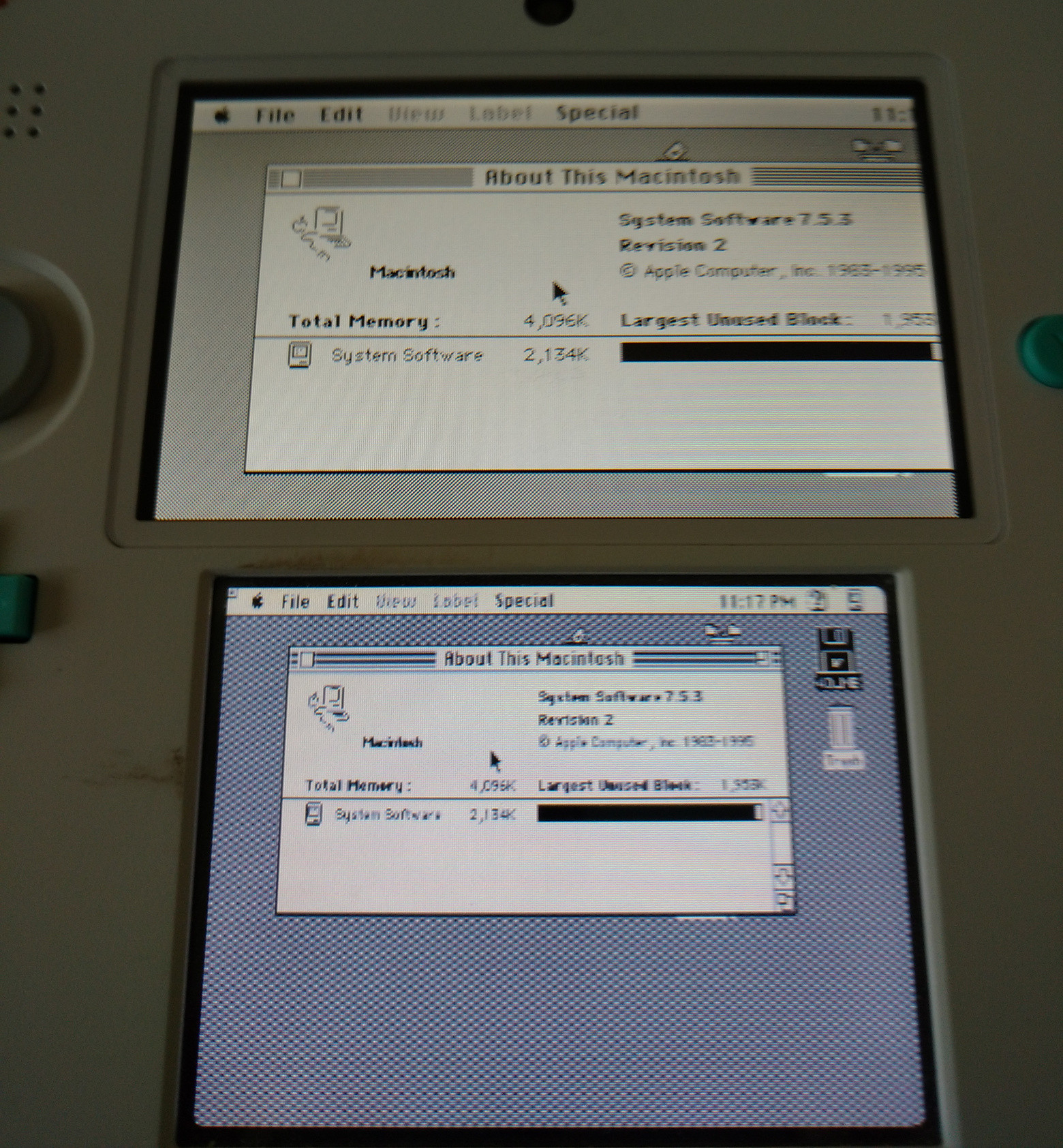
Proof if you would like to see it. I have also recorded video for both @shutterbug2000 and @Apache Thunder if you would like further "proof"

49thEHI.png
 
Last edited by ,
It will load up to disk6.dsk, considering there is no disk loading at runtime I might increase the number of disks to auto load.
Your best bet at the moment is to use the desktop version to make one big disk and put all your games on it.
 
Hm.
I'll bump up the number of disk images for the next release.

Here's what you can do possibly in the meantime:

1. Copy a zeroed out file with (x)MB of space you want
2. Name that disk image so it's auto loaded at startup
3. Let MacOS initialize the disk on startup
4. Copy over your files using Mini vMac on the 3DS

So you could in theory do it all by just renaming and swapping disk images around until everything is copied to the big disk.
 
I installed CIA version of vmac. I can not close the application with home button. It's stuck on the "closing application" screen.
Of course I shutdown the vmac from menu "special -> shutdown" first. I'm sorry if this is known issue.

My setup is corbenik CFW and Luma3DS, 11.0 FW-a9lh installed.
 
I installed CIA version of vmac. I can not close the application with home button. It's stuck on the "closing application" screen.
Of course I shutdown the vmac from menu "special -> shutdown" first. I'm sorry if this is known issue.

My setup is corbenik CFW and Luma3DS, 11.0 FW-a9lh installed.
Once you shut it down from the special menu hit L+R and Start at the same time to avoid that
 
  • Like
Reactions: Februarysn0w
Hm.
I'll bump up the number of disk images for the next release.

Here's what you can do possibly in the meantime:

1. Copy a zeroed out file with (x)MB of space you want
2. Name that disk image so it's auto loaded at startup
3. Let MacOS initialize the disk on startup
4. Copy over your files using Mini vMac on the 3DS

So you could in theory do it all by just renaming and swapping disk images around until everything is copied to the big disk.
Yeah OK I'll try this then
 
I installed CIA version of vmac. I can not close the application with home button. It's stuck on the "closing application" screen.
Of course I shutdown the vmac from menu "special -> shutdown" first. I'm sorry if this is known issue.

My setup is corbenik CFW and Luma3DS, 11.0 FW-a9lh installed.

I'll check when I get home, its a good possibility CIA apps need more support code to run properly.
Thank you for letting me know.
 
  • Like
Reactions: Februarysn0w
Small update

Added delay after exiting to prevent triggering the camera with the exit keys.
Added absolute mouse movement mode (Toggle with A, press C on keyboard to dismiss notice)
Increased the max number of disk images.
Fixed hang when being closed by the home menu.

I tried reducing the circle pad mouse speed but it just got too slow, I'm going to have to figure out how to handle the CStick entirely differently instead of treating it like a digital input.

https://github.com/TaraHoleInIt/mini-vmac-3ds-plus4M/releases/tag/1.0.2-Initial
 
Small update

Added delay after exiting to prevent triggering the camera with the exit keys.
Added absolute mouse movement mode (Toggle with A, press C on keyboard to dismiss notice)
Increased the max number of disk images.
Fixed hang when being closed by the home menu.

I tried reducing the circle pad mouse speed but it just got too slow, I'm going to have to figure out how to handle the CStick entirely differently instead of treating it like a digital input.

https://github.com/TaraHoleInIt/mini-vmac-3ds-plus4M/releases/tag/1.0.2-Initial
Awesome, how many disks can it load now?
 

Site & Scene News

Popular threads in this forum