Hacking Lameboy Emulator

  • Thread starter Thread starter Nenah
  • Start date Start date
  • Views Views 15,762
  • Replies Replies 22

Nenah

Member
Newcomer
Joined
Nov 8, 2007
Messages
18
Reaction score
0
Trophies
1
XP
11
Country
What hardware would i need to use to sucsessfully install a lameboy onto? ive tried with my M3 light but it wont work, what hardware does it work on?

Im looking to be able to properly play gameboy color games you see.

Thanks.
smile.gif
 
I downloaded this..

M3 Adapter (SD Card) - DLDI

But when i click onto that download file, it just asks me to choose a program to open it with, so i dont know what to do with this dowloaded DLDI file.

Sorry, im a stupid n00b i know!
 
^ Relax, we all start from some where
happy.gif


Search and download a program called DLDIrc with Google and install it. Select the DLDI file and patch the file by right click>your dldi file and you're done.
 
Ah thanks
smile.gif
most forums i post on dont bother helping me due to it.

I installed the program off google, version 0.71 and i followed the installation instructions then it gave me a huge list of DLIDI files and i looked down the list to find the one i download and clicked it, then it gave me a readme file but nothing else happened. What do i do from here?
 
no, ur not stupid, u just dont know the way mate
wink.gif


1. Download a DLDI patcher from the homepage. I recommend this one.
(http://news.gbatemp.net/dlditool-win32-gui.zip)

2. Download the appropriate DLDI patch for your flash cart.
(you've done this)

3. Select the DLDI file you want to use.

4. Select the homebrew you want to patch in the ‘binaries’ section.

5. Click ‘Patch’ and you’re done.

then copy the file on ur cart and run it.

source :http://gbatemp.net/?showtopic=45157

EDIT: look at my post and ur posts's time, as u were typing ur question, i was typing ur answer! kinda on same brain wavelength.
(hope u get through it)
 
Ah thanks
smile.gif
most forums i post on dont bother helping me due to it.

I installed the program off google, version 0.71 and i followed the installation instructions then it gave me a huge list of DLIDI files and i looked down the list to find the one i download and clicked it, then it gave me a readme file but nothing else happened. What do i do from here?
Right click on your homebrew file and select the DLDI option (can't remember exactly what it should say, sorry)

After that, a window appears with a bunch of text and ugly stuff. Hit any button (I recommend ENTER because.... I like that button...)

After that, a bunch more text shows up. After text stops being generated, you should get a message saying that your file has been successfully patched. Close the window and you're good to go
happy.gif
 
Thankyou loads you've all been so great.

So ive uploaded the M3 Adapter (SD Card) into the DLDI file part.

Now

What do i upload into the homebrew bit, the lameboy emulator or a .gbc game?


PS. : Do i follow this process for the DSmasterplus emulator on M3 Lite?
 
Execute Lameboy.nds from your M3. A file browser should show up (if a folder 'Lameboy' is absent in the root of your memory card). Navigate to your .gbc files and execute them within lameboy

Not really sure about DSMasterplus, sorry mate
frown.gif


EDIT: Well I'm off mate. If you got any more questions, PM me or someone else in this forum will handle it
happy.gif
 
Ive patched it sucssesfully and put the patched Lameboy file onto my M3's SD Card

Now to play gameboy color games, do i still run them through the M3 manager to change them to .gba files, or do i keep them as .gbc files?
 
Leave them as .gbc

I don't think you patch homebrew either on the M3(with the M3 manager, I think you just place it on the card. For the EZF4 you don't
unsure.gif
 
Thankyou
smile.gif
Do i change my Lameboy into a .gba file or leave it as a NDS file?

Also, can i put the Lameboy in the root of the SD card or do i put it in another folder?

ZAFDeltaForce, Thankyou very much
smile.gif
thanks for the offer and i will PM if you if help is needed, cheers.
 
Sorry for double posting, but ive got some pictures to help.

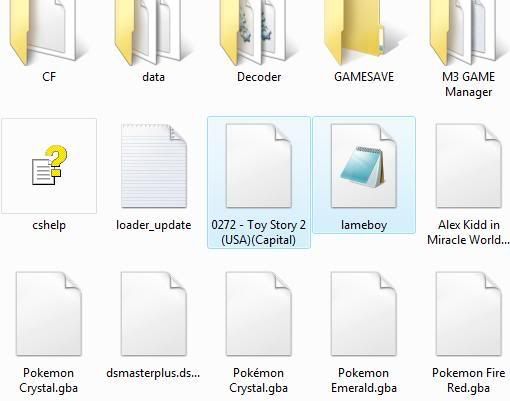
This is where i have my Lameboy on my SD card, and beside it a toy story 2.gbc game.

ELPIN.jpg


I left it like this, tried my DS and it wouldnt open the toy story 2 game as it still needed the goomba.gba file, meaning its not reading it through the Lameboy.

But the lameboy emulator cannot be find whilslt looking through the games list on my DS.

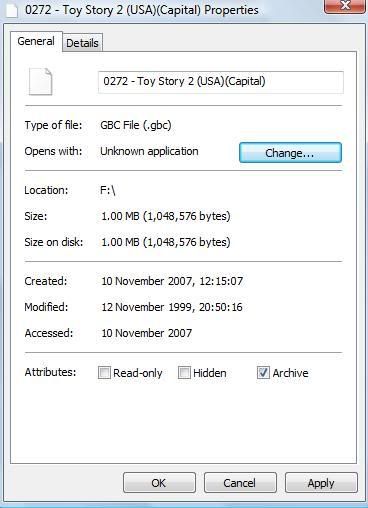
Do i need to do this by any chance..

elpin2.jpg


Then click "Change" and click the Lameboy?
 
you have to click on (consequentially running) lameboy.nds

then you select you gbc files.

pretty simple (i barely refrained myself from swearing here)
 
Do not patch anything with anything except for DLDI patching the lameboy.nds file. Put the patched lameboy.nds file on your card as well as the GBC file. Turn on your DS and launch lameboy.nds, not the GBC file. It will present you with a file listing on the bottom screen, where you select the GBC file to play.

A few possible things to consider if you're still having troubles:
1. Are you sure you're copying over the lameboy.nds file and not a text file? Your image shows the "lameboy" file being openable with Notepad, which doesn't seem right.
2. You say "But the lameboy emulator cannot be find whilslt looking through the games list on my DS." This implies to me that you're running the M3 in GBA mode. You must run it in DS mode for DS programs like Lameboy to be visible. Do you have a passthrough device in slot-1 to let you boot the M3 in DS mode?

If you don't have a passthrough device, then you can't use Lameboy and you'll have to keep using Goomba Color. If this is the case, be sure to grab the latest goomba.gba file from http://www.dwedit.org/dwedit_board/viewtopic.php?id=229
Go to the game manager program's folder in your C:\Program Files directory and find the place where the emulator cores are. One of them will be the old goomba.gba file renamed to something else (not entirely sure exactly what it will be called). Delete this one and replace it with the updated goomba.gba file, renaming it so it has the same filename as the file you just deleted.

 
Ive managed to do it now, to everyone who helped me, thankyou very much. :-) To some of the other people, just grow up and stop being so bloody nerdy, yeah i didnt understand, but you do...ooh thats bad, jesus christ have you even heard yourself? not everyone learns everything in a heartbeat, people like you put me off asking for help.

Why do I even bother thinking people are nice enough to help?
 
Do not patch anything with anything except for DLDI patching the lameboy.nds file. Put the patched lameboy.nds file on your card as well as the GBC file. Turn on your DS and launch lameboy.nds, not the GBC file. It will present you with a file listing on the bottom screen, where you select the GBC file to play.

A few possible things to consider if you're still having troubles:
1. Are you sure you're copying over the lameboy.nds file and not a text file? Your image shows the "lameboy" file being openable with Notepad, which doesn't seem right.
2. You say "But the lameboy emulator cannot be find whilslt looking through the games list on my DS." This implies to me that you're running the M3 in GBA mode. You must run it in DS mode for DS programs like Lameboy to be visible. Do you have a passthrough device in slot-1 to let you boot the M3 in DS mode?Â

If you don't have a passthrough device, then you can't use Lameboy and you'll have to keep using Goomba Color. If this is the case, be sure to grab the latest goomba.gba file from http://www.dwedit.org/dwedit_board/viewtopic.php?id=229
Go to the game manager program's folder in your C:\Program Files directory and find the place where the emulator cores are. One of them will be the old goomba.gba file renamed to something else (not entirely sure exactly what it will be called). Delete this one and replace it with the updated goomba.gba file, renaming it so it has the same filename as the file you just deleted.

2. Was my problem so i used my R4 to boot from Slot -1, thankyou for all the help you wrote above.
smile.gif
really apprecieate it.

xx
 

Site & Scene News

Popular threads in this forum