Hacking JGecko U Setup Guide

  • Thread starter Thread starter BullyWiiPlaza
  • Start date Start date
  • Views Views 416,125
  • Replies Replies 1,143
  • Likes Likes 27
Definitely don’t bother checking the pastebin link in my signature. You won’t find and BoTW cheat codes there.

Hehe
Lmao I didn't even notice that. Thank you :)

When I go to jgecko u though an error pops up saying the title id has not been found in the database. Would you mind explaining to me how to fix that please?
 
Lmao I didn't even notice that. Thank you :)

When I go to jgecko u though an error pops up saying the title id has not been found in the database. Would you mind explaining to me how to fix that please?


Yeah, you need to download the attached Titles.xml and place it in the same directory as JGecko U to fix the error.

See bully’s post on the previous page
 
Last edited by skoolzout1,
  • Like
Reactions: RedRose30
Hello, this program has been working for me for a while now until today, when I wiped everything and reinstalled Java. Now when I open the program I get the following error message (which prevents me from pressing the "Connect" button even if I have a valid IP entered). Is there anything I can do about this?

View attachment 143212
This bug is now fixed as well as the other one with the Cafe_OS_Syscalls URL.
 
Hello. I would hate to sound like a noob here, but I have a few questions regarding loading SD cheats and Mocha.

1. Do I have to use the modified Mocha CFW in order to get the SD access for the cheats? (I use CBHC v1.6)
2. Do I need a PC for using the SD cheats (GCTU)? I haven't used cheats for Wii U in a long time, so I don't remember much. All I remember is how to use J Gecko U and the TCP Gecko Installer, plus toggling cheats on and off via JGU.
3. Is there a way to use SDCaffeine and SD Cheats at the same time? Kinda like Riivolution on the Wii where modded game files and cheat codes were used simultaneously.

Thanks to anyone who gives me answers regarding this.
 
Hello. I would hate to sound like a noob here, but I have a few questions regarding loading SD cheats and Mocha.

1. Do I have to use the modified Mocha CFW in order to get the SD access for the cheats? (I use CBHC v1.6)
2. Do I need a PC for using the SD cheats (GCTU)? I haven't used cheats for Wii U in a long time, so I don't remember much. All I remember is how to use J Gecko U and the TCP Gecko Installer, plus toggling cheats on and off via JGU.
3. Is there a way to use SDCaffeine and SD Cheats at the same time? Kinda like Riivolution on the Wii where modded game files and cheat codes were used simultaneously.

Thanks to anyone who gives me answers regarding this.
1. I believe that you must use Mocha CFW specifically; if you use Flump's mod of CBHC, you can autoboot Mocha easily and launch everything fairly quickly with Mii Maker.
2. You need to generate the GCTU with your PC first, but after that everything is on-console. You don't need a PC at all. Keep in mind that some cheats will inherently crash games with this method though (e.g. in MK8 some codes crash the when loaded outside the race, so some GCTU files will crash the game since GCTU files load cheats 24/7)
3. This is an upcoming feature of WUPS (Wii U Plugin System) but not available yet.
 
1. I believe that you must use Mocha CFW specifically; if you use Flump's mod of CBHC, you can autoboot Mocha easily and launch everything fairly quickly with Mii Maker.
2. You need to generate the GCTU with your PC first, but after that everything is on-console. You don't need a PC at all. Keep in mind that some cheats will inherently crash games with this method though (e.g. in MK8 some codes crash the when loaded outside the race, so some GCTU files will crash the game since GCTU files load cheats 24/7)
3. This is an upcoming feature of WUPS (Wii U Plugin System) but not available yet.
Ahh thanks. I wanted to load some Smash 4 game mods with cheats such as having Giga Bowser, Giga Mac, etc become killable yet you can still select them via a modded CSS. Btw, why do I need this specific mod of CBHC if I can just press Home to manually boot Mocha CFW?
 
Ahh thanks. I wanted to load some Smash 4 game mods with cheats such as having Giga Bowser, Giga Mac, etc become killable yet you can still select them via a modded CSS. Btw, why do I need this specific mod of CBHC if I can just press Home to manually boot Mocha CFW?
You don't; it's more of a convenience thing.
 
Hello, and thanks in advance for your help. I am a bit older gamer, and I do not have so much time to "invest" in gaming so I use trainers to help me in certain cases.

Anyway, is there any way to find collection of trainers and cheat codes on one place which can be used with Jgecko? For example, cosmocortney.ddns.net does not work any more.
Something like geckocodes.org for Wii.

I have PAL Wii U console.

Thank you all.
 
Hello, and thanks in advance for your help. I am a bit older gamer, and I do not have so much time to "invest" in gaming so I use trainers to help me in certain cases.

Anyway, is there any way to find collection of trainers and cheat codes on one place which can be used with Jgecko? For example, cosmocortney.ddns.net does not work any more.
Something like geckocodes.org for Wii.

I have PAL Wii U console.

Thank you all.
There is no "good" database kind of website, unfortunately.
 
  • Like
Reactions: CuriousTommy
I've found moonjump code for twilight princess. How does activate it with SD code?
Code:
Moon Jump (Press left stick)
03000000 102F49A9
00000004 00000000
00120000 10681E40
12800000 13800000
0000002C 42800000
D0000000 DEADCAFE
 
So I have been trying to memory mod Mario Maker using the tutorial at http://themindhero.com/smemod.png and found that it used gecko dotnet instead of Jgecko u. I couldn't get gecko dotnet to do a memory search (it kept disconnecting halfway) and when I did it with Jgecko u, it worked, except the tutorial said to find the portion of memory 1 left and 2 down from the address I searched for, and Jgecko u appears to be organized differently. Any help?
 
Last edited by ,
What is JGecko U?
It's a gecko cheating client & RAM Debugger for PC (Windows, Mac and Linux).

Why not just use TCP Gecko.NET?
  • JGecko U is written in Java and is platform-independent
  • JGecko U has a cheat code manager
  • JGecko U has less bugs
  • JGecko U has exclusively been written for the Wii U so no broken features
  • JGecko U is still in development
  • JGecko U works on every Wii U firmware alike
  • JGecko U has a remote procedure call tab
  • JGecko U has a few other unique features
Where can I see it in action?
Here.

Is there anything I have to install on my computer?
Yes, Java. Following this tutorial.

Great, how do I use JGecko U now?
Here is a video tutorial for setting up your SD Card and Wii U for using JGecko U (caution: slightly outdated):

Required download links:
Homebrew Launcher
TCP Gecko Installer <- You HAVE to use this one. If you don't and complain I will hit you :wink:
JGecko U

Your SD Card should contain the following files and folders:
Code:
wiiu/apps/homebrew_launcher/icon.png
wiiu/apps/homebrew_launcher/homebrew_launcher.rpx
wiiu/apps/homebrew_launcher/meta.xml

wiiu/apps/tcpgecko/tcpgecko.elf
wiiu/apps/tcpgecko/icon.png
wiiu/apps/tcpgecko/meta.xml

The TCP Gecko files can all be downloaded from here.

NOTE:
I recommend using the updater for JGecko U and TCP Gecko (instead of collecting the files manually).

How do I get SD card cheats working?
I made a video for this:


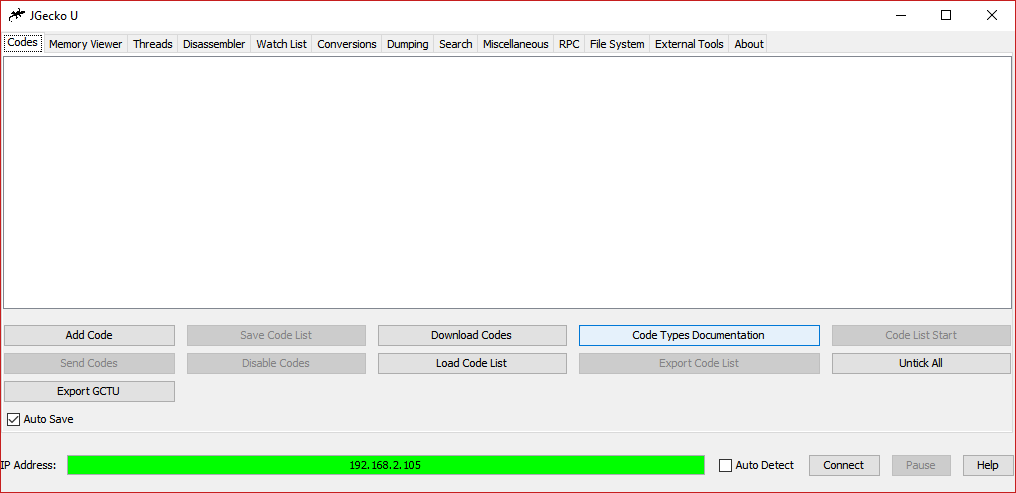
How does the program interface look like?
nvun8psn.png
Please give me an idiot-friendly step-by-step written guide for JGecko U codes:
1. Download JGecko U.jar.
2. Make sure you have JRE (Java Runtime Environment) installed.
3. Double click JGecko U.jar like any other *.exe file (JGecko U will create files and folders in its current directory on the first start so you may want to place it in a separate folder).
4. Put in the IP Address of your Wii U into the "IPv4 Address" field and press the "Connect" button.
5. Press the "Add Codes" button in the "Codes" tab.
6. Enter the name of the cheat code (in the "Title" field) and the code itself (in the "Code" field). Press "OK".
7. Repeat step 5 and 6 if you have more codes.
8. Check the codes you want to activate and press the "Send Codes" button.

The codes should now be active in-game.

(Thanks tastymeatball for this post)

When I try to use a splatoon code txt, it wont load. do i neede older jar file?
 
  • Like
Reactions: SubLoverD

Site & Scene News

Popular threads in this forum