

Hacking [Help] Certain apps don't appear

  • Thread starter Thread starter etshelden
  • Start date Start date
  • Views Views 1,462
  • Replies Replies 7

etshelden

Well-Known Member
Newcomer
Joined
Dec 30, 2015
Messages
67
Reaction score
7
Trophies
0
Age
33
XP
167
Country
United States
EDIT: Resolved, thanks!


I've installed a few apps today via loadiine, and while Homebrew Launcher and ddd show up, loadiine GX2 and nnu-patcher don't. (However, I can get loadiine GX2 to load by selecting that option under loader or whatever it's called)

The apps are compiled in my SD card correctly (under /root/wiiu/apps/), and here is a screenshot of the apps folder and the files in them.
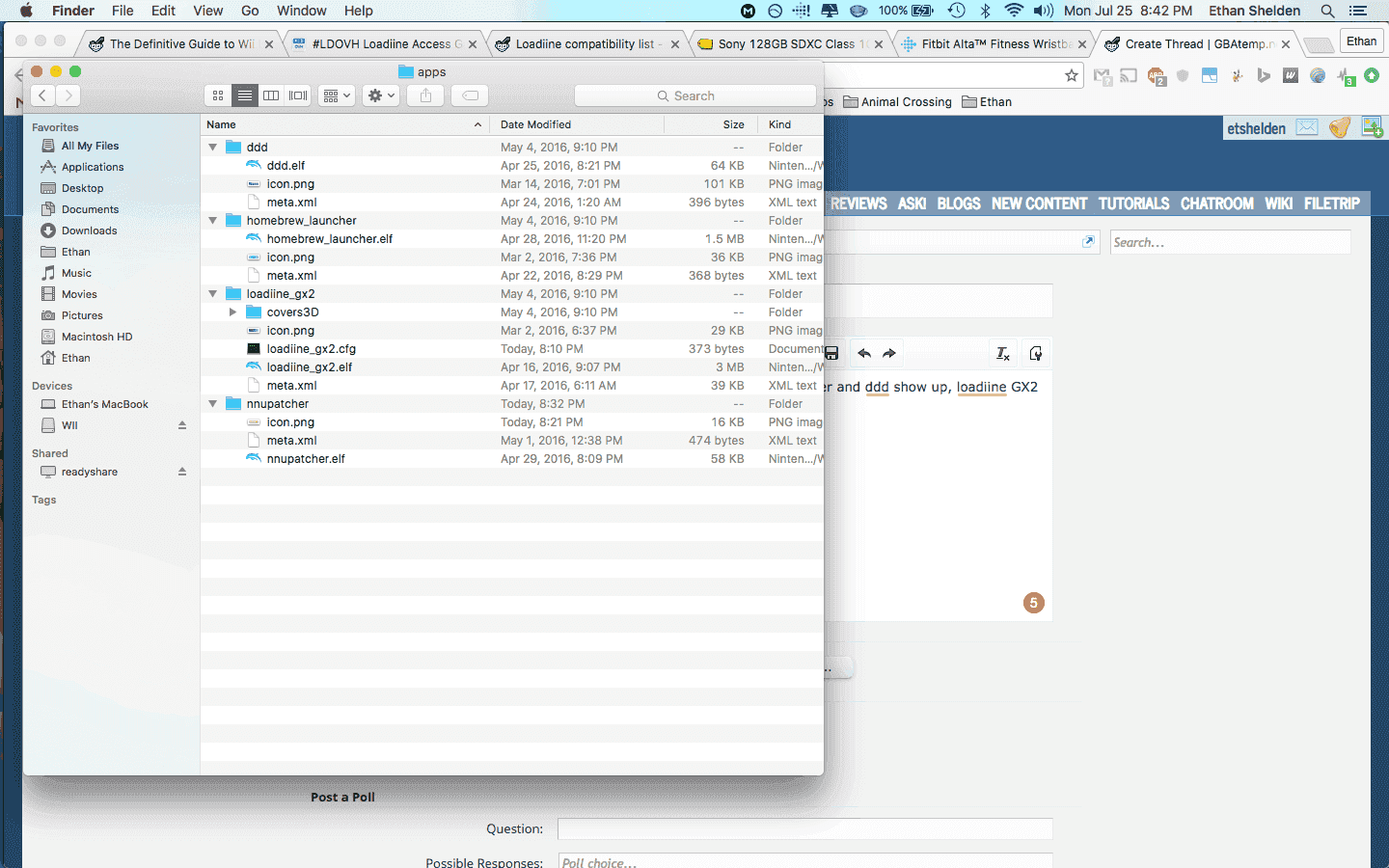
Screen Shot 2016-07-25 at 8.42.34 PM.png


I've tried loading with 1.2 RC3 and Illuminati, neither work. My firmware is 5.5.1 U.

If anyone could offer advice on how to get these to work, that'd be great!
 
Last edited by etshelden,

Oh if only the gods would take pity on us mere mortals and create a sticky (pin to the top of the 1st page) that could answer questions like these.

Installation


You need to extract the latest loadiine release to your SD card:
SD:/wiiu/apps/loadiine_gx2/loadiine_gx2.elf
SD:/wiiu/apps/loadiine_gx2/icon.png
SD:/wiiu/apps/loadiine_gx2/meta.xml

Source:
http://gbatemp.net/threads/loadiine-gx2.413823/

https://github.com/dimok789/loadiine_gx2/releases

List of changes:
https://github.com/dimok789/loadiine_gx2/commits/master

All that being said, you are on a Mac and may have hidden files that some apps do not play nice with.
 
Last edited by Bug_Checker_, , Reason: Sorry, impossible to bold sometimes depending on the device
Oh if only the gods would take pity on us mere mortals and create a sticky (pin to the top of the 1st page) that could answer questions like these.

Installation


You need to extract the latest loadiine release to your SD card:
SD:/wiiu/apps/loadiine_gx2/loadiine_gx2.elf
SD:/wiiu/apps/loadiine_gx2/icon.png
SD:/wiiu/apps/loadiine_gx2/meta.xml

Source:
http://gbatemp.net/threads/loadiine-gx2.413823/

All that being said, you are on a Mac and may have hidden files that some apps do not play nice with.

Very funny. If you looked at the screenshot, that's exactly what is there... Deleted the other files. Will test again in the morning.

However, what would be the reason for nnupatcher not loading?

Thanks!
 
This may sound odd, but try adding one more app to your sd card. HBL makes a new page for every 4 apps, and I've found that sometimes when all the apps don't load on the first page, switching to the second page and back makes them appear.
 
  • Like
Reactions: Bug_Checker_
This may sound odd, but try adding one more app to your sd card. HBL makes a new page for every 4 apps, and I've found that sometimes when all the apps don't load on the first page, switching to the second page and back makes them appear.
Hmm, I'll try that and let you know the results in the morning.

Thanks for the tip!
 
This may sound odd, but try adding one more app to your sd card. HBL makes a new page for every 4 apps, and I've found that sometimes when all the apps don't load on the first page, switching to the second page and back makes them appear.
Bingo, this just worked for me, thanks!
 
  • Like
Reactions: Bug_Checker_
Great news. Please report the first post with a request to change title to:
[Solved][Help] Certain apps don't appear
 

Site & Scene News

Popular threads in this forum