Hacking RELEASE Firmware Version Inspector - get FW version from NAND dump

  • Thread starter Thread starter shchmue
  • Start date Start date
  • Views Views 46,343
  • Replies Replies 119
  • Likes Likes 38
Can someone tell me what's wrong and what i'm missing? I've done all I can to try to figure Python on but, man i'm just lost :wacko: Trying to fix my switch but, don't remember what firmware version was on this when I backed it up.

How about installing the pycryptodome module like it is told on 1st page?
 
Hi, i'm trying this here Python stuff and got pretty far, but cannot seem to fix this error below. Installed the 32-bit version, did the pip install and renamed the Crypto folder to crypto. But still not getting the results. Any idea? Also tried to rename all the subfolders to use lowercase letters at the beginning of the foldername.. no lucky. Also, don't know if there should be an XTSN subfolder in site-packaged\crypto, but there is not.

upload_2019-6-7_0-48-7.png
 
Last edited by JungleJackNL,
I fixed my issue. Maybe i have overlooked this part, but if someone runs into this issue; on Github there is a file named crypto,py and the file needs to be placed in the root of Phyton. Maybe it was just dumb to not download it, but i didnt. Now it works.
 
Hi, I tried to install the command "
pip install pycryptodome"
but I always have this error
 

Attachments

  • errorePIP.PNG
    errorePIP.PNG
    6 KB · Views: 176
Hey guys, getting the "/Contents/ not found" error some users experienced before.
As far as I know, my Keys should be correct (copied them from the prod.keys file and split the 64-digit part up into two 32-digit parts, just like a user reported before)

Any ideas?

/Edit: Maybe related, but when I try dumping my keys with lockpick, I get an error that says I should reboot and try again (which I did and didn't work)

/EDIT2: My bad. Seems like my Keys were wrong... Dunno why. They were created by LockPick. biskeydump, however, provided the correct keys.
Looks like my Backup was made on 3.0.2 :)
 
Last edited by FajitaJohn,
I am getting this error:

> python FVI.py -b=device.keys .\full.00.bin
Firmware Version Inspector - by shchmue

Usage: FVI.py [-b=/path/to/biskeyfile] <dumpfile>
biskeyfile must contain the following lines:
BIS Key 2 (crypt): <32-digit hex key>
BIS Key 2 (tweak): <32-digit hex key>
or
bis_key_02 = <64-digit hex key>
omit -b if System partition already decrypted (eg. dumped with HacDiskMount)
dumpfile must be NAND dump (eg. Hekate rawnand.bin dump) or System partition


This is my format device.keys file:
secure_boot_key = asdf
tsec_key = asdf
device_key = asdf
bis_key_00 = asdf
bis_key_01 = asdf
bis_key_02 = asdf
bis_key_03 = asdf


I am using a splitted nand from SX OS and a device.keys (from biskeydump).

 
Last edited by profiden,
I am getting this error:

> python FVI.py -b=device.keys .\full.00.bin
Firmware Version Inspector - by shchmue

Usage: FVI.py [-b=/path/to/biskeyfile] <dumpfile>
biskeyfile must contain the following lines:
BIS Key 2 (crypt): <32-digit hex key>
BIS Key 2 (tweak): <32-digit hex key>
or
bis_key_02 = <64-digit hex key>
omit -b if System partition already decrypted (eg. dumped with HacDiskMount)
dumpfile must be NAND dump (eg. Hekate rawnand.bin dump) or System partition


This is my format device.keys file:
secure_boot_key = asdf
tsec_key = asdf
device_key = asdf
bis_key_00 = asdf
bis_key_01 = asdf
bis_key_02 = asdf
bis_key_03 = asdf


I am using a splitted nand from SX OS and a device.keys (from biskeydump).
i think the error is due to the `.\` syntax but also this tool unfortunately does not support split dumps. good idea for a feature, since many people use them

edit: that syntax is fine, maybe it's the relative path to the bis key file? either way it's not going to work on a split dump right now
 
Last edited by shchmue,
i am getting this error

H:\My Switch Backup\Backup 4.1>python FVI.py -b=keys.txt rawnand.bin
python: can't open file 'FVI.py': [Errno 2] No such file or directory
 

C:\Users\mrc48>AppData\Local\Programs\Python\Python37-32>python FVI.py D:\switch games\nand\biskeydump.txt D:\switch games\nand\rawnand.bin
'AppData\Local\Programs\Python\Python37-32' is not recognized as an internal or external command,
operable program or batch file.


Honestly have no idea what I'm doing. this is where I am so far.
 
Last edited by DarthFern,

C:\Users\mrc48>AppData\Local\Programs\Python\Python37-32>python FVI.py D:\switch games\nand\biskeydump.txt D:\switch games\nand\rawnand.bin
'AppData\Local\Programs\Python\Python37-32' is not recognized as an internal or external command,
operable program or batch file.


Honestly have no idea what I'm doing. this is where I am so far.
where did you install python?
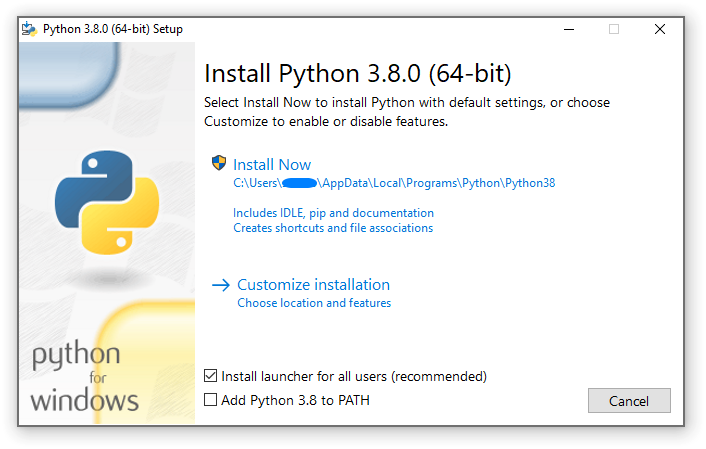
and did you select add python to PATH while installing?

win_installer.png


although I think I have an idea on where you install it so try this
Code:
%HOMEPATH%\AppData\Local\Programs\Python\Python37-32\python.exe FVI.py -b="D:\switch games\nand\biskeydump.txt" "D:\switch games\nand\rawnand.bin"
 
Hi guys. I'm trying to check the firmware of my first backup.

I tried using Python 3.7 64bit on windows 10, but I got the same error again and again saying it didn't found the BIS keys.

So I tried with Python 32bit, but now it says this:

E:\test>python FVI.py [-b=biskeydump64.txt] rawnand.bin
Traceback (most recent call last):
File "FVI.py", line 9, in <module>
from Crypto import XTSN
File "E:\test\Crypto.py", line 2, in <module>
from Crypto.Cipher import AES
ModuleNotFoundError: No module named 'Crypto.Cipher'; 'Crypto' is not a package
 
where did you install python?
and did you select add python to PATH while installing?

although I think I have an idea on where you install it so try this
Code:
%HOMEPATH%\AppData\Local\Programs\Python\Python37-32\python.exe FVI.py -b="D:\switch games\nand\biskeydump.txt" "D:\switch games\nand\rawnand.bin"


C:\Users\mrc48>C:\Users\mrc48\AppData\Local\Programs\Python\Python37\FVI.py -b="D:\switch games\nand\biskeydump 2.txt" "D:\switch games\nand\rawnand.bin"
Firmware Version Inspector - by shchmue

Dump is full EMMC raw NAND.
Traceback (most recent call last):
File "C:\Users\mrc48\AppData\Local\Programs\Python\Python37\FVI.py", line 187, in <module>
crypt = bytes.fromhex(line[key_index:key_index+0x20])
ValueError: non-hexadecimal number found in fromhex() arg at position 0


I reinstalled everything and tried again. Closer but not sure what this error means.
 

C:\Users\mrc48>C:\Users\mrc48\AppData\Local\Programs\Python\Python37\FVI.py -b="D:\switch games\nand\biskeydump 2.txt" "D:\switch games\nand\rawnand.bin"
Firmware Version Inspector - by shchmue

Dump is full EMMC raw NAND.
Traceback (most recent call last):
File "C:\Users\mrc48\AppData\Local\Programs\Python\Python37\FVI.py", line 187, in <module>
crypt = bytes.fromhex(line[key_index:key_index+0x20])
ValueError: non-hexadecimal number found in fromhex() arg at position 0


I reinstalled everything and tried again. Closer but not sure what this error means.
that's to do with the format of your bis key file. what's it look like?
 

Site & Scene News

Popular threads in this forum