Hacking EZ Flash Omega Micro SD initial error!

StanleyHammer

New Member
Newbie
Joined
Apr 5, 2020
Messages
4
Reaction score
1
Trophies
0
Age
28
XP
73
Country
United States
I just bought the EZ Flash Omega, i have followed the instructions for setup and I keep getting the error "Micro SD initial error!".

I am using a Game Boy micro (model OXY-001)
The Micro SD card I am using is a SanDisk ImageMate microSDXC UHS-I 128GB, it is formatted as exFAT 32kb
I have attempted reformatting, cleaning the contacts, making sure the screw is tight, and jiggling the cartridge.

When I turn the system on (holding R) it shows the gameboy logo screen, then the ez flash logo screen, then shows the initial error screen (image below)
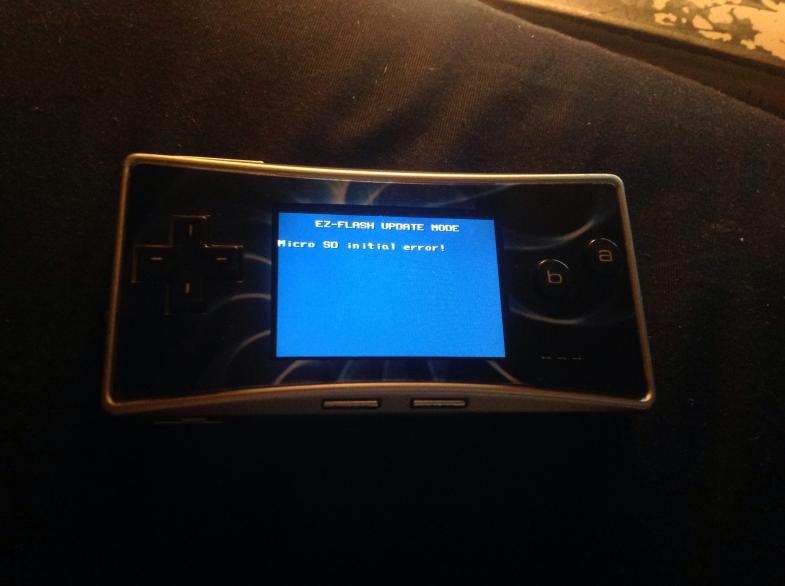
image0.jpg


Any help would be appreciated
 
I just bought the EZ Flash Omega, i have followed the instructions for setup and I keep getting the error "Micro SD initial error!".

I am using a Game Boy micro (model OXY-001)
The Micro SD card I am using is a SanDisk ImageMate microSDXC UHS-I 128GB, it is formatted as exFAT 32kb
I have attempted reformatting, cleaning the contacts, making sure the screw is tight, and jiggling the cartridge.

When I turn the system on (holding R) it shows the gameboy logo screen, then the ez flash logo screen, then shows the initial error screen (image below)

View attachment 202490

Any help would be appreciated
Try a smaller card 2-4-8-16GB
 
Update:

I got a different Micro SD card (Onn 32gb) and it works just fine now.
Out of curiosity I got a second SanDisk ImageMate 128gb and tried it, to no avail.
It seems like the system just doesn't like the SanDisk 128gb cards.
 
  • Like
Reactions: anotherthing
I had the same problem, maybe because I had formatted the sdcard putting "ez" as the label. I quickly reformatted without a label with a generic sdcard formatter.
I haven't tried to update the kernel.
now works.
 
  • Like
Reactions: sjenky
I have the SD initial error. Hadn't used it for about a year and when I got back to it got the error.
Nothing on the internet worked.
What end up working is I got my hot air station, 400C, lots of flux and then heated the main chip for a minute or two.
Works now:P
 
Last edited by steelseth,
  • Like
Reactions: Sterophonick
I had the same problem, maybe because I had formatted the sdcard putting "ez" as the label. I quickly reformatted without a label with a generic sdcard formatter.
I haven't tried to update the kernel.
now works.
THANK YOU! I'm a pretty technical guy but I spent an hour trying online 'solutions' to get it to work. Using a basic sdcard formatter fixed it instantly (from sdcard.org). I have a feeling that the windows formatter is what causes issues for most people, so I signed up to say thanks and hope others find this solution too.
 
I have the SD initial error. Hadn't used it for about a year and when I got back to it got the error.
Nothing on the internet worked.
What end up working is I got my hot air station, 400C, lots of flux and then heated the main chip for a minute or two.
Works now:P
hi guys:
i had the same issue with the “SD Card Initial” error.
I’ve reflow the back chips as previously mentioned (400C hot air station a a lot of flux) and now it works!

Nothing to do with the SD itself, it’s a weird BGA chip issue …
 

Site & Scene News

Popular threads in this forum