Hacking [Essentials] AceKard Skins

  • Thread starter Thread starter PanzerWF
  • Start date Start date
  • Views Views 162,269
  • Replies Replies 198
  • Likes Likes 1
^ No probs - & if there's any others you'd like from there - Let me know & I'll do the same thing

EDIT: Actually - I think I'll do it anyway
(Those without pictures means there weren't any in the forum to 'borrow')


previewxy0.gif
http://filetrip.net/f11068-Bumblebee-Skin-1-0.html
DSRed Skin: http://filetrip.net/f11047-Acekard-Forum-D...wnload-1-0.html
DS Skin: http://filetrip.net/f11062-Acekard-Forum-DS-Skin-1-0.html
Halo Skin: http://filetrip.net/f11050-Acekard-Forum-Halo-Skin-1-0.html
Handmade Skin: http://filetrip.net/f11051-Acekard-Forum-H...e-Skin-1-0.html
SkinOne Skin: http://filetrip.net/f11057-Acekard-Forum-S...e-Skin-1-0.html
WinXp - Silver Skin: http://filetrip.net/f11059-Acekard-Forum-W...r-Skin-1-0.html
 
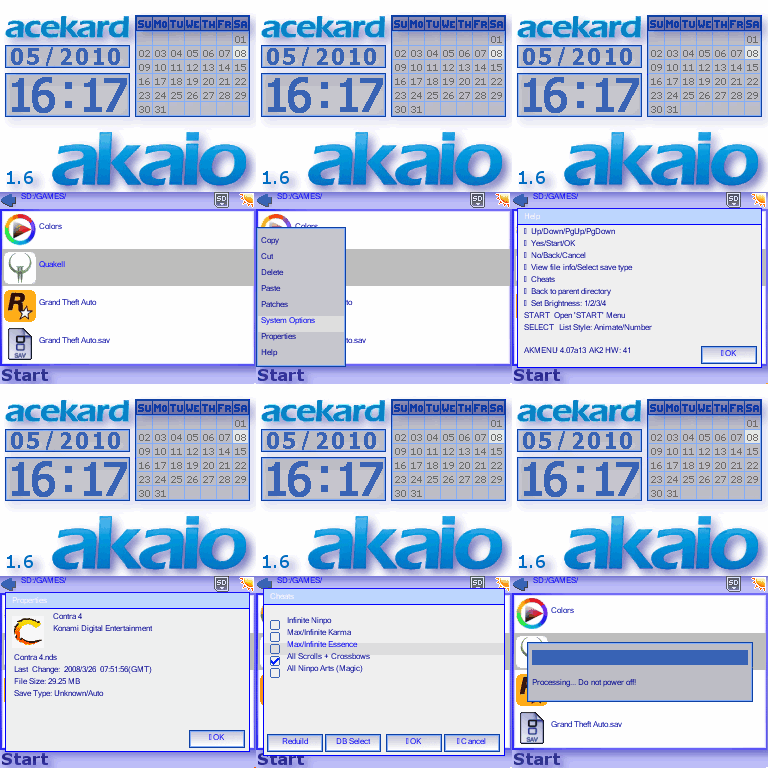
i think this is the best rendition of my basic AKAIO theme so far, i did a lot of small tweaks and added some eyecandy dropshadow for it to have a look of professionalishness.

..and it goes real good on the DS screens, RayRay
11100-preview.gif

AKAIO_DropShadow
 
This is my FIRST ever skin for the Acekard 2!!!

Skin: Pokemon Black

Preview:
050208550.gif


Download: Click Here

-------------------------------------------------------------------------------------
Finished the Pokemon White Skin! (Just a Colour edit and few changes...)

Skin: Pokemon White

Preview:
050211991.gif


Download: Click Here

---------------------------------------------------------------------------------------

I would appreciate some comments and suggestions for first skins!
biggrin.gif

If there are any problems or bugs just tell me!
 
VatoLoco said:
i think this is the best rendition of my basic AKAIO theme so far, i did a lot of small tweaks and added some eyecandy dropshadow for it to have a look of professionalishness.

..and it goes real good on the DS screens, RayRay
11100-preview.gif

AKAIO_DropShadow

Sweet, thank you very much. I have to say, this is my favourite theme.

I always use different themes, but this is the one I always come back too.
grog.gif
yaynds.gif
 
JohnLoco said:
exangel said:
Smoothe edges man, really like it.

I apparently didn't make the calendars deep enough for this month, I am thinking of making another version of BRS theme that looks proper in months that have 6 weeks. Time to fire up the desktop!
happy.gif
Thanks

Edit:
brs2.gif

available at http://filetrip.net/f11117-Acekard-2i-Blac...-Theme-1-0.html right now.
after NDSThemes moderator approval it will also be at http://www.ndsthemes.com/themes/details/t/5d51cd15b7 I believe.
 
tajio said:
This is my FIRST ever skin for the Acekard 2!!!

Skin: Pokemon Black

*snip

Skin: Pokemon White

*snip*

I would appreciate some comments and suggestions for first skins!
biggrin.gif

If there are any problems or bugs just tell me!
Hate to tell you, but you're using the wrong title pictures for both of the skins. The japanese in the black skin says Pocket Monsters White, and the white skin says Pocket Monsters Black. It probably doesn't matter that much, but I just wanted to point it out. I don't know how hard making a skin is, but all you have to do is switch the japanese titles.
 
fedgerama said:
tajio said:
This is my FIRST ever skin for the Acekard 2!!!

Skin: Pokemon Black

*snip

Skin: Pokemon White

*snip*

I would appreciate some comments and suggestions for first skins!
biggrin.gif

If there are any problems or bugs just tell me!
Hate to tell you, but you're using the wrong title pictures for both of the skins. The japanese in the black skin says Pocket Monsters White, and the white skin says Pocket Monsters Black. It probably doesn't matter that much, but I just wanted to point it out. I don't know how hard making a skin is, but all you have to do is switch the japanese titles.


I lol'd

Pretty epic for first skin though O.o
 
BlueDS neatest skin imo

damn you cannonfoddr for posting the cobra skin - took long enough to get the image of that ass out of my mind last time i saw it.
 
coattails said:
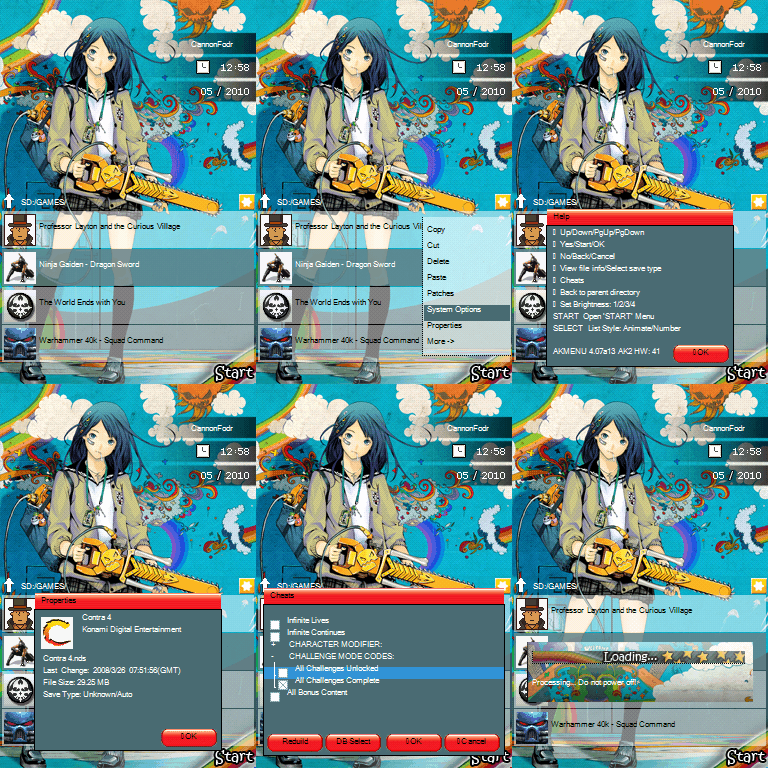
Can anyone fix this skin or give me some tips/instructions on how to do it myself?

http://www.ndsthemes.com/themes/details/t/8bcf09a501

The skin looks amazing, but it just turns into discolorated gibberish on my DS screen when I load it up... How do I go about fixing a theme like this?
I've had a quick look using AKEdit - it seems some of the graphics are NOT 16-bit format, & this is a reason why graphics look like 'discolored garbage'

Give us a little while (I'm 'working' at the moment) & I'll see what I can do
 
CannonFoddr said:
coattails said:
Can anyone fix this skin or give me some tips/instructions on how to do it myself?

http://www.ndsthemes.com/themes/details/t/8bcf09a501

The skin looks amazing, but it just turns into discolorated gibberish on my DS screen when I load it up... How do I go about fixing a theme like this?
I've had a quick look using AKEdit - it seems some of the graphics are NOT 16-bit format, & this is a reason why graphics look like 'discolored garbage'

Give us a little while (I'm 'working' at the moment) & I'll see what I can do

EDIT: I noticed my fix causes the pictures to have pixelation, use CannonFoddr's.

I fixed it and I also added in the proper calender files.

http://www.mediafire.com/?wzjiyym3gmn
 
Exaltys said:
CannonFoddr said:
coattails said:
Can anyone fix this skin or give me some tips/instructions on how to do it myself?

http://www.ndsthemes.com/themes/details/t/8bcf09a501

The skin looks amazing, but it just turns into discolorated gibberish on my DS screen when I load it up... How do I go about fixing a theme like this?
I've had a quick look using AKEdit - it seems some of the graphics are NOT 16-bit format, & this is a reason why graphics look like 'discolored garbage'

Give us a little while (I'm 'working' at the moment) & I'll see what I can do
I fixed it and I also added in the proper calender files.

http://www.mediafire.com/?wzjiyym3gmn
Dam he beat me to it - anyway - there's a copy on filetrip now as well @ http://filetrip.net/f11226-Chainsaw-Girl-Skin-1-0.html

4608801224_f4519f216b_o.gif
 
Exaltys: How did you convert yours by the way ???? - did you use AKEdit by any chance.....
If so then that explains the pixelation of it... It's known fact (just not very well known) that AKEdit will 'convert' ALL graphics in a skin even if it's only just one that is 'wrong'
(it's mentioned in this WIKI)

FYI - The way I've done it (although it IS long winded) is to use 'GIMP'
I load in the graphic (usinfg 'Drag-&-Drop') then

'File' > 'Save As' > [Save] > [Replace] (the existing file) > 'Advanced Options' > Select 16-bit 'X1 R5 G5 B5' option > [Save]
 

Site & Scene News

Popular threads in this forum