Hacking Error code - 160-2713 - USB drive

  • Thread starter Thread starter markmcrobie
  • Start date Start date
  • Views Views 24,872
  • Replies Replies 16

markmcrobie

Well-Known Member
Member
Joined
May 24, 2008
Messages
623
Reaction score
24
Trophies
1
XP
1,287
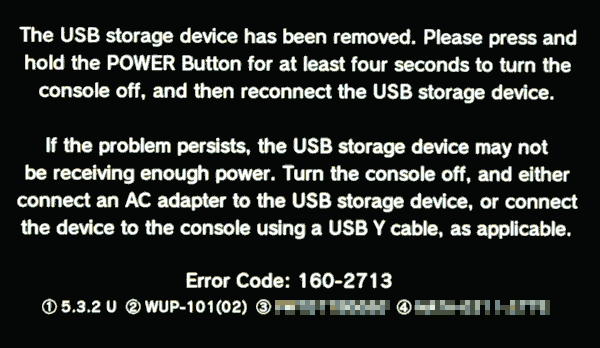
I've been installing games using WUP Installer to a USB2 320GB hard drive. They work fine, but 3 or 4 times now I've had a black screen error on Wii U with the Error code - 160-2713. It says something to do with not enough power.

I'm not using a Y cable currently (I have one ordered from Amazon), but the drive has worked fine in the same Wii U as a vWii backup loader previously, with no issues. I also Googled the error and found some people with Y cables till get the error, so thought I'd ask here anyway.

If I used a 64GB or 128GB USB thumb drive instead, would that be less prone to this error? What about an externally powered USB desktop drive?

I don't want to install loads of games and start playing them only to find I have to install them all over again on a new drive!

Thanks
 
I'm on 5.5.1, but this image grabbed from Google shows the same wording:


wiiu-error-160-2713.gif
 
Turned that off already, and it's a new-ish WD USB3 drive. I've had the same problem with an older Seagate USB2 drive


Sent from my iPhone using Tapatalk
 
Plug the hard drive into a windows PC and download seatools, then run a long generic scan on it (it will take a while)

As long as you don't format anything the data on the drive should be fine
 
Last edited by DanTheMan827,
I get the same error with my 2.5" USB drive. It's a CnMemory Airy 2.5 USB 3.0 drive with a 750GB Toshiba drive inside, using a Y cable. The error comes up seemingly at random when starting games, but also sometimes during games when the drive was idle for a bit, or when installing updates. Also, sometimes starting a game takes a lot longer than normally. I thought that it might go into sleep mode, so I opened the enclosure (it was not made to be opened >.<) and checked the APM values on a PC. It's set to 254, so it should never spin down and it also doesn't sound like it spins down. I can also rule out a lack of power, since the same error happens when I power it through its 5V input with a 2.5A power brick. I even switched out the drive in the enclosure for a 250GB WD one, but I get the same error.

With an older 3.5" USB drive it works perfectly fine, no issues at all.
 
I've been installing games using WUP Installer to a USB2 320GB hard drive. They work fine, but 3 or 4 times now I've had a black screen error on Wii U with the Error code - 160-2713. It says something to do with not enough power.

I'm not using a Y cable currently (I have one ordered from Amazon), but the drive has worked fine in the same Wii U as a vWii backup loader previously, with no issues. I also Googled the error and found some people with Y cables till get the error, so thought I'd ask here anyway.

If I used a 64GB or 128GB USB thumb drive instead, would that be less prone to this error? What about an externally powered USB desktop drive?

I don't want to install loads of games and start playing them only to find I have to install them all over again on a new drive!

Hi I've had the same issue where I have downloaded a wii u game off of USB helper then downloaded the game on the USB stick directly from wup installer, and after an update when I go to launch the game it just crashes and gives me this error, and somehow i managed to fix it. All I did was delete the update in the downloads manager tehn launched the game without the update and it worked, after I saw that the game worked I just reinstalled the update and waited and there u go it should be fixed
 
This happens a lot since it's Nintendo's fault on making it terrible with USB sticks and the fact the format it uses sucks and can get corrupted, happened to me and I lost all my save data and games.
 

Site & Scene News

Popular threads in this forum