Homebrew Custom Theme Thread

okay i'm pretty late but for my first try i made a Depeche Mode 3DS Theme for fans of Depeche Mode ( with pimpf as bgm for the menu )
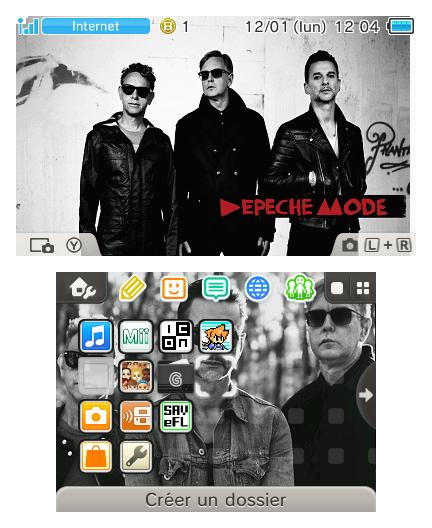
B7JRHslIUAAhDC5.jpg

download : https://www.dropbox.com/s/l00rzetvswe1fdw/DepecheModeTheme.rar?dl=0

More themes from me are coming i'm working on a Phoenix Wright atm :)

 
okay i'm pretty late but for my first try i made a Depeche Mode 3DS Theme for fans of Depeche Mode ( with pimpf as bgm for the menu )
B7JRHslIUAAhDC5.jpg

download : https://www.dropbox.com/s/l00rzetvswe1fdw/DepecheModeTheme.rar?dl=0

More themes from me are coming i'm working on a Phoenix Wright atm :)

Nice Work. But remember that the picture on the top screen must have a 412x240 Resolution not 400x240. That's the reason why you have the white stripe on the right side. The white corner on the top left can you remove with LZ11 and EFE.
 
dronesplitter I love your themes... especially the Earthbound ones as you already know. Could I request a Giygas related one? Maybe with his creepy ass music and his face in the background? Would be awesome but no worries if you don't feel like it. :yaysp:
 
I considered a Giygas theme, actually. But that was when I made the lumine hall theme instead. I will mull around what to do with a Giygas one - I want it to have a good idea behind how it looks :)

And thanks for saying you especially like the EarthBound themes. Those are also my favorites.
 
  • Like
Reactions: Ryft
  • Like
Reactions: MaNiAlJoWo
You can fix the color with Every File Explorer and LZ11. First decrompress your body_LZ.bin with LZ11. Rename your folder icons from bmp to png and put them in the explorer and save again. After that you must compress your body_LZ.bin with LZ11.
 
  • Like
Reactions: MaNiAlJoWo
Quick question - has the base theme in the theme creator been changed? I see a lot of these themes now use the base color scheme rather than the Bullet Bill/Black theme. What changed? Did someone release a theme with those colors by manually editing the colors of the theme in hex?
 
You know what the only let down is the fact you cant save your themes in your theme list and you need to keep changing them on your SD-Card, don't get me wrong I'm not complaining one bit but such a shame, so many good themes that I would luv to save in my list instead of Ninti's crappy goes!

Edit: Is there no way of overwriting Nintendo's themes instead and saving these or do you have to have one bin file on your sd-card for each theme you want and chop & change?
 
You know what the only let down is the fact you cant save your themes in your theme list and you need to keep changing them on your SD-Card, don't get me wrong I'm not complaining one bit but such a shame, so many good themes that I would luv to save in my list instead of Ninti's crappy goes!

Edit: Is there no way of overwriting Nintendo's themes instead and saving these or do you have to have one bin file on your sd-card for each theme you want?

that´s only possible with a cfw. hope there will be a solution in the near future.
 
You can fix the color with Every File Explorer and LZ11. First decrompress your body_LZ.bin with LZ11. Rename your folder icons from bmp to png and put them in the explorer and save again. After that you must compress your body_LZ.bin with LZ11.

EveryFileExplorer doesn't have a recompresss option for LZ11. At least my version doesn't. It only has decompress in the menu list. It has recompress feature for other compression formats though, but don't think they are same as LZ11 though....
 
EveryFileExplorer doesn't have a recompresss option for LZ11. At least my version doesn't. It only has decompress in the menu list. It has recompress feature for other compression formats though, but don't think they are same as LZ11 though....

Maybe my english isn´t good enough. I meant two different programs. Every File Explorer AND LZ11.
 

Site & Scene News

Popular threads in this forum