Gaming Computer Died

  • Thread starter Thread starter .Chris
  • Start date Start date
  • Views Views 2,243
  • Replies Replies 16

.Chris

Clueless
Member
Joined
Feb 20, 2009
Messages
2,196
Solutions
4
Reaction score
69
Trophies
1
Location
United States
XP
888
Country
United States
Well, my old Vaio running Windows XP has died a long time ago. Anyone else had a computer that died in the past? Does anyone know how to fix this? (I know i ask too many questions...)

 
Well i did a funeral last time xD

Can you be a little more specific with the Died? it can be hardware or software problems
 
Goten said:
Well i did a funeral last time xD

Can you be a little more specific with the Died? it can be hardware or software problems
um lets see...
my dad was trying to replace the hard drive and it didnt work. he put back the old hard drive but still didnt work
thats all i know
 
Old hard drives crap out all the time. Use a tester and try to see if it's busted, even a few bad sectors can kill the thing for good
 
Make sure it's plugged in to the right place? If its an IDE drive it might be in the wrong plug on the motherboard.
 
Need more detailed information; what happens when you try to turn the computer on? Any lights, fans, beeping noises? Nothing at all? There's lots of things that can go wrong with a computer, we'll need info like that if we're going to get any closer to the reason why it's not working
smile.gif
 
Law said:
Make sure it's plugged in to the right place? If its an IDE drive it might be in the wrong plug on the motherboard.
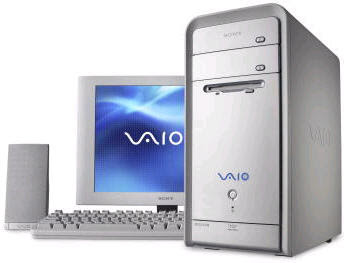
he said he has a Sony Vaio computer, I think that implies its a laptop.
so there should be only 1 plug available from the HDD slot, and it could be either SATA or IDE depending on the age of the computer...
 
Costello said:
Law said:
Make sure it's plugged in to the right place? If its an IDE drive it might be in the wrong plug on the motherboard.
he said he has a Sony Vaio computer, I think that implies its a laptop.
so there should be only 1 plug available from the HDD slot, and it could be either SATA or IDE depending on the age of the computer...
Sony_Vaio_Desktop.jpg


USER WAS BANNED FOR THIS POST
 
Psyfira said:
Need more detailed information; what happens when you try to turn the computer on? Any lights, fans, beeping noises? Nothing at all? There's lots of things that can go wrong with a computer, we'll need info like that if we're going to get any closer to the reason why it's not working
smile.gif
when i turn on the computer i hear a fan then after a after a few seconds the computer just shuts down
 
that's a short-circuit.

look at the the connectors you / he touched - make sure there are no bent pins on them.
and make sure there arent any missing screws that may have dropped onto anything.
 
steve-p said:
that's a short-circuit.

look at the the connectors you / he touched - make sure there are no bent pins on them.
and make sure there arent any missing screws that may have dropped onto anything.
no bent pins no missing screws i havent dropped anything
 
DaDownloadMan said:
myuusmeow said:
Sony_Vaio_Desktop.jpg


USER WAS BANNED FOR THIS POST
um what?
That was a joke. People use those to humor others. Allow me to explain:

Costello, a current administrator of this forum, stated that he believed that Sony Vaio's were laptops, not thinking that they had a desktop series. Myuusmeow posted proof that there was a desktop series of the Vaio. Making it into a joke implying that Costello would over react, myuusmeow added "USER WAS BANNED FOR THIS POST" which is a common text string that replaces a post that in turn bans a user. It was a joke. Feel free to laugh now though, explained jokes aren't that funny.
mellow.gif
 

Site & Scene News

Popular threads in this forum