Homebrew RELEASE BackupNX

  • Thread starter Thread starter SegFault42
  • Start date Start date
  • Views Views 13,487
  • Replies Replies 40
  • Likes Likes 19
This is beautiful! Backing up my Checkpoint saves atm.
Hope you use plutonium when you develop the gui.


EDIT:If I were to do this multiple times, this would automatically overwrite without issue, correct?
 
Last edited by JonJaded,
yes i will work to add gdrive and next owncloud B-)
Do What The F*ck You Want To Public License

My favorite kind of license :evil:

I did not realize dropbox's API was simple rest.

gdrive uses oath and an app_id, which:

a) google can revoke your app ID at any time.

b) the user must give your app permission via web browser, which is a little troublesome on the switch. I believe you can launch the switch's web browser to the application permission screen, have the user login to the gdrive, give permission. Once the user gives permission you need to get the oath token back to your app (I have not researched this yet, but you might be able to copy how rclone does it).

Not impossible, but a pain in the dick :)
 
I'm meaning the creation of the .json , where can I get it , etc .

The format is in the OP. It's just a text file that ends with .json
Usage :

You need cred.json file in /switch/BackupNX/

{
"cloud-provider" : "Dropbox",
"key" : "YOUR-API-KEY"
}

Also ran into an issue, not all of my Checkpoint directory gets backed up to Dropbox. Probably because some of the folder names are too long. (Which sucks, I know it's not something you can fix.) Maybe switching over to another cloud service might allow for longer folder names.
 
  • Like
Reactions: matias3ds
Hi,

Hi guys, I just pre-released my new homebrew BackupNX. It's a homebrew to sync your files to Dropbox.

Initially, i wrote this tool to upload all my saves state in dropbox when i use Checkpoint. But you can upload what you want.

It's a pre-release, i have a lot of things to add like progress bar, better UI, upload on Gdrive, Mega ....

Feel free to report bugs.

Hope it will be usefull for you.

Usage :

You need cred.json file in /switch/BackupNX/

{
"cloud-provider" : "Dropbox",
"key" : "YOUR-API-KEY"
}


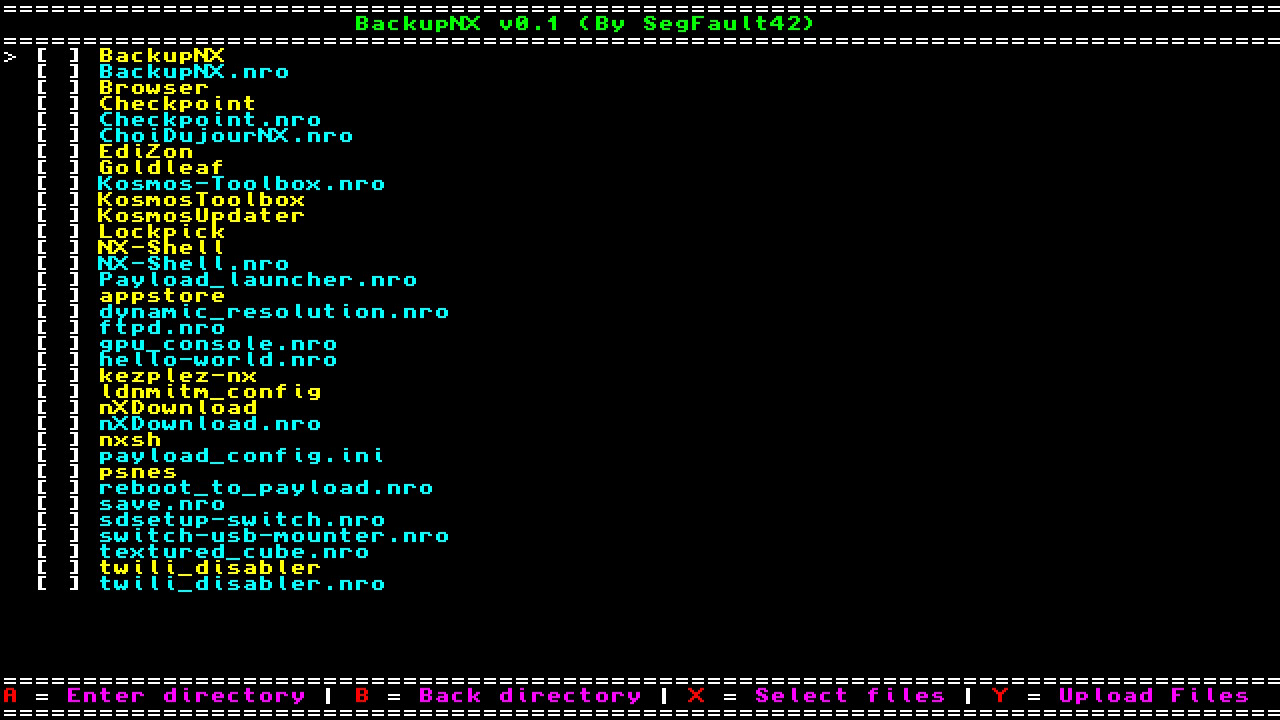
60921186-32a75080-a29a-11e9-939d-4385a4bfcc7c.jpg


60921268-5cf90e00-a29a-11e9-9cf7-7185016e0912.jpg


https://github.com/segfault42/BackupNX

good work, may I suggest that you add a function that checks a custom folder/file? My thinking is we can create our own file/folder so we can specify which things we'd like backed up. Maybe like a scheduled backup function with this. Like if you play a game all the time and you don't always backup. You could set an "auto-backup" feature so that way it backs up whatever you specify. One example could be like backup this every 24hrs or 1week.
also, this should currently work with your own servers, just specify your server api key and domain I believe.
 
Last edited by laramie,
what else do people use for their saves? manual backup?
i use this program pretty much exclusively. i dont mind the UI, except a little spacing and sorting by game id name, plus editable home directory, would make this truly great.
thank you.
 
Awesome app!
Could you add option to download from dropbox ? That way i can sync some saves between PC and Switch (Divinity Original Sin 2 and Zelda Breath of the Wild)
 
  • Like
Reactions: jasonhk and falcorr
When I initiate a backup, the folder gets created in dropbox but no files get moved. Can anyone help me?
 
Hi,

Hi guys, I just pre-released my new homebrew BackupNX. It's a homebrew to sync your files to Dropbox.

Initially, i wrote this tool to upload all my saves state in dropbox when i use Checkpoint. But you can upload what you want.

It's a pre-release, i have a lot of things to add like progress bar, better UI, upload on Gdrive, Mega ....

Feel free to report bugs.

Hope it will be usefull for you.

Usage :

You need cred.json file in /switch/BackupNX/

{
"cloud-provider" : "Dropbox",
"key" : "YOUR-API-KEY"
}


60921186-32a75080-a29a-11e9-939d-4385a4bfcc7c.jpg


60921268-5cf90e00-a29a-11e9-9cf7-7185016e0912.jpg


https://github.com/segfault42/BackupNX
Could you explain the steps for the Dropbox access token?
I have create a app on Dropbox and generated the access token full access,
put on the cred.json, and run the NRO.
When I press Y:upload, it is no response, no success and no error message?:unsure:
I think may be my access token issue? or the Dropbox API issue?
 
Last edited by jasonhk,
  • Like
Reactions: Bachato

Site & Scene News

Popular threads in this forum