Hacking XCXGecko: Xenoblade Chronicles X trainer GUI using pyGecko

  • Thread starter Thread starter MiMiCAX
  • Start date Start date
  • Views Views 479,865
  • Replies Replies 1,010
  • Likes Likes 36

MiMiCAX

Well-Known Member
Member
Joined
Dec 24, 2006
Messages
98
Reaction score
89
Trophies
1
XP
556
Country
Canada
This GUI front-end is designed to make it easier for others to enjoy XCX.
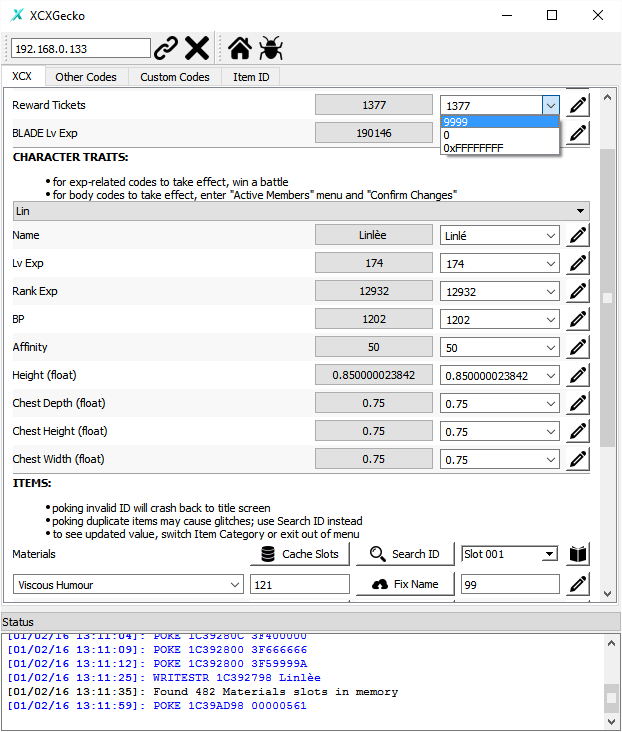
  • This tool requires kernel exploit and pyGecko to use; it's your responsibility to find out how to run these on your Wii U firmware version (hint: search on this thread and on GBATemp)
  • Do not ask if XCXGecko works on firmware 5.X.X; if pyGecko works, then XCXGecko should connect properly
  • Use at your own risk
  • All codes have been tested on XCX v1.0.1E and v1.0.1U, and have been confirmed to support v1.0.2E and v1.0.2U.
  • To use with XCX v1.0.1/v1.0.2 (Japanese version), see v1.2.2-jpn release, or modify code_db in config.ini
  • To use with OnionKnight's LoadiineV4+pyGecko combined payload, click 'Payload: ...' toolbar button to toggle
download latest release *UPDATED 2016/05/07*

screenshot.png


Features


sample.jpg


Issues? Suggestions? (pull requests welcome :))

Submit new codes: msg me on gbatemp, or make a pull request on github

Code requests: reply to this thread


Instructions on WiiU 5.3.2


  1. for backup: run loadiine kernel exploit + loadiine (miimaker + pygecko) + pygecko payloads; for disc: run kernel exploit + pygecko payloads
  2. start XCX and load into your savegame
  3. run XCXGecko.exe, enter your Wii U IP, and press the connect icon
  4. have fun reading and poking

Loading XCX backup via Loadiine on WiiU 5.3.2


  1. run web browser, load exploit.wiiubrew.net, and select "Loadiine Kernel (5.3.2)"
  2. after returning to home menu, run web browser, and select "Loadiine (Mii Maker + pyGecko)"
  3. in Loadiine screen, press A to "Install Loadiine", then select XCX, then press Y for "Smash Bros + return to home menu"
  4. after returning to home menu, run web browser, and select "pyGecko (Loadiine 5.3.2)"
  5. after returning to home menu, click on your Smash Bros disc icon

Instructions for EShop/disc version on WiiU 5.5.x


see this post

Special Thanks


  • folks @ wiiubrew for creating pyGecko
  • MiZ J0K3R, danmc, Intropy, and others for finding XCX codes
  • manpccore for donating towards adding Gear Mod support
 
Last edited by MiMiCAX,
Program is running fine, but Precious Resources are all out of order for me!
Ex: Changing Arc Sand Ore with your program will change my Aurorite.

v1.0.1u
 
Last edited by matrixsoul,
I can't even get pygecko to work with this game.

Steps I took:
Kernel exploit (loadiine)
Loadiine Mii maker 4.0
Pygecko

When I run pygecko, the browser freezes requiring restart.
If I run pygecko first before loadliine, the client times out when trying to connect after launching game. Connects fine before launching game.

Any advice?
 
I can't even get pygecko to work with this game.

Steps I took:
Kernel exploit (loadiine)
Loadiine Mii maker 4.0
Pygecko

When I run pygecko, the browser freezes requiring restart.
If I run pygecko first before loadliine, the client times out when trying to connect after launching game. Connects fine before launching game.

Any advice?

Instead of using "Loadiine (Mii Maker) 4.0", use "Loadiine (Mii Maker + pyGecko)"
 
Instead of using "Loadiine (Mii Maker) 4.0", use "Loadiine (Mii Maker + pyGecko)"

Hmm, I do not have such option in my loadliine that I host myself (got the complete package from that one sticky). What url do you use for your homebrew?
 
Hmm. Whenever I use that loadiine version, the wii u freezes upon game launch stating an error has occurred. Sad day.

1. run web browser, load exploit.wiiubrew.net, and select "Loadiine Kernel (5.3.2)"
2. after returning to home menu, run web browser, and select "Loadiine (Mii Maker + pyGecko)"
3. in Loadiine screen, press A to "Install Loadiine", then select XCX, then press Y for "Smash Bros + return to home menu"
4. after returning to home menu, run web browser, and select "pyGecko (Loadiine 5.3.2)"
5. after returning to home menu, click on your Smash Bros disc icon
 
1. run web browser, load exploit.wiiubrew.net, and select "Loadiine Kernel (5.3.2)"
2. after returning to home menu, run web browser, and select "Loadiine (Mii Maker + pyGecko)"
3. in Loadiine screen, press A to "Install Loadiine", then select XCX, then press Y for "Smash Bros + return to home menu"
4. after returning to home menu, run web browser, and select "pyGecko (Loadiine 5.3.2)"
5. after returning to home menu, click on your Smash Bros disc icon

This is exactly what I did, except using miimaker instead of smash.
I guess I could download my smash I bought, but I wonder if it actually would work. Nothing lost in trying I guess.
 
  • Like
Reactions: cyb0rg
Program is running fine, but Precious Resources are all out of order for me!
Ex: Changing Arc Sand Ore with your program will change my Aurorite.

v1.0.1u

I tested them again on v1.0.1e. I guess EU/US have some mis-alignment issues :(

--------------------- MERGED ---------------------------

so since 5.5 will soon be a thing, will this compat?

No idea. Who knows if/when pyGecko will be ported to 5.5.0.
 
sorry am no to this all hacking stuff noob about computers and hacking need step by step ,,, i bought new wii u with 5.3.2 what should i do first? block internet to wiiu? then install kernel hack?
 
  1. after returning to home menu, run web browser, and select "Loadiine (Mii Maker + pyGecko)"
  2. in Loadiine screen, press A to "Install Loadiine", then select XCX, then press Y for "Smash Bros + return to home menu"


do you give me your pygecko for xcx???html and elf files?
 
why do protagonist changes are reverted each time?
Which changes?
I know that BP stays the same even after reboot.

--------------------- MERGED ---------------------------

  1. after returning to home menu, run web browser, and select "Loadiine (Mii Maker + pyGecko)"
  2. in Loadiine screen, press A to "Install Loadiine", then select XCX, then press Y for "Smash Bros + return to home menu"

do you give me your pygecko for xcx???html and elf files?
I'm using files hosted by exploit.wiiubrew.net. you should either ask them or look at the source code of their webpage.
 
  • Like
Reactions: MiZ J0K3R
Which changes?
I know that BP stays the same even after reboot.

--------------------- MERGED ---------------------------


I'm using files hosted by exploit.wiiubrew.net. you should either ask them or look at the source code of their webpage.


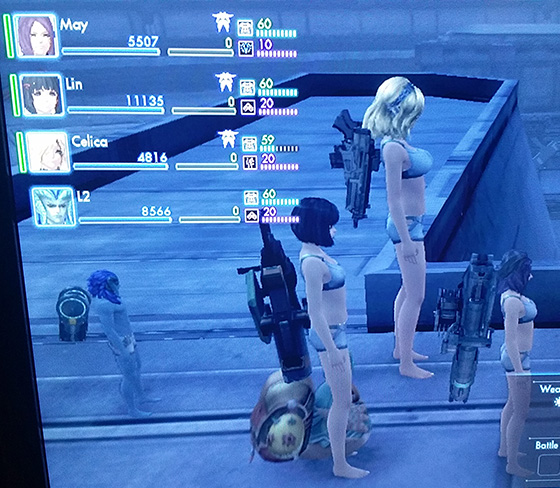
I changed the boob size, and height, all the others keep the changes except the protagonist, I'm using the original US disc
 
Last edited by kamesenin888, , Reason: bad position of my response
@goldenfly Cool, tks for this, but having a problem when trying to get the names, it gives me the following error when trying to get any name (i have some in jpn language that the eur game can't display properly, dunno if it matters):
IMG_20151222_140539-1.jpg


I din try to write a name and change them so dunno if that part is working. At least the memory addresses i know are correct cause i changed a few names already a couple days ago cause i had/have still have some original jpn names.
 
well since i can't do anything (5.5, thanks son! T~T) would anyone who has an epic beast with crazy mad stats like 5000 ranged / melee / potential. drop their level to 1 or something so we can hire you for mad exp grindage?

a full set of Treasure Sensor XX gear would be great too

dont forget ur name
 

Site & Scene News

Popular threads in this forum