Hacking SWITCH NOOB PARADISE - Ask questions here

  • Thread starter Thread starter APartOfMe
  • Start date Start date
  • Views Views 6,111,992
  • Replies Replies 47,954
  • Likes Likes 66
Hey all,

I'm pretty new to the Switch HB scene and have a question (Probably been asked 1000 times and i've looked 100's of times)

I got my first unpatched V1 around 5 weeks ago, made some good progress on a few games as you do :)

Then bought another unpatched V1 (keeping both)

Is it at all possible to get my games saves off the first switch and on to the second one?

Both had my original NID setup on HOS before I copied the NAND and created an emuMMC.

Only difference is the name as I changed my name on the profile of the first switch to 'Dad' rather than 'Fox'

Both run Atmosphere via Hekate.

I am guessing it is not possible, there doesn't seem to be any correlation between the two looking from Edizon.
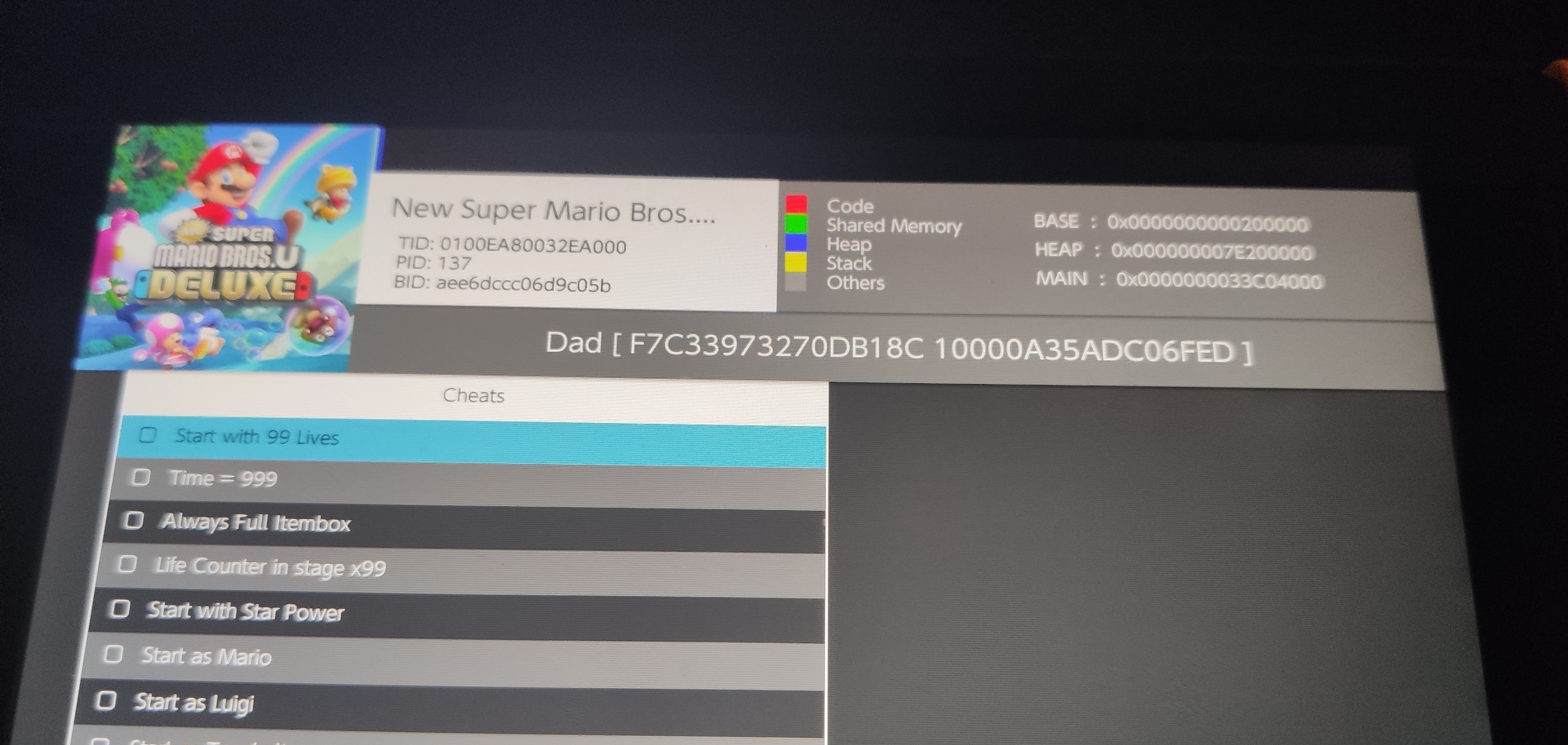
IMG_20220728_181629~2.jpg


^^^ Above is the original Switch (1st one)
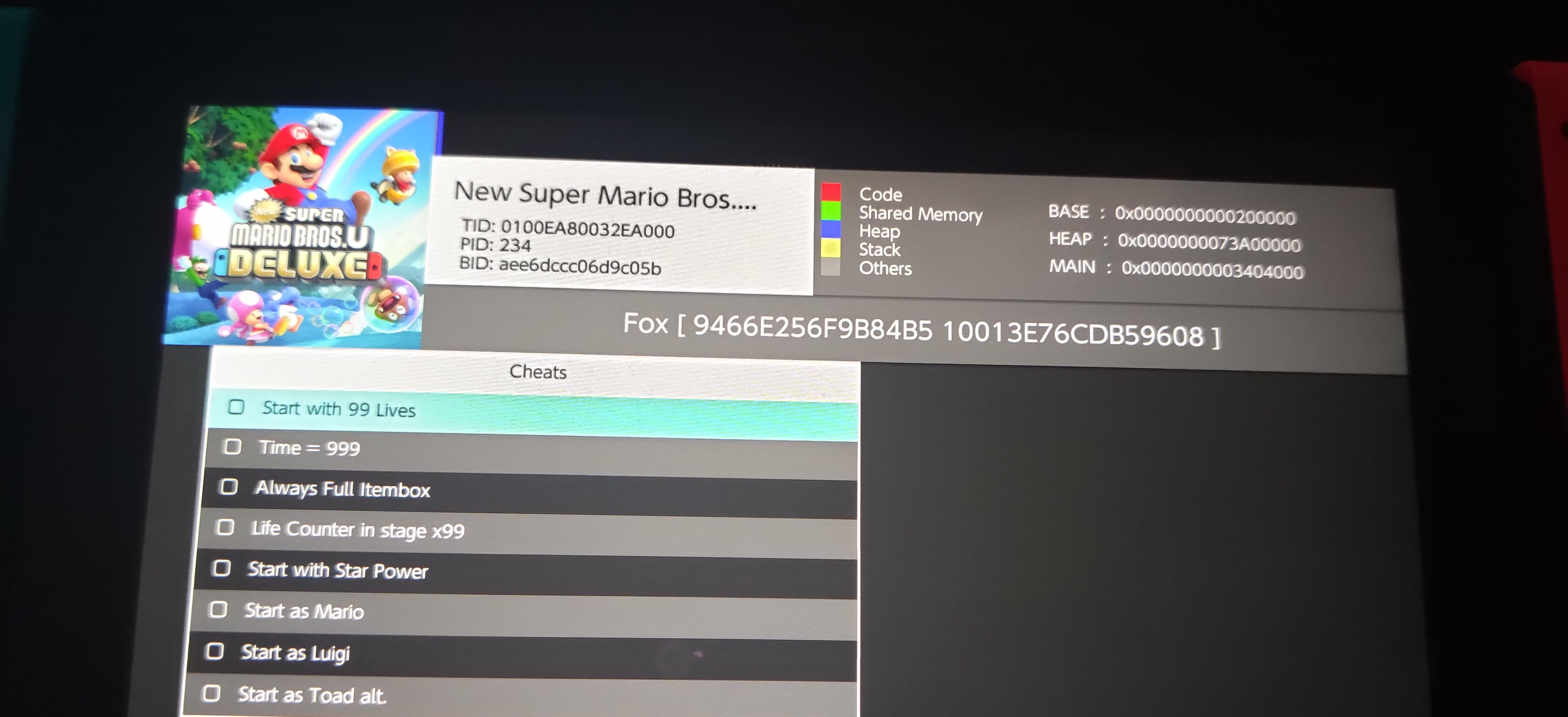


IMG_20220728_181807~2.jpg


^^^ This is the second Switch

Cheers in advance guys (I know this place is full of clever people)

Matt

 
Hey all,

I'm pretty new to the Switch HB scene and have a question (Probably been asked 1000 times and i've looked 100's of times)
Welcome!
I got my first unpatched V1 around 5 weeks ago, made some good progress on a few games as you do :)

Then bought another unpatched V1 (keeping both)
good choice
Is it at all possible to get my games saves off the first switch and on to the second one?
Yes! Use JKSV to export your saves from one and import your saves on the other.
Both had my original NID setup on HOS before I copied the NAND and created an emuMMC.

Only difference is the name as I changed my name on the profile of the first switch to 'Dad' rather than 'Fox'

Both run Atmosphere via Hekate.

I am guessing it is not possible, there doesn't seem to be any correlation between the two looking from Edizon.

View attachment 320011

^^^ Above is the original Switch (1st one)


View attachment 320012


^^^ This is the second Switch

Cheers in advance guys (I know this place is full of clever people)

Matt
no need for anything to match. You could send them to me and I could import them with JKSV. :-)

PS: Click on my tagline in my signature block for a whole bunch of links to fun stuff to play with on your Switch.
 
  • Like
Reactions: MFox333
Hey all, I got a problem with my cousins' Switch... I can't boot into emunand anymore.
The atmosphere splash screen shows up, then the Atmosphere white and black thingy, then it always returns:
A fatal error occurred when running Atmosphère.
Program ID: 010000000000002b
Error Desc: std: :abort() called (0xffe)

Gotta say, I tried EVERYTHING to fix this. Tried fresh atmosphere folder, hekate folder, sigpatches, tried this that seemeed promising: gbatemp net/threads/panic-occured-while-running-atmosphere-title-id-0100000000000002b.591345/ but didn't work out, I have no clue what to do now.

I guess that, if there really is no fix, is that I could reinstall the Emunand again, but I really don't want to lose the save files, they would get pretty angry about that...
Also, the Switch is pretty damaged, if that helps... left joycon can't attach well, cartridge slot stopped working, and the left speaker too.
If there's someone that can help... never felt this lost about a console
 
Hello all, I had a few small issues that I wanted to ask about, hopefully its nothing complicated, and sorry if this turns into a super long post.

So I have a two little issues, but I’m not sure if they are related. A few days ago I set up ryujinx, mostly because I saw that The Stretchers would run on it, which it does, so pretty stoked about that.

Today I got the new mario strikers from amazon, and I got out the homebrewed switch that only sees action when I want to dump something. It had firmware 14.1.1 installed, and I went ahead and installed ofw 14.1.2. Then I dumped the cartridge for strikers as well as the update.

When I went to try strikers on yuzu, I went to install the update, but it failed. I later tried this on ryujinx, and it was successful. I’ve tried a number of times to install the update on yuzu, but its a no-go, I havent had this happen before. I’m not sure if its a bad dump or what.

The second problem (again, not sure if its related to anything) but when I saw that mario strikers was crashing (I fixed it with a mod), I went to try mario kart 8 to make sure everything was working ok. Funny thing, I couldnt get past the first screen that pops up, its just stays there. It doesnt freeze, it just stays at the wavy mario kart 8 deluxe screen, thats all. Its like my conroller is totally unresponsive, but its only on mario kart 8, all other titles work fine.

I was thinking that putting the update firmware would fix that, even though it had been working fine before, but it still made no difference. On ryujinx, I can get past that opening screen, same firmware (14.1.2). I’ve been playing mario kart 8 on yuzu for the last 6 months or so, no issue, I’m not sure why I cant get past that title screen now.

In writing this, I did remember that I updated yuzu yesterday. The maintenance tool wasnt working, so I deleted the yuzu folder in the local data, and reinstalled. I was able to update to the latest version. Did I do something here that messed with mario kart 8? After I updated yuzu yesterday, I didnt try mario kart 8, I was just playing mario 3d world.

tldr:

1st problem is that I can get the update for mario strikers to work in yuzu, but it work in ryujinx.

2nd problem is that mario kart 8, which has been working fine for months now, wont progress past the opening screen. Firmware 14.1.2 is installed.

Let me know if theres any questions, hope this all made sense, thank you!
 
Hey all, I got a problem with my cousins' Switch... I can't boot into emunand anymore.
The atmosphere splash screen shows up, then the Atmosphere white and black thingy, then it always returns:
A fatal error occurred when running Atmosphère.
Program ID: 010000000000002b
Error Desc: std: :abort() called (0xffe)

Gotta say, I tried EVERYTHING to fix this. Tried fresh atmosphere folder, hekate folder, sigpatches, tried this that seemeed promising: gbatemp net/threads/panic-occured-while-running-atmosphere-title-id-0100000000000002b.591345/ but didn't work out, I have no clue what to do now.

I guess that, if there really is no fix, is that I could reinstall the Emunand again, but I really don't want to lose the save files, they would get pretty angry about that...
Also, the Switch is pretty damaged, if that helps... left joycon can't attach well, cartridge slot stopped working, and the left speaker too.
If there's someone that can help... never felt this lost about a console
Have you tried running the Archive Bit fix using Hekate?
I had to repost this because I forgot to add the prefix.

So I have a problem with my Nintendo switch that sometimes when I'm in homebrew menu and launch a certain application it crashed and I tried to delete and redownload but that didn't work. and crashes my Nintendo switch if I run it in Applet mode.
Does anyone know how to fix it?
What is the error code?
 
Have you tried running the Archive Bit fix using Hekate?
Yep, did that too, said "no change needed" and didn't work.

I'm fully convinced that my emunand broke, and got corrupted somehow.
Deleting the erpt save (the one corrupted) data with nxnandmanager looked like a solution but didn't work either.

If I managed to boot one more time I could dump all saves with jksv and then rebuild the emunand (with some guide I can't find lol) but I can't, that's the issue...

EDIT: creating a new emunand, I found a way to backup save data thankfully.
 
Last edited by Greg065,
Thanks for this @binkinator :)

Managed to create backups on the first switch, dragged them to my desktop via FTP and then copied to the second switch and restored the save using the profile I wanted to save associated with. Worked like a charm thank you very much.

I was just confused as to who the save got associated with etc beforehand just watching videos and stuff, seems like it saves it to whoever claims the save whilst running JKSV. Again, thanks a million!
 
  • Like
Reactions: binkinator
is this new ? how come i never heard of it :O not tat i complain but wow
Hit the back button on the bottom of the page and they have pages for a lot of different processes. There are a couple techniques that I think they make harder than they need to be but in general it‘s a well rounded guide. An example would be firmware. They provide a dumping guide…I prefer to download it from that Darthsternie Firmware site.
 
  • Like
Reactions: XenobladeShill
Hit the back button on the bottom of the page and they have pages for a lot of different processes. There are a couple techniques that I think they make harder than they need to be but in general it‘s a well rounded guide. An example would be firmware. They provide a dumping guide…I prefer to download it from that Darthsternie Firmware site.
i just saw the guide again, i need to have the modchip for these ?
 
So everything was fine and in tinfoil it was saying "Failed to read from BOOT0" this morning when I launched it. So I turned the switch off completely and now it won't re open again :(
The light is flashing under the switch though. It's a purple light.
Tried to turn it off again by pressing on the power button and it was flashing purple now yellow, and then nothing
By the looks of it it seems it's a soldering issue I'm going to have to contact the modder again. sigh

edit: tried gain to reset it using the volume buttons same sequence of lights flashing but now a red light came on(when I didn't have a SD card in it.)
Does it as well with the sd card in it now. Light just stays red.
 
Last edited by Casual,
Yes, V2 (Mariko) requires a modchip unless you have a super low FW version. If you’re above 4.1.0 forget about it…you need a chip.

View attachment 320147
ok this makes sense now why it wasnt as visible. No worries i will do the research for modchips, this is great.
 
  • Like
Reactions: binkinator
Hi all, I am a nOOb and need some help. Have tried to hack my switch. It worked fine for a while. Then I tried updating the setup and now it will not load once i use the Lunch button in Hekate ( newest - downloaded today) and it flashes a few logos ( hekate & atmosphere) then ends up in a black screen. I have to hold the power down for 15 seconds then it will reboot.....

I am using the RCMloader OneB to inject, and this seems to work fine. Hekate is v5.7.2

What to do? I have tried finding an answer online, but have had no luck.
 
Last edited by Looglan,

Site & Scene News

Popular threads in this forum