Homebrew RELEASE 90DNS: DNS server for blocking all Nintendo Servers

  • Thread starter Thread starter AveSatanas
  • Start date Start date
  • Views Views 897,495
  • Replies Replies 622
  • Likes Likes 102
I have two situations:

1. Each time I log in to a new Wifi, it loses the DNS, I forget to add it when adding the new wifi, and I always get the "the console is ready for update" message. Is there any way to erase the update without having to go to recovery and erase everything?
EDIT: For this one, I used goldleaf and there's an option to erase it from there. Very easy.

2. Is there any way to permanently add the DNS options within atmosphere, so this doesn't happen regardless if I add a new wifi?

one of the latest releases of atmosphere added a dns mitm. You'll need to use that if you want option 2
 
  • Like
Reactions: falcorr
Yes, exactly, use an atmosphere hosts file.

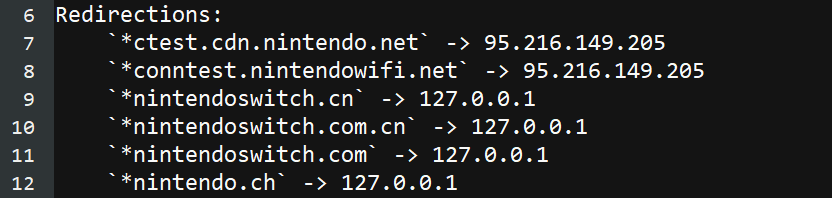
For emummc, put emummc.txt in /atmosphere/hosts with the following text. Should be okay, but double check before trusting it.

Code:
# 90DNS
127.0.0.1 *nintendo.com
127.0.0.1 *nintendo.net
127.0.0.1 *nintendo.jp
127.0.0.1 *nintendo.co.jp
127.0.0.1 *nintendo.co.uk
127.0.0.1 *nintendo-europe.com
127.0.0.1 *nintendowifi.net
127.0.0.1 *nintendo.es
127.0.0.1 *nintendo.co.kr
127.0.0.1 *nintendo.tw
127.0.0.1 *nintendo.com.hk
127.0.0.1 *nintendo.com.au
127.0.0.1 *nintendo.co.nz
127.0.0.1 *nintendo.at
127.0.0.1 *nintendo.be
127.0.0.1 *nintendods.cz
127.0.0.1 *nintendo.dk
127.0.0.1 *nintendo.de
127.0.0.1 *nintendo.fi
127.0.0.1 *nintendo.fr
127.0.0.1 *nintendo.gr
127.0.0.1 *nintendo.hu
127.0.0.1 *nintendo.it
127.0.0.1 *nintendo.nl
127.0.0.1 *nintendo.no
127.0.0.1 *nintendo.pt
127.0.0.1 *nintendo.ru
127.0.0.1 *nintendo.co.za
127.0.0.1 *nintendo.se
127.0.0.1 *nintendo.ch
127.0.0.1 *nintendoswitch.com
127.0.0.1 *nintendoswitch.com.cn
127.0.0.1 *nintendoswitch.cn
95.216.149.205 *conntest.nintendowifi.net
95.216.149.205 *ctest.cdn.nintendo.net
 
Last edited by aarstar,
They are just copied from a post on Reddit. There's a log file in the atmosphere/logs folder that shows they are loaded. Beyond that, someone else will have to answer about knowing if they worked or not.
 
This list is from the gitlab for 90dns and its a week old from this posting so should be the latest list

Emummc: put emummc.txt in /atmosphere/hosts with the following text
sysnand: put sysmmc.txt in /atmosphere/hosts with the following text

Code:
# 90DNS
127.0.0.1 *nintendo.com
127.0.0.1 *nintendo.net
127.0.0.1 *nintendo.jp
127.0.0.1 *nintendo.co.jp
127.0.0.1 *nintendo.co.uk
127.0.0.1 *nintendo-europe.com
127.0.0.1 *nintendowifi.net
127.0.0.1 *nintendo.es
127.0.0.1 *nintendo.co.kr
127.0.0.1 *nintendo.tw
127.0.0.1 *nintendo.com.hk
127.0.0.1 *nintendo.com.au
127.0.0.1 *nintendo.co.nz
127.0.0.1 *nintendo.at
127.0.0.1 *nintendo.be
127.0.0.1 *nintendods.cz
127.0.0.1 *nintendo.dk
127.0.0.1 *nintendo.de
127.0.0.1 *nintendo.fi
127.0.0.1 *nintendo.fr
127.0.0.1 *nintendo.gr
127.0.0.1 *nintendo.hu
127.0.0.1 *nintendo.it
127.0.0.1 *nintendo.nl
127.0.0.1 *nintendo.no
127.0.0.1 *nintendo.pt
127.0.0.1 *nintendo.ru
127.0.0.1 *nintendo.co.za
127.0.0.1 *nintendo.se
127.0.0.1 *nintendo.ch
127.0.0.1 *nintendo.pl
127.0.0.1 *nintendoswitch.com
127.0.0.1 *nintendoswitch.com.cn
127.0.0.1 *nintendoswitch.cn
95.216.149.205 *conntest.nintendowifi.net
95.216.149.205 *ctest.cdn.nintendo.net
95.216.149.205 *90dns.test

You can verify the functionality of the DNS redirection by booting into emummc (or sysmmc if you applied the config to sys), and powering off after.

A report will be generated in sd:/atmosphere/logs called dns_mitm_startup.log. If this starts with the following, the dns redirection is active

Example

dnsmitm.png
 
Last edited by pcwizard7,
Its probably just me but : I really need help. I am deleting all WLAN profiles and starting fresh using 90DNS servers and the app 90dns checker tool is giving me a red status on all servers. This is after updating to 12.1 and using 19.5 atmosphere.. I would hate to get a ban on the couple me and my wife have.
 
This list is from the gitlab for 90dns and its a week old from this posting so should be the latest list

Emummc: put emummc.txt in /atmosphere/hosts with the following text
sysnand: put sysmmc.txt in /atmosphere/hosts with the following text
...

Thanks, I was looking for something to use on top of changing the the s nameservers to 90DNS ones.
 
This list is from the gitlab for 90dns and its a week old from this posting so should be the latest list

Emummc: put emummc.txt in /atmosphere/hosts with the following text
sysnand: put sysmmc.txt in /atmosphere/hosts with the following text

Code:
# 90DNS
127.0.0.1 *nintendo.com
127.0.0.1 *nintendo.net
127.0.0.1 *nintendo.jp
127.0.0.1 *nintendo.co.jp
127.0.0.1 *nintendo.co.uk
127.0.0.1 *nintendo-europe.com
127.0.0.1 *nintendowifi.net
127.0.0.1 *nintendo.es
127.0.0.1 *nintendo.co.kr
127.0.0.1 *nintendo.tw
127.0.0.1 *nintendo.com.hk
127.0.0.1 *nintendo.com.au
127.0.0.1 *nintendo.co.nz
127.0.0.1 *nintendo.at
127.0.0.1 *nintendo.be
127.0.0.1 *nintendods.cz
127.0.0.1 *nintendo.dk
127.0.0.1 *nintendo.de
127.0.0.1 *nintendo.fi
127.0.0.1 *nintendo.fr
127.0.0.1 *nintendo.gr
127.0.0.1 *nintendo.hu
127.0.0.1 *nintendo.it
127.0.0.1 *nintendo.nl
127.0.0.1 *nintendo.no
127.0.0.1 *nintendo.pt
127.0.0.1 *nintendo.ru
127.0.0.1 *nintendo.co.za
127.0.0.1 *nintendo.se
127.0.0.1 *nintendo.ch
127.0.0.1 *nintendo.pl
127.0.0.1 *nintendoswitch.com
127.0.0.1 *nintendoswitch.com.cn
127.0.0.1 *nintendoswitch.cn
95.216.149.205 *conntest.nintendowifi.net
95.216.149.205 *ctest.cdn.nintendo.net
95.216.149.205 *90dns.test

You can verify the functionality of the DNS redirection by booting into emummc (or sysmmc if you applied the config to sys), and powering off after.

A report will be generated in sd:/atmosphere/logs called dns_mitm_startup.log. If this starts with the following, the dns redirection is active

Example

dnsmitm.png
So if we do this no need to use 90DNS anymore?
 
hello today 30th december 2021 it still works? i have already applied incognito mode and 90dns and when it connects to the wifi it connects me to the router but then the other step tells me no internet and does not connect to the wifi, i have also changed the DNS manually from the wifi configuration and it does not let me connect, what is the problem?
I have tried nslookup pointing to the dns 207.246.121.077 and 163.172.141.219 the problem persists.
 
hello today 30th december 2021 it still works? i have already applied incognito mode and 90dns and when it connects to the wifi it connects me to the router but then the other step tells me no internet and does not connect to the wifi, i have also changed the DNS manually from the wifi configuration and it does not let me connect, what is the problem?
I have tried nslookup pointing to the dns 207.246.121.077 and 163.172.141.219 the problem persists.
 
So this will connect you to the internet but not to Nintendo Servers. Just to make sure, this won't connect to Nintendo's eShop to get updates for games?

And whomever is hosting the servers plan to keep it going for at least a year?

Thanks
As far as I know, I tested it on an unpatched switch.
Didn't load the Eshop.
 
So this will connect you to the internet but not to Nintendo Servers. Just to make sure, this won't connect to Nintendo's eShop to get updates for games?

And whomever is hosting the servers plan to keep it going for at least a year?

Thanks
Tested It on an Unpatched Switch, didn't load the Eshop
 
hello today 30th december 2021 it still works? i have already applied incognito mode and 90dns and when it connects to the wifi it connects me to the router but then the other step tells me no internet and does not connect to the wifi, i have also changed the DNS manually from the wifi configuration and it does not let me connect, what is the problem?
I have tried nslookup pointing to the dns 207.246.121.077 and 163.172.141.219 the problem persists.
It still works.
 
It still works.
The problem I have is when connecting the wifi tells me that there is no internet and does not connect.

I edit the values and check the dns and see that they are correct and try to connect again but does not pass the router test to the internet, I guess with the url of nintendo blocked does not allow me to connect to nintendo and validate the connection as successful.

How can I skip that step and allow me to leave the wifi connection active?

thanks so much.
 
Hi, I have a mariko switch, no mod, never connected to internet, so I'm not concerned about a ban or anything. The reason I'm interested in 90DNS is because I despise telemetry in principle. I can add this to my pi-hole, but I need to be able to download game updates. The reason I'm looking at finally connecting it to the internet is because I recently purchased the GTA Trilogy and Vice City needs to be downloaded (not included on the cart).

How can I use 90DNS on my pi-hole, but still allow connections for the game download?
 
Hi, I have a mariko switch, no mod, never connected to internet, so I'm not concerned about a ban or anything. The reason I'm interested in 90DNS is because I despise telemetry in principle. I can add this to my pi-hole, but I need to be able to download game updates. The reason I'm looking at finally connecting it to the internet is because I recently purchased the GTA Trilogy and Vice City needs to be downloaded (not included on the cart).

How can I use 90DNS on my pi-hole, but still allow connections for the game download?
There is a DNS server called AquaticDNS which will still allow you to use online Nintendo services while blocking some telemetry. It will not block all of it however so use at your discretion.
 
what about the games? does this works with the freaking updates? or do i have to look elsewhere?
 
I've used 90dns for years with no issue but I have a question. I have an American switch and the region is set to The Americas. I recently moved to Japan. My switch region is still set to The Americas. Should I use the DNS for blocking the American servers or the global one? Sorry if this question has been asked before.
 

Site & Scene News

Popular threads in this forum